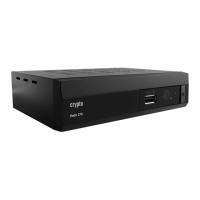
The Crypto ReDi 40 MP is a versatile SD DVB-T MPEG4 receiver designed to enhance your television viewing experience with a range of convenient features. This device allows you to not only watch digital terrestrial television but also interact with your content in new ways, offering flexibility and control over your entertainment.
One of the standout features of the ReDi 40 MP is its Time Shift capability. This function provides you with the freedom to pause live television programs as you are watching them. Imagine you're in the middle of an exciting game or a gripping movie, and you need to step away for a moment. With Time Shift, you can simply press the Play button to pause the broadcast. When you return, you can resume watching from exactly where you left off, ensuring you don't miss any crucial action or dialogue. This feature is particularly useful for managing interruptions during live broadcasts, giving you unprecedented control over your viewing schedule. It eliminates the frustration of missing key moments due to real-world demands, allowing you to enjoy your favorite programs at your own pace.
Beyond pausing live TV, the ReDi 40 MP also incorporates a robust PVR (Personal Video Recorder) function. This allows you to record your favorite TV programs to an external HDD (Hard Disk Drive). You have two primary ways to utilize this feature: you can record a program while you are actively watching it, or you can program the device to record a show even when you are not at home. This is incredibly convenient for ensuring you catch all your desired content, regardless of your availability. The recorded programs can then be watched at a later time that suits your schedule. A particularly useful aspect of the PVR function is its ability to record one program while you are watching another, provided both channels belong to the same frequency group of four. This multi-tasking capability further enhances the flexibility of your viewing experience, allowing you to manage multiple recording and viewing preferences simultaneously without conflict.
The ReDi 40 MP is not just a TV receiver and recorder; it also functions as a comprehensive Media Player. This feature transforms your television into a multimedia hub, allowing you to enjoy a wide variety of digital content from external storage devices. You can watch your favorite movies in popular formats such as AVI, DivX, and MKV. For audio enthusiasts, the device supports listening to your favorite music files. Additionally, you can view your cherished photos, turning your TV screen into a large digital picture frame. This broad media compatibility means you can consolidate your entertainment sources, playing back videos, music, and images directly through your television using a single device.
To support its PVR and Media Player functionalities, the ReDi 40 MP offers External Storage connectivity. You can connect an external USB stick or a hard disk drive to the device. The receiver is compatible with both FAT32 and NTFS file system formats, offering flexibility for various storage devices. For optimal performance and reliability, it is recommended to use low-power 2.5" Hard Disks. If you opt for 3.5" Hard Disks, ensure they come with an external power supply to meet their power requirements. This external storage capability is fundamental to both recording TV programs and playing back your personal media files, making the device highly adaptable to your digital content needs.
The user interface of the ReDi 40 MP is designed for ease of use, featuring a Multilingual OSD Menu (On-Screen Display) and Multilingual Teletext. This ensures that users from various linguistic backgrounds can navigate the device's settings and access information comfortably. The inclusion of Teletext also provides access to additional text-based information broadcast alongside television programs, such as news, weather, and program schedules.
In summary, the Crypto ReDi 40 MP is a feature-rich SD DVB-T MPEG4 receiver that goes beyond basic television reception. With its Time Shift function, you gain control over live broadcasts, allowing you to pause and resume viewing at your convenience. The PVR capability enables you to record and schedule your favorite programs, ensuring you never miss a show. Its robust Media Player functionality transforms your TV into a multimedia center, capable of playing movies, music, and photos from external storage. Coupled with easy external storage connectivity and a user-friendly multilingual interface, the ReDi 40 MP offers a comprehensive and flexible solution for modern television viewing and digital media consumption.



 To Next Page
 General