

EasyManua.ls Logo

CSW RECTORSEAL SAFE-T-SWITCH SS500EP - User Manual

CSW RECTORSEAL SAFE-T-SWITCH SS500EP
3 pages
Print Icon
To Next Page IconTo Next Page
Loading...
Description
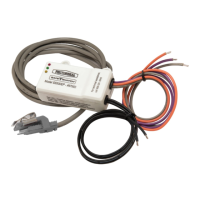
Safe-T-Switch® Model SS500EP electronic overflow switch is installed on primary drain pan
when plenum rating is needed. Small size and slim profile great for use on commercial
rooftop downflow units. The SS500EP's logic circuit continuously samples the probes for
water and shuts down the system if water is detected.
Code Size Qty. per Case Lbs. per Case Cubic Ft per Case
97693
Safe-T-Switch SS500EP
24 71 1.11
Packaging
Component List:
(1) Central processing unit
(2) 4P Probe
(3) Reset instruction tag
(4) Warning Sticker (not shown)
Installation Instructions:
Notice: Failure to read and comply with all warnings, cautions and instructions prior to starting installation may cause personal injury and/or property
damage and void the warranty.
Warning: Disconnect power to unit at main panel prior to performing electrical work. If not present, it is recommended that an inline fuse be
installed to protect the 24 VAC circuit.
INSTRUCTIONS
PRIMARY PAN INSTALLATION (see Fig. 1):
1. Route the plenum rated wire and sensor into the plenum space using the HVAC system manufacturer’s supplied raceway or conduit.
2. If necessary, remove the bracket from the sensor before routing.
3. Clip the bracket onto the side of the pan where water level is the highest and press firmly in place, positioning the wires up and probes down.
4. Adjust the sensor height by pushing the sensor into the bracket. The bracket is a one-way ratchet mechanism. If the sensor is set too low in the
pan, push the sensor from the lead side until it disengages from the bracket, then reset.
5. Adjust the sensor so that the probes are below the rim of the pan.
6. The switch will trip when the water level reaches the probes.
Figure 1: Installation on drain pan
Sensor
Drain Pan
Clip/Bracket
Probes
PRODUCT DATA SHEET
Page 1 of 3
SAFE-T-SWITCH
®
SS500EP
For primary drain pan
Question and Answer IconNeed help?

Do you have a question about the CSW RECTORSEAL SAFE-T-SWITCH SS500EP and is the answer not in the manual?

Summary

Product Description

Product Overview

Details the Safe-T-Switch SS500EP electronic overflow switch for primary drain pans and its application in commercial units.

Component List

Included Components

Lists the parts included with the SS500EP: central processing unit, probe, reset instruction tag, and warning sticker.

Installation Instructions

General Installation Notice

Warning to read all instructions before installation to avoid personal injury, property damage, and voiding the warranty.

Primary Drain Pan Installation Steps

Step-by-step guide for installing the sensor and bracket in the primary drain pan, including sensor height adjustment.

Packaging Information

Packaging Details

Provides packaging details including code, size, quantity per case, weight per case, and cubic feet per case.

Wiring and Specifications

Wiring Instructions

Provides instructions for connecting the SS500EP to the HVAC system's 24 VAC power supply and thermostat wiring.

Wiring Diagram

Illustrates the wiring connections for unit shutdown based on the switch's NC or NO configuration.

Product Specifications

Details electrical ratings, switching capacity, wire length, and plenum rating for the device.

Maintenance and Testing

Switch and Sensor Testing

Explains how to test the switch functionality and sensor position using LEDs and simulating water presence.

Important Safety Information

Key Safety Precautions

Highlights critical safety warnings regarding installation, electrical shock, product usage limitations, and dual compressor systems.

Assembly Details

Assembly Diagram

Visual representation of the SS500EP components and their assembly, including wire lengths.

Component Itemization

Lists individual item numbers, part numbers, descriptions, and quantities for the SS500EP assembly.

Warranty Information

Product Warranty Details

Outlines the limited express warranty terms and conditions for the RectorSeal product, including remedies for breaches.

Overview

The RectorSeal Safe-T-Switch® Model SS500EP is an electronic overflow switch designed for installation in primary drain pans, particularly in applications requiring plenum rating. Its compact size and slim profile make it suitable for commercial rooftop downflow units. The device operates by continuously sampling its probes for water and automatically shuts down the HVAC system if water is detected, preventing overflow and potential damage.

Function Description:

The SS500EP consists of a central processing unit (CPU), a 4P probe, a reset instruction tag, and a warning sticker. The CPU's logic circuit constantly monitors the probes for the presence of water. When water reaches the probes, the switch activates, and the system is shut down. This prevents the drain pan from overflowing, mitigating water damage to the HVAC unit and surrounding property. The device is designed for Normally Closed (NC) circuits, where the switch interrupts the red (thermostat) wire to shut down the entire unit. If wired into the yellow circuit, the fan continues to run, which can help inhibit mold growth during extended absences. For Normally Open (NO) switching, the "Common" (gray) and "NO" (orange) switch leads are used.
Important Technical Specifications:

  • Power: 24 VAC
  • Switching Capacity: 5 Amps
  • Lead Wires: 12 inches, 18 AWG
  • Plenum Rated Tail: 72 inches
  • Certifications: cULus Listed, IND. CONT. EQ. 25XE, UL 508, UL 2043
  • Components: SE-4P Probe, UL tag (SE-4P & CP-1P), Reset Instruction tag, Central Processing Unit CP-1P

Usage Features:

  • Installation: The switch is installed by clipping its bracket onto the side of the drain pan where the water level is highest, with the wires positioned upwards and probes downwards. The sensor height is adjustable by pushing it into the bracket, which features a one-way ratchet mechanism. If the sensor is set too low, it can be disengaged and reset by pushing it from the lead side. The probes must be positioned below the rim of the pan. The switch trips when the water level reaches the probes.
  • Plenum Rating: The CPU is plenum rated, but the lead wire is not and must remain outside the plenum space.
  • Wiring: Installation requires disconnecting power to the unit. An inline fuse is recommended to protect the 24 VAC circuit. The "power" (black) wires connect to the 24 VAC power supply. For NC circuits, the red thermostat wire is cut, and the "common" (gray) switch lead is connected to one end, while the "NC" (purple) switch lead connects to the air handler terminal.
  • Safety: Users must read and comply with all warnings, cautions, and instructions to avoid personal injury, property damage, and to maintain warranty validity. It is crucial to disconnect power before any electrical work. The device is intended for use in water only and should not be used with flammable liquids or vapors. It will not detect clogs upstream from the installation point. A fuse and time delay are recommended to protect the 24-volt circuit and prevent rapid cycling of equipment. The product is not for use on dual compressor systems.

Maintenance Features:

  • Testing (Switch): After installation and power-up, a green LED on the CPU should illuminate. If not, the "Power" (black) wire connection and voltage should be checked. To test the switch, short across the probes with a wet finger, metallic conductor, or water. If wired correctly, the unit will stop, and a red LED will turn on after approximately 5 seconds. When the short is removed, the red LED will turn off, the green and amber LEDs will turn on, and the A/C unit will restart after about 5 seconds. The amber LED will automatically turn off after about 4 days, or it can be manually turned off using the reset instruction tag on the probe wire.
  • Testing (Sensor Position): To test the sensor position, turn on the A/C unit to produce normal condensate flow. If the sensor is too low, the switch will activate and shut down the unit. To further test, block the drain to allow the pan to fill with water. The switch should activate before the pan overflows. Adjust the sensor height as needed.

CSW RECTORSEAL SAFE-T-SWITCH SS500EP Specifications

General IconGeneral
BrandCSW
ModelRECTORSEAL SAFE-T-SWITCH SS500EP
CategorySwitch
LanguageEnglish