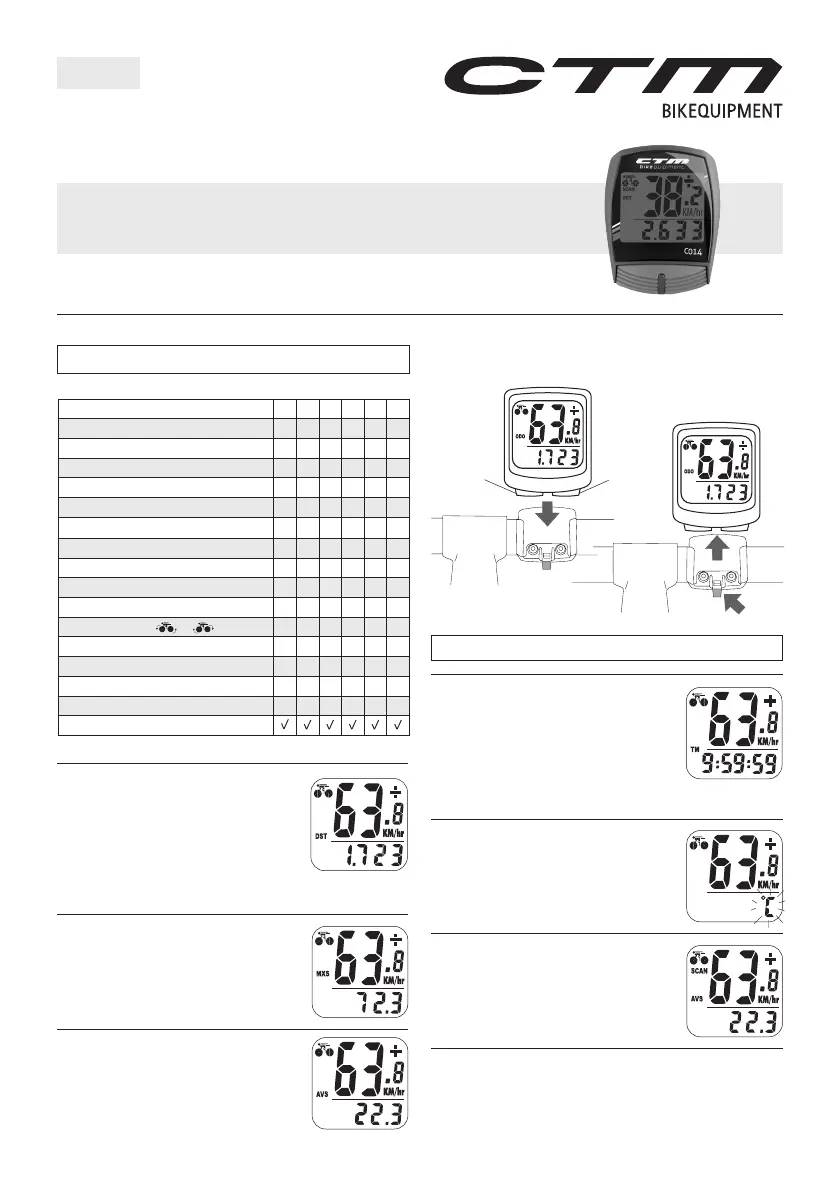
Slide the computer onto the mounting bracket until it snaps
firmly into position. Press the ralease button to take out the
computer as shown in Fig. 1.
ATTENTIN: Refer to the appendix for installation reference.
Trip timer measurement is lndicated by T
and is displayed on the bottom line. Trip Timer
is activated automalically with speedometer
input (n when you ride and ff when you
stop). It records only the time spent actually
riding. Reset T to zero by pressing the LEFT
button for 2 seconds in ST mode. Press the RIHT button to enter
Temperature mode.
Press and hold LEFT button for 2 seconds, "˚ "
will stat to flash. Press RIHT button to select
"˚ " or "˚ F" and press LEFT button to confirm.
Press RIHT button to enter the Scan mode.
The Scan mode allows ST, XS, AVS and T to
cycle on the screen without pressing any keys.
Press the RIHT button to enter the lock mode.
To stat the unit, press the RIHT button to turn on the display and
the wireless mounting system. To stop the unit, left unused for over
5-6 minutes and then the computer will automatically switch off to
preserve batteries.
Trip distance measurement is indicated by
ST and is displayed on Iha bottom line. Trip-
meter is activated automalically with speed-
ometer input. Reset ST to zero by pressing
the LEFT butlon for 2 seconds; ST (Trip dis-
tance), T (Trip 1imer) & AVS (Average Speed) will also be reset al
that time. Press the RIHT button to enter XS mode.
aximum speed measurement is indicated by
XS and is displayed on the bottom line. axi-
mum speed is stored in memory and updaled
only when a higher speed is reached. To reset
XS, press and hold the LEFT butlon in the XS
mode. Press the RIHT button to enter AVS mode.
Average Speed measunnent is indicated by
AVS and is displayed on the bottom line. AVS
is calculated with the Trip Timer (T), so AVS is
the average speed only while riding. Press the
RIHT button to enter T mode.
YLE PUTER
Co14
ATTENTI0N: omputer Functions refer to the packing details.
Speedometer (SP) 0-99.9 K/hr or /hr
Tripmeter (ST) 0~999.9 K or /hr
dometer () 0~9999.9 K or
Auto Trip 1imer (T) 9: 59' 59"
aximum Speed (XS) 0-99.9 K/hr or /hr
Average Speed (AVS) 0~99.9 K/hr or /hr
Scan - for ST, XS, AVS, T
Freeze Frame emory - for T, AVS, ST
Speed omparator -(+or-)
igital lock
12 / 24 hour selectable
Speed Tendency ( or )
dometer Save Function
Temperature (-10˚ to +50˚ )
˚ / ˚ F Selection
aintenance Program
* EL BAKLIHT (PTINAL)
FI. 1
LEFT RIHT
RELEASE
EN



 To Next Page
 Loading...