EasyManua.ls Logo

CTX CMS-3435 - Monitor Features; Multiscan Features Overview

CTX CMS-3435
41 pages
Print Icon
To Next Page IconTo Next Page
To Previous Page IconTo Previous Page
Loading...
FEATURES
OF
CMS-3435/36
Multiscan,
model
CMS-3435/36,
from
Chuntex
is
a
high
resolution
color
monitor
that
automatically
ad-
justs
to
graphics
board
scanning
frequencies
from
15.5KHz
to
38KHz.
Multiscan
gives
IBM
PC,
PC/
XT,
PC
/
AT,
PS
/
2
and
PC
compatibles
users
crisp
text
and
vivid
color
graphics
displays
when
used
with
any
of
the
IBM
graphics
adapters
(the
CGA,
EGA,
MCGA,
VGA,
or
3514A).
Multiscan
can
also
be
used
with
other
IBM
compatible
graphics
adapters
to
provide
IBM
users
with
the
widest
range
of
color
monitor
compatibility
and
capability
available
in
the
market
place.
e
CMS-3435/36
automatically
scans
all
frequen-
cies
between
15.5KHz
and
38KHz
and
is
com-
patible
with
the
IBM
PC,
PC
/
XT,
PC
/
AT,
PS
/2
and
look-alikes.
e
CMS-3435/36
uses
14
inch
fine
pitch
(0.29mm
or
0.28mm)
non-glare
CRT
and
has
a
maximum
horizontal
resolution
of
1024
dots
and
a
maxi-
mum
vertical
resolution
of
768
lines
for
superior
clarity
of
display.
e
CMS-3435/36
is
compatible
with
IBM
CGA,
EGA,
MCGA,
VGA,
8514A
graphic
adapters
and
non-
IBM
Boards
supporting
extended
display
modes
such
as
800
x
600,
132
columns
etc.
This
wide
compatibility
makes
it
possible
to
upgrade
boards
and
software
without
purchasing
a
new
monitor.
@
CMS-3435/36
offers
both
TTL
and
ANALOG
sig-
nal
inputs,
and
in
the
ANALOG
mode
can
display
an
unlimited
palette
of
colors
depending
on
the
graphics
board
and
software
being
used.
Fea-
tures
a
TEXT
SWITCH
witha
choice
of
four
colors
(red,
blue,
green,
amber)
displaying
word
processing,
spread
sheets,
data-bases
or
other
software
in
crisp
alphanumeric
text
on
a
dark-
bulb
black
background.
e
CMS-3435/36
is
equipped
with
vertical
auto
sizing
circuit.
The
circuit
works
according
to
horizontal
frequency
and
sync
polarization
of
IBM
CGA,
EGA
and
VGA
convention.
This
func-
tion
can
be
made
inactive
by
turning
off
the
Auto
Switch
located
on
front
panel
if
the
input
signal
is
non-IBM
standard.
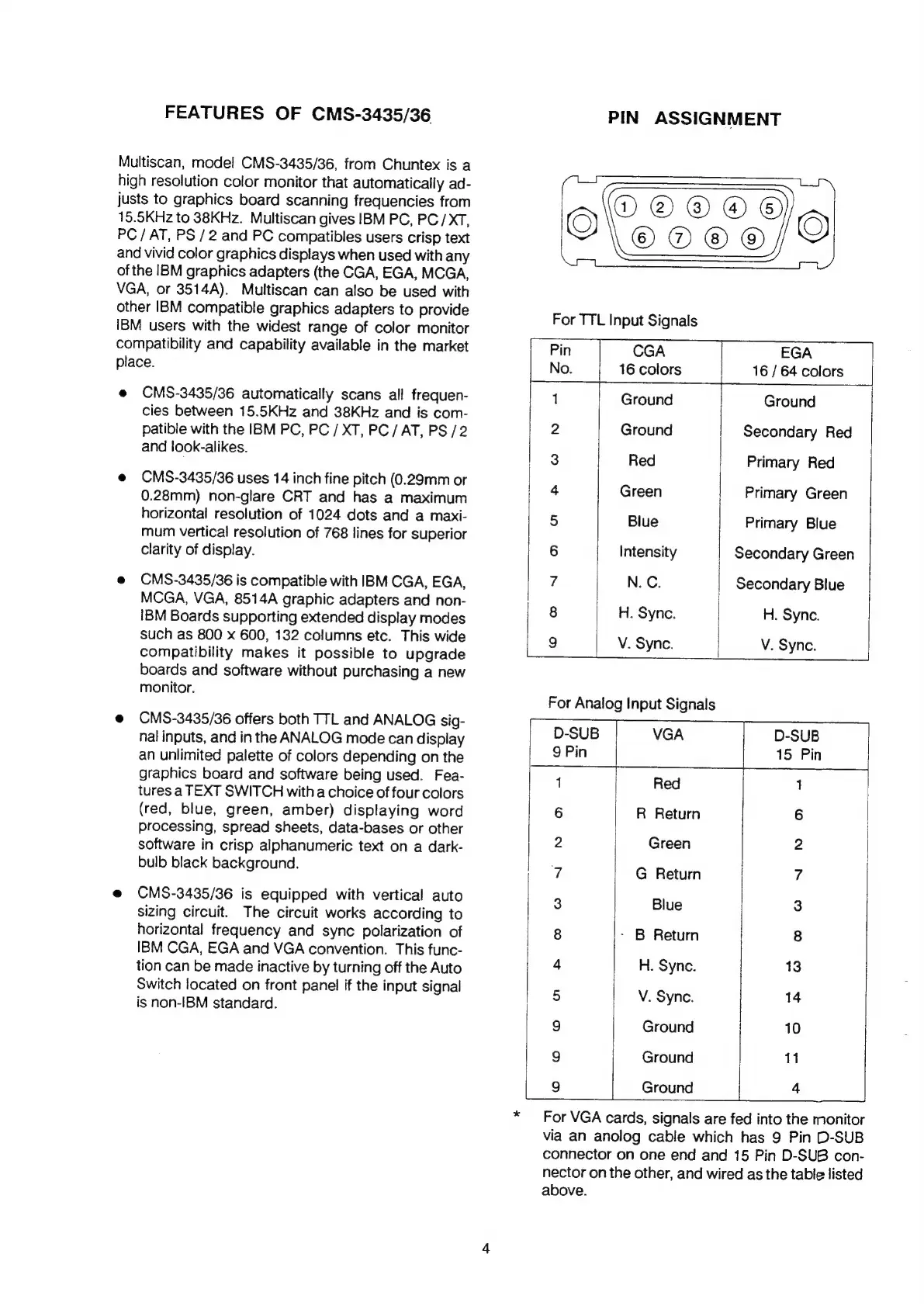
PIN
ASSIGNMENT
Glarorors
O\cooo/9
For
TTL
Input
Signals
Pin
CGA
EGA
No.
16
colors
16
/
64
colors
1
Ground
Ground
2
Ground
Secondary
Red
3
Red
Primary
Red
4
Green
Primary
Green
5
Blue
Primary
Blue
6
Intensity
Secondary
Green
7
N.
C.
Secondary
Blue
8
H.
Sync.
H.
Sync.
9
V.
Sync.
V.
Sync.
For
Analog
Input
Signals
D-SUB
VGA
D-SUB
9
Pin
15
Pin
1
Red
1
6
R
Return
6
2
Green
2
7 G
Return
7
3
Blue
3
8
-
B
Return
8
4
H.
Sync.
13
5
V.
Sync.
14
9
Ground
10
9
Ground
11
9
Ground
4
*
For
VGA
cards,
signals
are
fed
into
the
monitor
via
an
anolog
cable
which
has
9
Pin
D-SUB
connector
on
one
end
and
15
Pin
D-SUB
con-
nector
on
the
other,
and
wired
as
the
table
listed
above.

Related product manuals