EasyManua.ls Logo

CTX CMS-3435 - Front Panel Controls; Power and Indicator Controls; Picture Adjustment Controls; Auto Switch and Signal Selection

CTX CMS-3435
41 pages
Print Icon
To Next Page IconTo Next Page
To Previous Page IconTo Previous Page
Loading...
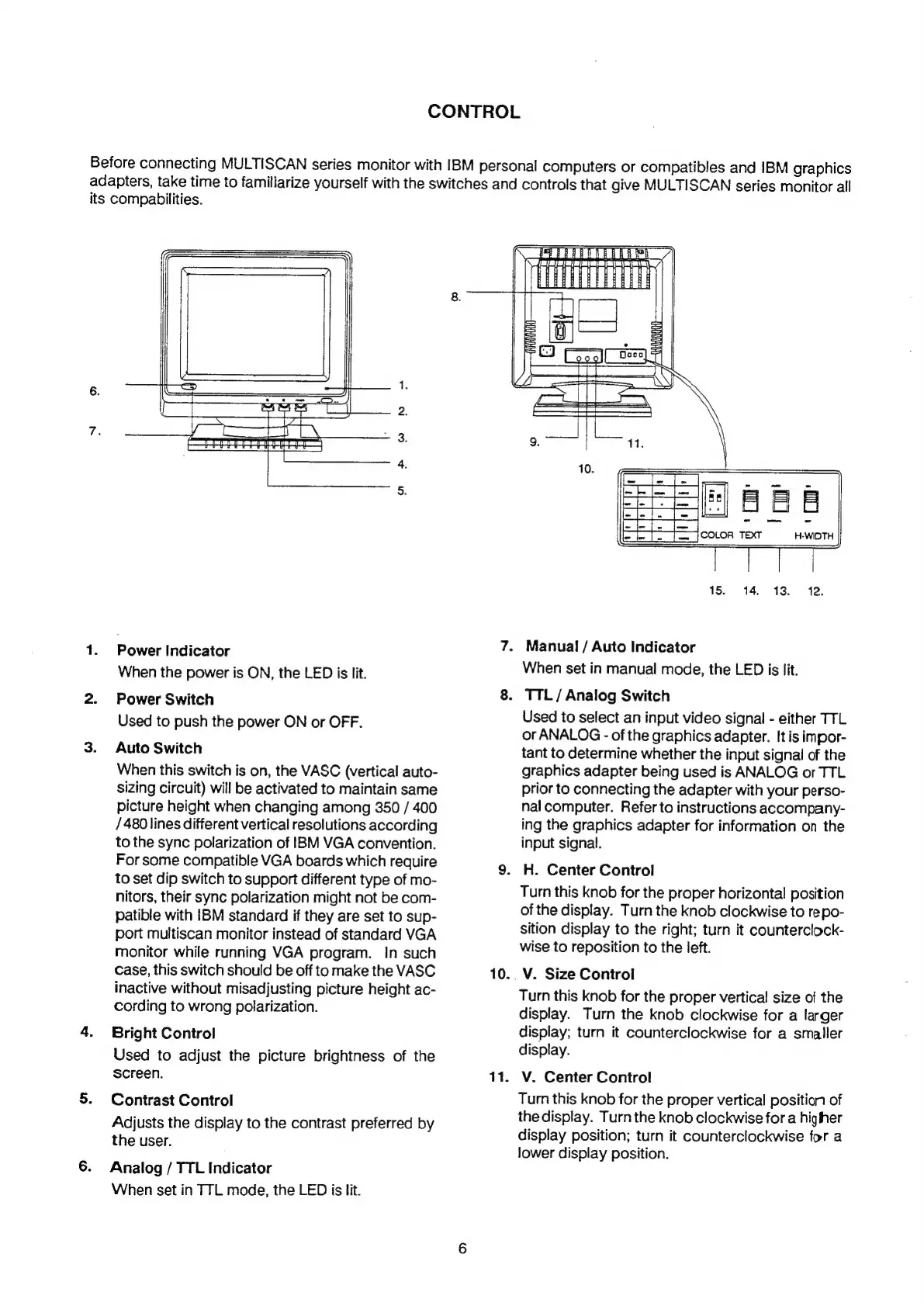
CONTROL
il
uv
fF
ww
NW
Power
Indicator
When
the
power
is
ON,
the
LED
is
lit.
Power
Switch
Used
to
push
the
power
ON
or
OFF.
Auto
Switch
When
this
switch
is
on,
the
VASC
(vertical
auto-
sizing
circuit)
will
be
activated
to
maintain
same
picture
height
when
changing
among
350
/
400
/
480
lines
different
vertical
resolutions
according
to
the
sync
polarization
of
BM
VGA
convention.
For
some
compatible
VGA
boards
which
require
to
set
dip
switch
to
support
different
type
of
mo-
nitors,
their
sync
polarization
might
not
be
com-
patible
with
IBM
standard
if
they
are
set
to
sup-
port
multiscan
monitor
instead
of
standard
VGA
monitor
while
running
VGA
program.
In
such
case,
this
switch
should
be
off
to
make
the
VASC
inactive
without
misadjusting
picture
height
ac-
cording
to
wrong
polarization.
Bright
Control
Used
to
adjust
the
picture
brightness
of
the
screen.
Contrast
Control
Adjusts
the
display
to
the
contrast
preferred
by
the
user.
Analog
/
TTL
Indicator
When
set
in
TTL
mode,
the
LED
is
lit.
10.
11.
Before
connecting
MULTISCAN
series
monitor
with
IBM
personal
computers
or
compatibles
and
IBM
graphics
adapters,
take
time
to
familiarize
yourself
with
the
switches
and
controls
that
give
MULTISCAN
series
monitor
all
its
compabilities.
Manual
/
Auto
Indicator
When
set
in
manual
mode,
the
LED
is
lit.
.
TTL/
Analog
Switch
Used
to
select
an
input
video
signal
-
either
TTL
or
ANALOG
-
of
the
graphics
adapter.
It
is
impor-
tant
to
determine
whether
the
input
signal
of
the
graphics
adapter
being
used
is
ANALOG
or
TTL
prior
to
connecting
the
adapter
with
your
perso-
nal
computer.
Refer
to
instructions
accompany-
ing
the
graphics
adapter
for
information
on
the
input
signal.
H.
Center
Control
Turn
this
knob
for
the
proper
horizontal
position
of
the
display.
Turn
the
knob
clockwise
to
repo-
sition
display
to
the
right;
turn
it
counterclock-
wise
to
reposition
to
the
left.
V.
Size
Control
Turn
this
knob
for
the
proper
vertical
size
of
the
display.
Turn
the
knob
clockwise
for
a
larger
display;
turn
it
counterclockwise
for
a
smaller
display.
V.
Center
Control
Turn
this
knob
for
the
proper
vertical
position
of
the
display.
Turn
the
knob
clockwise
for
a
higher
display
position;
turn
it
counterclockwise
for
a
lower
display
position.

Related product manuals