EasyManua.ls Logo

CTX CMS-3436 - Page 8

Default Icon
41 pages
Print Icon
To Next Page IconTo Next Page
To Previous Page IconTo Previous Page
Loading...
ON
AUTO
ON
12
eo
OFF
MANUAL
OFF
COLOR
TEXT
H-WIDTH
||
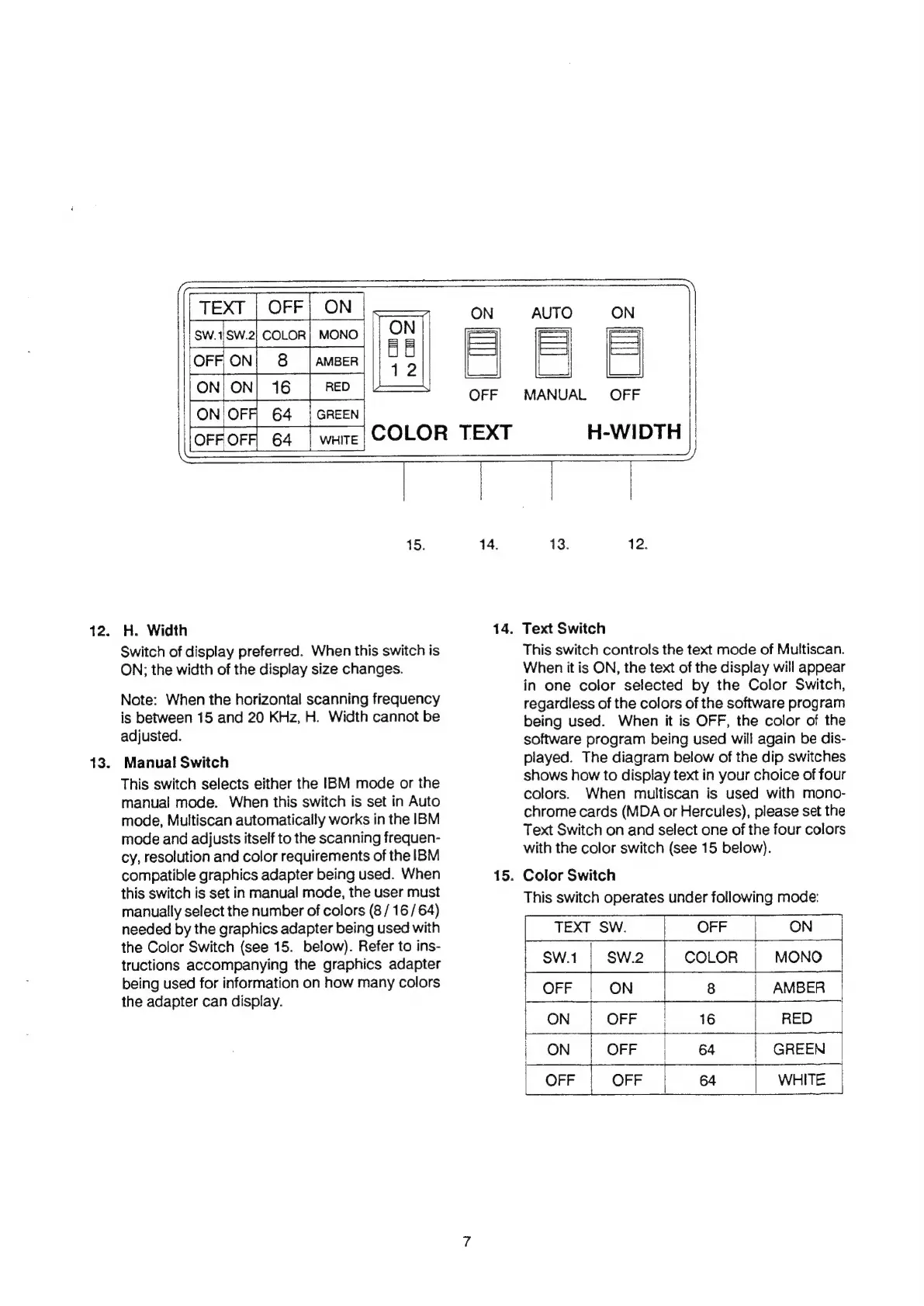
15.
12.
H.
Width
13.
Switch
of
display
preferred.
When
this
switch
is
ON;
the
width
of
the
display
size
changes.
Note:
When
the
horizontal
scanning
frequency
is
between
15
and
20
KHz,
H.
Width
cannot
be
adjusted.
Manual
Switch
This
switch
selects
either
the
IBM
mode
or
the
manual
mode.
When
this
switch
is
set
in
Auto
mode,
Multiscan
automatically
works
in
the
IBM
mode
and
adjusts
itself
to
the
scanning
frequen-
cy,
resolution
and
color
requirements
of
the
IBM
compatible
graphics
adapter
being
used.
When
this
switch
is
set
in
manual
mode,
the
user
must
manually
select
the
number
of
colors
(8
/
16
/
64)
needed
by
the
graphics
adapter
being
used
with
the
Color
Switch
(see
15.
below).
Refer
to
ins-
tructions
accompanying
the
graphics
adapter
being
used
for
information
on
how
many
colors
the
adapter
can
display.
ud
14.
14.
15.
13.
12.
Text
Switch
This
switch
controls
the
text
mode
of
Multiscan.
When
it
is
ON,
the
text
of
the
display
will
appear
in
one
color
selected
by
the
Color
Switch,
regardless
of
the
colors
of
the
software
program
being
used.
When
it
is
OFF,
the
color
of
the
software
program
being
used
will
again
be
dis-
played.
The
diagram
below
of
the
dip
switches
shows
how
to
display
text
in
your
choice
of
four
colors.
When
multiscan
is
used
with
mono-
chrome
cards
(MDA
or
Hercules),
please
set
the
Text
Switch
on
and
select
one
of
the
four
colors
with
the
color
switch
(see
15
below).
Color
Switch
This
switch
operates
under
following
mode:
TEXT
SW.
OFF
ON
SW.1
|
SW.2
COLOR
MONO
OFF
ON
8
AMBER
|
ON
|
OFF
|
16
RED
|
ON
|
OFF
|
64
GREEN
OFF
|
OFF
64
WHITE

Related product manuals