6
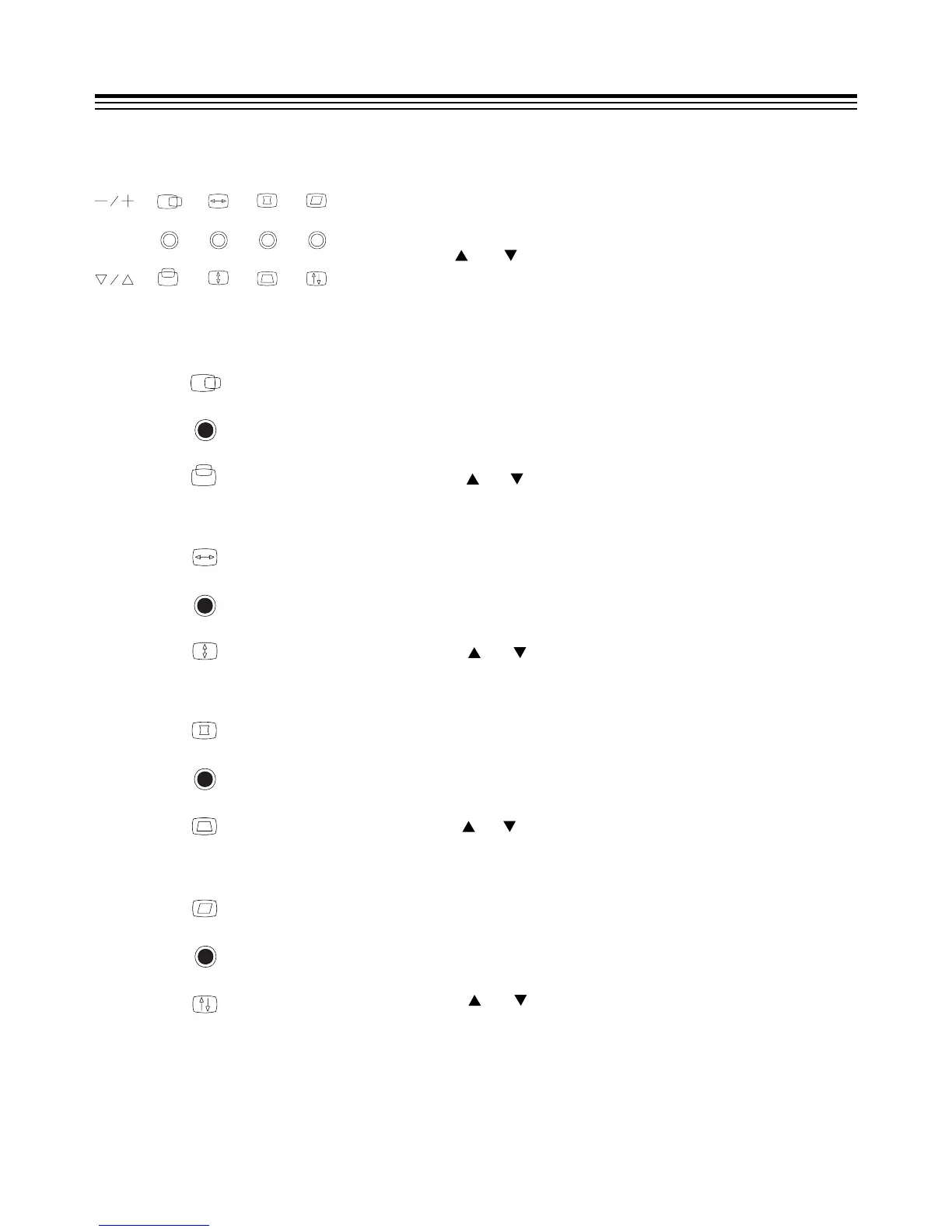
When all LED indicators are off
Press "+", "" button to adjust the contrast of picture.
Press " ", " " button to adjust the brightness of
picture.
Press "+", "" button at the same time to RECALL the
factory preset status of the picture.
(1) When the first LED indicator is lighted
Press "+", "" button to adjust the horizontal
position of the picture.
Press " ", " " button to adjust the vertical position
of the picture.
(2) When the second LED indicator is lighted
Press "+", "" button to adjust the horizontal size
of the picture.
Press " ", " " button to adjust the vertical size of
the picture.
(3) When the third LED indicator is lighted
Press "+", "" button to adjust the pincushion
distortion of the picture.
Press " ", " " button to adjust the trapezoid distortion
of the picture.
(4) When the fourth LED indicator is lighted
Press "+", "" button to adjust the parallelogram
distortion of the picture.
Press " ", " " button to adjust the rotation of the
picture.
HOW TO ADJUST YOUR MONITOR


 To Next Page