7
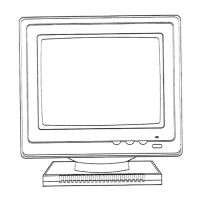
USER CONTROLS
(1) POWER BUTTON
(2) POWER INDICATOR
As long as the monitor is powered this indicator is
lit. In normal operation it lights green, while in
power saving mode the indicator will turn to
amber.
(3) ENTER BUTTON ( )
To open On Screen Display (OSD) Menu or Enter
Subdirectory.
(4) CONTROL BUTTON
To adjust the parameter of a selected function.
(5) EXIT BUTTON (ESC)
To exit OSD window.
POWER SAVE NOTE
This monitor is equipped with automatic power-saving circuitry design which will work
with any computer unit following the VESA DPMS detection format, and the ENERGY
STAR
low power state definition. Every time when you first turn on your PC and monitor
,the power save function remains inactive, the function will then be triggered when the
input signal from the PC is cut off by the computer itself, or through some other loss
of signal input afterwards.



 To Next Page