shows when charging , the charger should not be plugged out until power is fully charged. The indicator light
becomes blue,the battery icon's green bar will stop.
When the power exhausts out,wait for a minute and turn the device on.
Notice:1.if you want the special charger with 12V --2A ,contact the distributor in the local.
2.Don't use 5V charger, or we are not responsible if the device is damaged to lead by the usage of
5V charger.
�
�
�
�
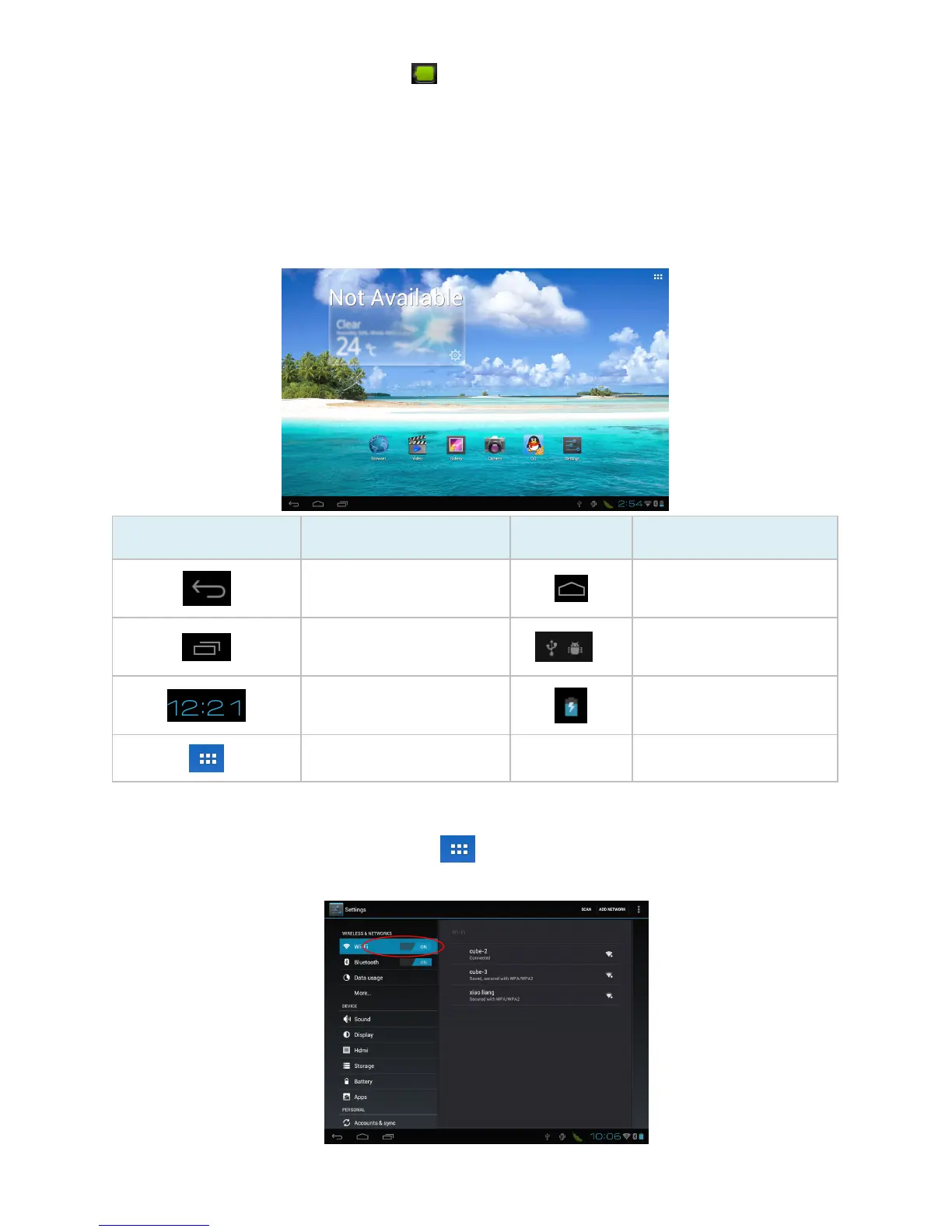
Main user interface ( menu icons definition )
Icon Function introduction Icon Function introduction
Return button
Any interface and click it
will return to main menu
Menu of Recent operation
The system has identify
new device
To show the time of current
system
Battery icon showing the
remaining power
Function module menu
二. Operation introduction
1.Wifi Setting
a. WIFI on setting : click module menu icon , enter module menu list,click "setting" to enter
the setting menu,click "wireless & networks" to enter,select "Wi-Fi" :


 To Next Page