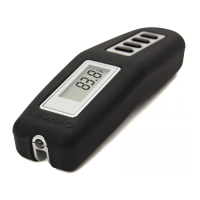
1. Remove the storage sleeve and pull off the insulation film on the back side of the product.
2. Slide ON/OFF switch to "ON" on the back side of thermometer.
3. Slide °C/°F switch to “°C” to display Celsius or “°F” to display Fahrenheit.
4. Custom temperature mode
(1) “ MEAT” mode and “BEEF-RARE” are set by default. Press ◄ and ► to switch to “USER” and other meat.
Press “MODE”, it will flash, press ◄ or ► to switch to meat(BEEF-LAMB-VEAL-PORK-FISH
-CHICK-TURKY-BURG-USER-BEEF) Press “MODE” to select one meat, then press ◄ or ► to select taste, press “MODE” to
confirm taste, MEAT and TASTE will flash 2S.
(2) Press ◄ or ► to switch to “USER”, Press “MODE” to set temperature. “--”stands for no selected alarm temperature. Press ◄
or ►, “--” starts at 50°C by default. Press “MODE” to confirm the selected temperature.
Temperature reset: press “MODE” and then press ◄ and ► in the same time, it will show “--”,then press “MODE” .
To set temperature, press ◄ or ►. Press left button to minus or right button to add. Press and hold in for 2S to fast-forward or
fast-backward. Confirm desired temperature.
If you set “ ” it will beep and the LCD will flash when temperature is finished. Press any button to cancel the alarm.
5. Temperature function:
Insert the thermometer into the thickest part of the meat or poultry. The tip should be at least 1 inch into the meat or poultry but
not in contact with bone or gristle. When the temperature is stable, press “HOLD” to lock the temperature on screen (“HOLD”
appears on screen). Remove the thermometer to check whether the desired temperature is reached. If not, press the “HOLD”
button again to release the locked-in temperature and display current temperature (“HOLD” disappear on screen). Repeat the
above steps until the desired temperature is reached.
6. Backlight/Alarm mode option.
Turn on the backlight and alarm by default, press “HOLD” for 2S to enter backlight and alarm setting, it’s set mode icon flash, press
“HOLD” to switch mode.
Press “HOLD” for 2S, the corresponding icon will flash 3 times, confirm the desired mode and exit select status.
Without confirming manually selected mode after 5S, it will confirm automatically and exit mode selection.
Under the status of mode selection, other buttons can not trigger functions. Exit the mode selection state to trigger button setting
function.
7. Timer count-up or count-down:
Hold down “MODE” for 2s to switch between meat choice/timer mode.
USER MANUAL
PACKAGE CONTENTS
HOLD
BUTTON
RIGHT
BUTTON(+)
LEFT
BUTTON(-)
MODE
SE T
HOL D
MEAT
TAST E
TIME R
BACK LIGHT HOLD
LOW BATTERY
INDICATOR
CURRENT
TEMPERATURE
TIMER
TASTE
ALARM
CUSTOM TEMP
MEAT
CHOICES
SE T
HOL D
MEAT
TAST E
TIME R
°C/°F
BATTERY
COVER
ON/OFF
Buttons (front) Screen Back
OPERATING INSTRUCTIONS
To set a count-down time, press ◄ or ► to set “H” and “M”, press left button to minus, press right button to
add, press and hold for 2S to fast-forward or fast-backward. Press“MODE” to confirm the setting of “H” or “M”.
Press“MODE” to begin or pause counting under TIMER mode, if you set “ ” it will beep and the LCD will
flash when count-down is finished. Press any button to cancel the alarm.
To pause the timer, press ◄ and ► in the meantime to reset to zero.
Slide switch to “OFF” to conserve battery life when you finish cooking.
To start a count-up, start from zero, the timer will count up to 23 hours,59 minutes.
SET
HOLD
TIMER
O u tdoor Grilling Products
INSTANT READ
THERMOMETER
Model NO: CGWM-070

 Need help?
 General

 To Next Page