
 Need help?
Do you have a question about the Cuisinart Coffee on Demand and is the answer not in the manual?
Set the brew-start time by turning the dial to PROG, then AUTO ON, and pressing the On/Off button.
Blue indicator light signals the programmed Auto-On brew cycle is starting at the set time.
To repeat the brew cycle at the same time the next day, turn dial to AUTO ON and press On/Off button.
Soak the charcoal water filter for 15 minutes, then insert it into the water reservoir holder.
Remove and fill the water reservoir with the desired number of cups, then replace it firmly.
Insert filter, add one scoop of coffee per cup, adjust to taste, and ensure basket is secure.
Plug in, turn dial to Brew, press On/Off. Blue light indicates brewing; Auto On turns dial green for delay.
After brewing, five beeps sound. Place mug on drip tray and press lever to pour coffee.
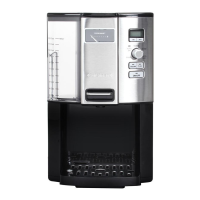
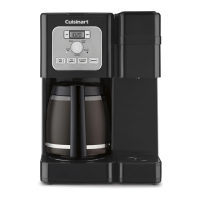
The Cuisinart Coffee on Demand™ 12-Cup Programmable Coffee Maker is a sophisticated appliance designed to provide a convenient and customizable coffee brewing experience. This quick reference guide outlines its primary functions, usage features, and maintenance considerations, ensuring users can quickly set up and operate their new coffeemaker.
At its core, this coffeemaker is designed to brew up to 12 cups of coffee, offering programmable features that allow users to set the time, schedule automatic brewing, and even control the auto-off duration. The device features a function dial that serves as the central control for selecting various modes: Clock, Auto Off, Brew, Prog (Program Auto On), and Auto On.
The "Clock" function allows users to set the current time. By turning the function dial to "Clock" and pressing and holding either the Hour or Minute button, the clock display will begin flashing. Users can then adjust the time until the desired hour and minute are shown, at which point the numbers will stop flashing, indicating the time has been set. This ensures the coffeemaker always displays the correct time, which is crucial for its programmable features.
The "Auto Off" function provides a safety and energy-saving feature. Users can program the coffeemaker to automatically shut off between 0 and 4 hours after the brew cycle is completed. To set this, the function dial is turned to "Auto Off," and the "Set Time" instructions (similar to setting the clock) are followed to select the desired auto-off duration. This prevents the coffeemaker from remaining on indefinitely, conserving energy and offering peace of mind.
The "Brew" function is the standard mode for immediate coffee brewing. When the function dial is set to "Brew," and the On/Off button is pressed, the coffeemaker will begin brewing coffee. A blue On/Off indicator light will illuminate to signal that the brewing process has started.
The "Prog" (Program Auto On) function allows users to schedule a specific time for the coffeemaker to begin brewing automatically. When the function dial is turned to "Prog," the AUTO ON LED will flash, indicating that the coffeemaker is ready to accept a programmed brew-start time. Users follow the "Set Time" instructions to input their desired start time. This feature is ideal for waking up to freshly brewed coffee.
The "Auto On" function activates the advanced brew-start feature. After programming a brew-start time using the "Prog" function, users turn the function dial to "Auto On" and press the On/Off button. A green AUTO ON light will illuminate, confirming that the advanced brew-start function is active and the coffeemaker will begin brewing at the scheduled time. To use the same programmed brew cycle the next day, users simply turn the function dial to "Auto On" and press the On/Off button once more, and the green Auto On light will turn on.
The Cuisinart Coffee on Demand™ coffeemaker incorporates several features designed to enhance the user experience from setup to daily operation.
One key usage feature is the charcoal water filter system. Before initial use, the charcoal water filter must be fully immersed in cold tap water for 15 minutes. This filter is then inserted into the water filter holder and placed inside the water reservoir. This filtration system helps to remove impurities from the water, ensuring a cleaner and better-tasting cup of coffee.
The coffeemaker utilizes a removable water reservoir, which simplifies the filling process. Users can easily remove the reservoir, fill it with the desired amount of water corresponding to the number of cups they wish to brew, and then firmly push it back into place. This design minimizes spills and makes it convenient to add water.
For coffee grounds, the coffeemaker supports both a permanent gold tone filter and paper filters, providing flexibility based on user preference. The chosen filter is inserted into the filter basket holder. The provided scoop helps users measure the correct amount of ground coffee, with a general recommendation of one scoop per cup, though this can be adjusted to taste. Ensuring the filter basket is securely in place and the lid is completely closed is crucial for proper brewing.
The control panel includes clear indicators for various functions. The blue On/Off indicator light signals that a brew cycle is starting or is in progress. The green AUTO ON light confirms that the advanced brew-start function is active. These visual cues help users understand the current status of the coffeemaker at a glance.
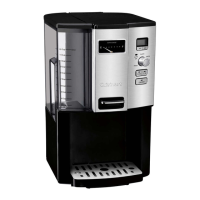
After the brew cycle is complete, the coffeemaker emits five beeps, and the On/Off indicator light turns off, signaling that the coffee is ready. The "Coffee on Demand" feature allows users to dispense coffee directly into a mug or cup by placing it on the drip tray and pressing a lever. The cup area illuminates when the lever is pressed, making it easy to see the coffee being dispensed, even in low light. This eliminates the need for a traditional carafe, offering a convenient, single-serve dispensing method.
While the guide primarily focuses on setup and usage, it implicitly highlights several maintenance considerations essential for the longevity and optimal performance of the coffeemaker.
The charcoal water filter, as mentioned, is a critical component for water quality. Regular replacement of this filter, as detailed in the full instruction booklet, is a key maintenance task to ensure continued filtration effectiveness and prevent mineral buildup within the coffeemaker.
The use of a permanent gold tone filter or paper filters in the filter basket holder simplifies the disposal of used coffee grounds. The filter basket itself is likely removable for easy cleaning, preventing the accumulation of old coffee residue.
The removable water reservoir and drip tray are designed for easy cleaning. These components can be detached from the main unit, allowing for thorough washing to prevent mold or mineral buildup. The illuminated cup area also suggests that the dispensing mechanism is designed for easy access and cleaning, ensuring hygiene and preventing clogs.
The "CLEAN" indicator on the function dial suggests a self-cleaning cycle or a reminder for descaling. While not explicitly detailed in this quick reference, such a feature is common in programmable coffeemakers and is vital for removing mineral deposits that can accumulate over time, especially in areas with hard water. Regular descaling, as outlined in the comprehensive instruction booklet, is crucial for maintaining brewing efficiency and extending the life of the appliance.
Overall, the Cuisinart Coffee on Demand™ 12-Cup Programmable Coffee Maker is designed with user convenience and coffee quality in mind, offering a range of programmable features, intuitive controls, and components that facilitate easy setup, daily use, and routine maintenance.
 General
| Model | DCC-3000 |
|---|---|
| Capacity | 12 cups |
| Brew Strength Control | Yes |
| Programmable | Yes |
| Removable Water Reservoir | Yes |
| Self-Clean Function | Yes |
| Type | Drip Coffee Maker |
| Automatic Shutoff | Yes |
| Warm Function | Yes |
| Carafe | No carafe |
| Filter Type | Charcoal Water Filter |
| Color | Black |




 To Next Page