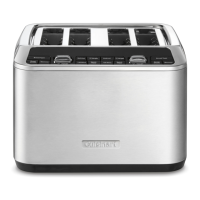
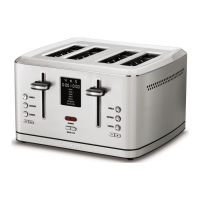
The Cuisinart 4-Slice Digital Toaster with MemorySet (CPT-740) is an advanced kitchen appliance designed to toast various types of bread with precision and convenience. This instruction booklet provides comprehensive details on its functions, usage, and maintenance to ensure user safety and continued enjoyment of the product.
Function Description
The primary function of this toaster is to toast bread slices to a desired browning level. It features four wide toasting slots, capable of accommodating a variety of bread types, from thin slices to thicker items like bagels and waffles. The toaster is equipped with dual control panels, allowing users to toast items in the left two slots independently from the right two slots, each with its own settings.
A key feature is the LCD Display, a black backlit screen that clearly shows the selected shade setting, bread type, and memory function. It also provides a countdown timer, so users know exactly when their toast will be ready.
The toaster offers several specialized Bread-Type Functions to optimize toasting for different items:
- WHITE: Designed for soft, white sandwich breads, typically made from unrefined white flour.
- GRAIN: Ideal for unrefined, nutrient-dense breads, including 100% whole grain, sprouted whole grain, rye, oat, and flax varieties.
- BAGEL: Toasts bagels to perfection by reducing heat on one side of the toasting slot, ensuring the cut side is toasted slightly more than the other. A directional icon on the toaster top indicates the correct way to insert bagels (cut side facing away from the center of the pair of toasting slots).
- SWEET: Caters to breads with higher sugar content, such as raisin-cinnamon bread, fruit and nut bread, potato bread, brioche, and challah.
- WAFFLE: Specifically designed for waffles, often paired with the DEFROST function for frozen waffles.
- ENG. MUFFIN: Adds extra time to the toasting cycle to accommodate the denser texture of English muffins.
- GLUTEN-FREE: Optimized for most types of gluten-free bread. It's important to note that this function does not remove gluten from the bread.
In addition to bread types, the toaster includes other functional settings:
- Defrost Function: A longer cycle that first defrosts frozen bread and then toasts it to the desired browning shade. An LED ring around the button illuminates when selected.
- Single-Slice Function: Ensures even toasting from side to side when only one slice of bread is placed in a slot. An LED ring around the button illuminates when selected.
- Cancel Function: Immediately stops the toasting process and automatically lifts the bread, providing an easy way to interrupt a cycle.
Usage Features
The Cuisinart Digital Toaster is designed for intuitive and flexible use:
- High-Lift Levers: These levers bring the toast closer to the top of the toaster, making it easier to remove smaller items without difficulty.
- Browning Shade Selector Buttons (+/-): Users can increase or decrease the desired shade level from 1 to 7. The selected shade number is displayed on the LCD. Shade levels 1-2 are for light toast, 3-5 for medium, and 6-7 for dark.
- MemorySet Feature: This advanced feature allows users to program and save up to 8 favorite toast settings (4 per toast side). To program, press the red MEMORY button, select a memory setting number (1-4), then press and hold the MEMORY button until it flashes. Next, select the desired bread type using the BREAD TYPE button and the toast shade using the +/- SHADE buttons. Confirm by pressing and holding the MEMORY button until the settings stop flashing. Memory settings remain saved even when the toaster is unplugged. Any memory setting can be revised by simply repeating the programming steps. To erase all memory settings, unplug the toaster, press and hold the SINGLE and DEFROST buttons together, then plug the toaster back into the outlet; settings will revert to default (White, shade 4).
- General Operation: To begin toasting, insert bread slices into the slots, ensuring the carriage lever is in the up position. Select the desired bread option and/or function (e.g., DEFROST, SINGLE SLICE, or a MEMORY setting). Set the browning level using the shade buttons. Then, press the carriage lever down until it locks. The LCD will display a countdown of the remaining toasting time.
- Automatic Shut-Off: After 5 minutes of no operation, the toaster enters idle mode, and the LCD turns off. Pressing any button or pushing down the carriage lever will reactivate the LCD.
- Toast Pastries: Exercise caution with toaster pastries, as the filling can become very hot before the surface browns. It is recommended to start with the lightest setting and never leave pastries unattended.
- Tips for Best Results:
- Avoid forcing foods into the toasting slots; items should fit freely.
- Do not place buttered breads in the toaster to prevent fire hazards.
- Uneven toasting can often be attributed to slices of uneven thickness.
- For lighter or drier breads, use a lower setting.
- For very fresh bread, use the Grain setting.
- For breads with uneven surfaces (like English muffins), use the English Muffin setting.
- For thicker, denser, or very fresh breads, use a higher browning setting; very thick slices may require a second cycle.
- When toasting raisin or fruit breads, remove any loose pieces to prevent them from falling into the toaster or sticking to guide wires.
- Slice bagels into two equal halves before toasting.
- Use the Defrost function for frozen bread, waffles, pancakes, French toast, and bagels.
Maintenance Features
Proper cleaning and maintenance are essential for the longevity and safe operation of the Cuisinart Digital Toaster:
- Always Unplug Before Cleaning: Ensure the toaster has cooled completely and is unplugged from the electrical outlet before any cleaning.
- Exterior Cleaning: Do not use abrasive cleaners. Simply wipe the exterior with a clean, damp cloth and dry thoroughly.
- Crumb Tray: The toaster includes a slide-out crumb tray, located on the back, which collects crumbs. To clean, slide out the tray, discard crumbs, wipe it clean, and replace it. Never operate the toaster without the crumb trays in place.
- Removing Stuck Bread: If bread pieces remain in the toaster, unplug the unit, turn it upside down, and gently shake it. Never insert hard or sharp instruments into the slots, as this can damage the toaster and pose a safety hazard.
- Cord Storage: The toaster features cord storage cleats on its underside to wrap excess cord, keeping the countertop neat and preventing the cord from hanging over the edge of a table or countertop. Never wrap the cord around the outside of the toaster.
- Servicing: Any servicing beyond routine cleaning should be performed by an authorized service representative.
The Cuisinart 4-Slice Digital Toaster is designed for household use and comes with a limited three-year warranty, covering defects in materials and workmanship under normal home use. For safety, it is crucial to read all instructions carefully before using the appliance. Always unplug the toaster when not in use and allow it to cool before cleaning or handling. Do not operate the appliance with a damaged cord or plug, or if it has malfunctioned. Avoid using the toaster outdoors or under wall cabinets, and do not place it near hot surfaces or in a heated oven.

 Need help?
 General

 To Next Page