EasyManua.ls Logo

Cuisinart DCC-T20 - User Manual

Cuisinart DCC-T20
12 pages
Print Icon
To Next Page IconTo Next Page
Loading...
For your safety and continued enjoyment of this product, always read the instruction book carefully before using.
Touchscreen 14-Cup Coffeemaker
DCC-T20
INSTRUCTION BOOKLET
Question and Answer IconNeed help?

Do you have a question about the Cuisinart DCC-T20 and is the answer not in the manual?

Summary

Important Safeguards

Features and Benefits

Touchscreen Control Panel

Overview of the coffeemaker's control panel and its functions, referencing page 6 for details.

Reveal Screen Technology

Before Brewing Your First Pot of Coffee

Charcoal Water Filter

Details the function and installation of the charcoal water filter to remove impurities from tap water.

Programming Your Coffeemaker

Setting the Clock

Instructions for setting the time of day, Auto On, and Auto Off times using HR and MIN icons.

Setting Auto On Time

How to program the coffeemaker to start brewing automatically up to 24 hours in advance.

Setting Auto Off Time

How to program the coffeemaker to shut off automatically from 0 to 4 hours after brewing.

Turning Off Ready Tone

How to disable or enable the audible alert for when the brew cycle is finished.

Making Coffee

Brew Pause Feature

Cleaning and Maintenance

Decalcification

Warranty

Limited Three-Year Warranty

Details the warranty period and coverage for U.S. and Canada consumers for defects in materials and workmanship.

California Residents

Specific warranty service options and consumer rights for California residents returning nonconforming products.

Hassle-Free Replacement Warranty

Explains the process for obtaining product repair or replacement under the warranty by contacting customer service.

Summary

Important Safeguards

Features and Benefits

Touchscreen Control Panel

Overview of the coffeemaker's control panel and its functions, referencing page 6 for details.

Reveal Screen Technology

Before Brewing Your First Pot of Coffee

Charcoal Water Filter

Details the function and installation of the charcoal water filter to remove impurities from tap water.

Programming Your Coffeemaker

Setting the Clock

Instructions for setting the time of day, Auto On, and Auto Off times using HR and MIN icons.

Setting Auto On Time

How to program the coffeemaker to start brewing automatically up to 24 hours in advance.

Setting Auto Off Time

How to program the coffeemaker to shut off automatically from 0 to 4 hours after brewing.

Turning Off Ready Tone

How to disable or enable the audible alert for when the brew cycle is finished.

Making Coffee

Brew Pause Feature

Cleaning and Maintenance

Decalcification

Warranty

Limited Three-Year Warranty

Details the warranty period and coverage for U.S. and Canada consumers for defects in materials and workmanship.

California Residents

Specific warranty service options and consumer rights for California residents returning nonconforming products.

Hassle-Free Replacement Warranty

Explains the process for obtaining product repair or replacement under the warranty by contacting customer service.

Overview

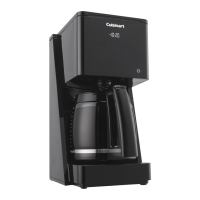
The Cuisinart T-Series Touchscreen 14-Cup Coffeemaker (DCC-T20) is a sophisticated appliance designed to deliver a premium coffee brewing experience with intuitive touchscreen controls and advanced features. Its primary function is to brew coffee, offering customization options for strength, temperature, and brew size, all while maintaining the purity of the coffee flavor.

Function Description:

The coffeemaker brews up to 14 cups of coffee, utilizing a charcoal water filter to ensure the purest coffee flavor by removing chlorine, bad tastes, and odors from tap water. It features a showerhead design that evenly distributes water over coffee grounds, minimizing temperature loss during brewing. Users can program the coffeemaker to automatically begin brewing up to 24 hours in advance with the Auto On feature. The Brew Pause™ feature allows for pouring a cup mid-brew, temporarily stopping the coffee flow from the basket. For optimal flavor with smaller batches, a 1-4 Cup setting adjusts the brew process when making fewer than 5 cups. The coffeemaker also includes a Bold setting for those who prefer a stronger coffee. An Auto Off feature allows users to program the unit to shut off from 0 to 4 hours after the brew cycle is complete, enhancing safety and energy efficiency. The unit's control panel utilizes "Reveal Screen Technology," becoming invisible in idle mode to create a sleek aesthetic, and wakes up with a simple touch of the power icon.

Important Technical Specifications:

  • Capacity: 14 cups (glass carafe)
  • Power: Designed for 120-volt outlets.
  • Filter Type: Accommodates #4 paper filters or the included Cuisinart® Permanent Gold-Tone Commercial-Style Filter.
  • Water Filter: Charcoal water filter for taste and odor removal.
  • Material: All parts in contact with coffee or liquids are BPA-free.
  • Reset Feature: 60-Second Reset protects programmed information (time of day, Auto On, Auto Off) in case of power interruption.
  • Warming Plate: Adjustable temperature settings (Low, Medium, High) for the heating plate.
  • Dimensions: Not explicitly stated, but implied to be a countertop appliance.

Usage Features:

  • Touchscreen Control Panel: An intuitive LCD display allows users to set the time of day, program Auto On and Auto Off times, and select brewing preferences.
  • Hour and Minute Icons: Used for setting the clock and program times.
  • Auto On Icon: Activates the programmable brew-start feature.
  • Bold Icon: Selects between bold or regular coffee strength. A white indicator confirms selection.
  • Carafe Temperature Icon: Adjusts the warming plate temperature to Low, Medium, or High, with the selection appearing on the display.
  • 1-4 Cup Icon: Optimizes brewing for smaller quantities (fewer than 5 cups), indicated by a white light.
  • Clean Icon: A red indicator light signals when it's time to decalcify the coffeemaker.
  • Brew/Off & Auto Off Icon: Turns the coffeemaker on/off and programs the automatic shut-off time.
  • Ready Tone Icon: Toggles an audible "Brew Cycle Finished" alert on or off. An "X" icon appears when the tone is off.
  • Power/Wake Icon: Taps to activate the LCD touchscreen or put it to sleep.
  • Water Reservoir: Features a water level indicator window for easy filling.
  • Coffeemaker Lid: Opens for access to the filter basket, water filter, and reservoir.
  • Carafe: An easy-pour glass carafe with an ergonomic handle and markings for 4 to 14 cups.
  • Measuring Scoop: Included for accurate coffee ground measurement.

Maintenance Features:

  • Cleaning and Maintenance: The coffeemaker should be turned off and unplugged before cleaning. The filter basket, carafe, and carafe lid are dishwasher-safe (upper rack only) or can be hand-washed with warm, soapy water. The base unit should be wiped with a damp cloth; never immerse it in water. The heating plate should be cleaned with a damp cloth, avoiding abrasive materials.
  • Charcoal Water Filter Replacement: Recommended every 60 days or after 60 uses, and more frequently with hard water. The filter is inserted into a holder within the water reservoir.
  • Decalcification: The CLEAN icon illuminates in red to indicate when decalcification is needed. The process involves filling the reservoir with a mixture of 1/3 white vinegar and 2/3 water, pressing and holding the CLEAN icon until it flashes, and running a cleaning cycle. After the cycle, a rinse cycle with fresh, cold water is recommended. The charcoal water filter must be removed before decalcifying.
  • User-Serviceable Parts: The manual explicitly states, "NO USER-SERVICEABLE PARTS ARE INSIDE. REPAIRS SHOULD BE DONE ONLY BY AUTHORIZED PERSONNEL," emphasizing that users should not attempt to open the base panel.

The Cuisinart DCC-T20 combines elegant design with practical functionality, making it a versatile and user-friendly coffeemaker for daily use. Its focus on water quality, customizable brewing, and ease of maintenance ensures a consistent and enjoyable coffee experience.

Cuisinart DCC-T20 Specifications

General IconGeneral
BrandCuisinart
ModelDCC-T20
CategoryCoffee Maker
LanguageEnglish

Related product manuals