OPERATING INSTRUCTIONS OI37
*-(%01&3"5*/(*/4536$5*0/4øø /$
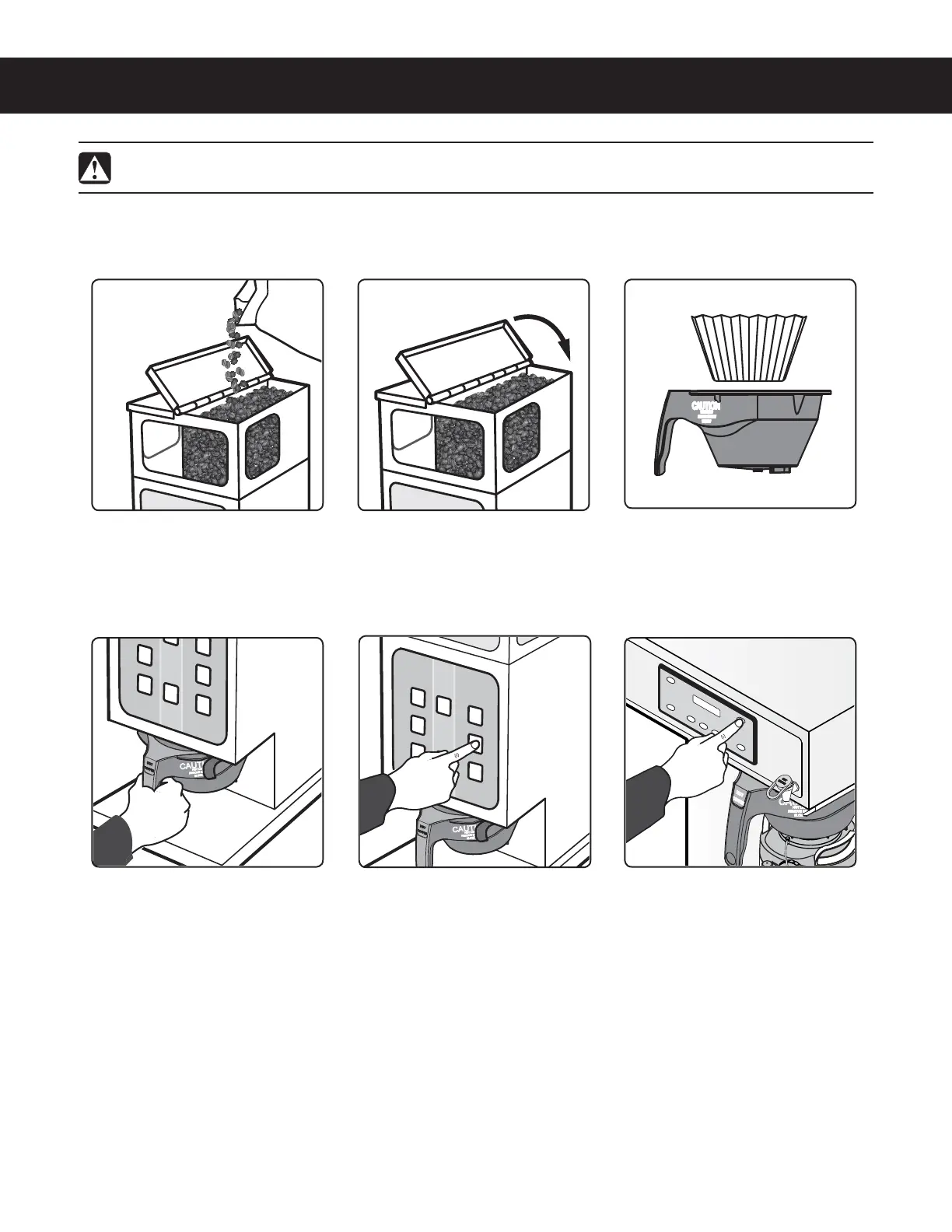
2 Close the lid. 1MBDFBDMFBOQBQFSmMUFSJOUP
the brew basket.
4 Slide the brew basket all
the way back into the brew
basket rails.
5 Make sure the grinder is on.
On the grinder control panel,
press the desired grind size/
brew volume button; SMALL,
MEDIUM or LARGE. The
grinder will start to grind
coffee into the brew basket.
Wait for the grinder motor
to stop before removing the
brew basket.
Open one of the hopper
MJETBOEmMMXJUIGSFTIXIPMF
coffee beans.
6 Some grinders are
connected to a brewer and
lock the brew selection into
the brewer. This is indicated
CZBnBTIJOH-&%OFYUUPUIF
corresponding BREW button
on the brewer. Transfer the
mMMFECSFXCBTLFUUPUIF
brewer and press the desired
BREW button. The brew
cycle is complete when the
#3&8MJHIUTUPQTnBTIJOH
The grinder is factory preset for optimal performance.
WARNING - TO AVOID SCALDING, AVOID SPLASHING. Keep body parts clear of the brewer during
brewing. Do not remove the brew basket while the BREW light is on. Keep body parts away from hot surfaces.


 To Next Page