
 Need help?
Do you have a question about the CVS Health 800 Series and is the answer not in the manual?
Outlines intended uses and lists contraindications like pregnancy, children.
Warns about serious injury or death if precautions are not followed.
Advises child supervision and proper cuff tubing use for safety.
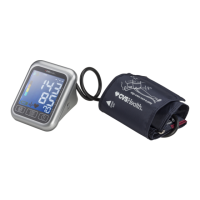
Overview of the automatic digital blood pressure monitor and its features.
Details the advanced measurement system for comfort and accuracy.
Explains blood pressure, its fluctuations, and arterial pressure changes.
Provides guidelines for high, low, and normal blood pressure readings.
Discusses factors influencing blood pressure and lifestyle changes.
Identifies and labels the components of the main measuring unit.
Details the wide range soft cuff and contact information.
Instructions for inserting and replacing batteries, including important notes.
Explains the function and operation of the touch pad buttons.
Step-by-step guide to setting the date and time on the monitor.
Instructions for connecting and using the AC power adapter.
Guidance on connecting the cuff tube to the monitor.
How to select between User 1, User 2, or Guest mode.
Explains how to choose between single measurement or MAM mode.
Details the MAM technology for taking multiple measurements.
Steps for proper preparation before taking a blood pressure measurement.
Identifies common errors and their causes during measurement.
Detailed instructions on how to correctly apply and fit the blood pressure cuff.
Step-by-step guide on how to perform a blood pressure measurement.
How to view, manage, and clear stored measurement data.
How to interrupt or stop an ongoing measurement.
Instructions for setting up medication or measurement reminders.
Explains the hypertension risk indicator display and its classifications.
Information on the irregular heartbeat symbol and when to consult a doctor.
Explains battery indicators for low charge and replacement requirements.
How to view and interpret AM/PM averaged blood pressure readings.
Steps to activate and enable Bluetooth® on the blood pressure monitor.
Instructions for pairing the blood pressure monitor with your smartphone via Bluetooth.
Ensuring the correct user (1 or 2) is selected on the monitor.
Lists common error codes and their possible causes and solutions.
Troubleshooting common device malfunctions and their remedies.
Guidelines for proper care, cleaning, and handling of the device and cuff.
Details the warranty coverage for the monitor and accessories.
Lists technical details like weight, size, ranges, power, and IP classification.
Provides contact details for customer service and support.
 General
| Brand | CVS Health |
|---|---|
| Model | 800 Series |
| Category | Blood Pressure Monitor |
| Type | Upper Arm |
| Display | LCD |
| User Profiles | 2 |
| Irregular Heartbeat Detection | Yes |
| WHO Blood Pressure Classification Indicator | Yes |
| Memory | 60 readings per user |
| Average Reading | Yes |
| Power Source | 4 x AA Batteries |

 To Next Page
