05
06
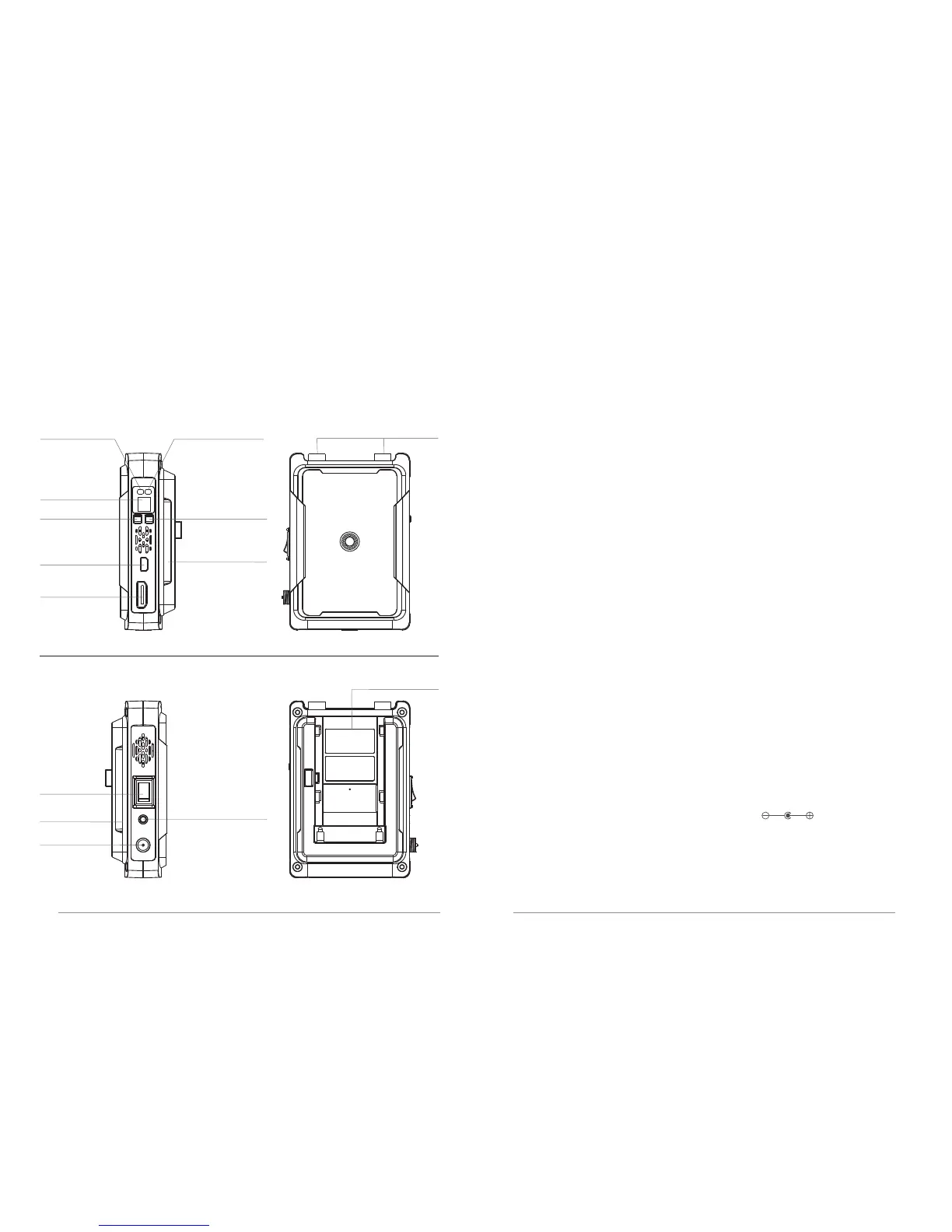
Used to indicate the network working status of the product.
Used to indicate the video transmission working status of the product.
3. Digital LED:
Used to display the current working channel of the receiver.
6. Mini USB:
8. Battery interface:
SONY NP-F970 and compatible battery series.
10. DC IN:
4. CH button:
5. Mode button:
Press and hold (3s) for code pairing.
ON / OFF
Receiver:3072
Video indicator
Digital LED
CH button Mode button
Mini USB
HDMI Out
Battery interface
Link indicator
Antenna interface
DC IN
Audio output
interface (3.5mm)
Power
ON/OFF
Battery
interface
Battery interface
Receiver 3072 Interface Introduction
1. Link indicator:
2. Video indicator:
a: Short press to switch the frequency channel;
b: Press and hold (3s) to turn on / off the fan.
Software Upgrading
7. HDMI Out:
Connect to HD source devices that support HDMI input
(HDTV, and projector)
9.Power switch:
This port is connected to a power adapter or other DC power sources
(such as battery pack, etc.).(SPEC:5.5mm )


 To Next Page