6
Front Panel
Last updated: 7月 12, 2022 03:28. Revision #5489
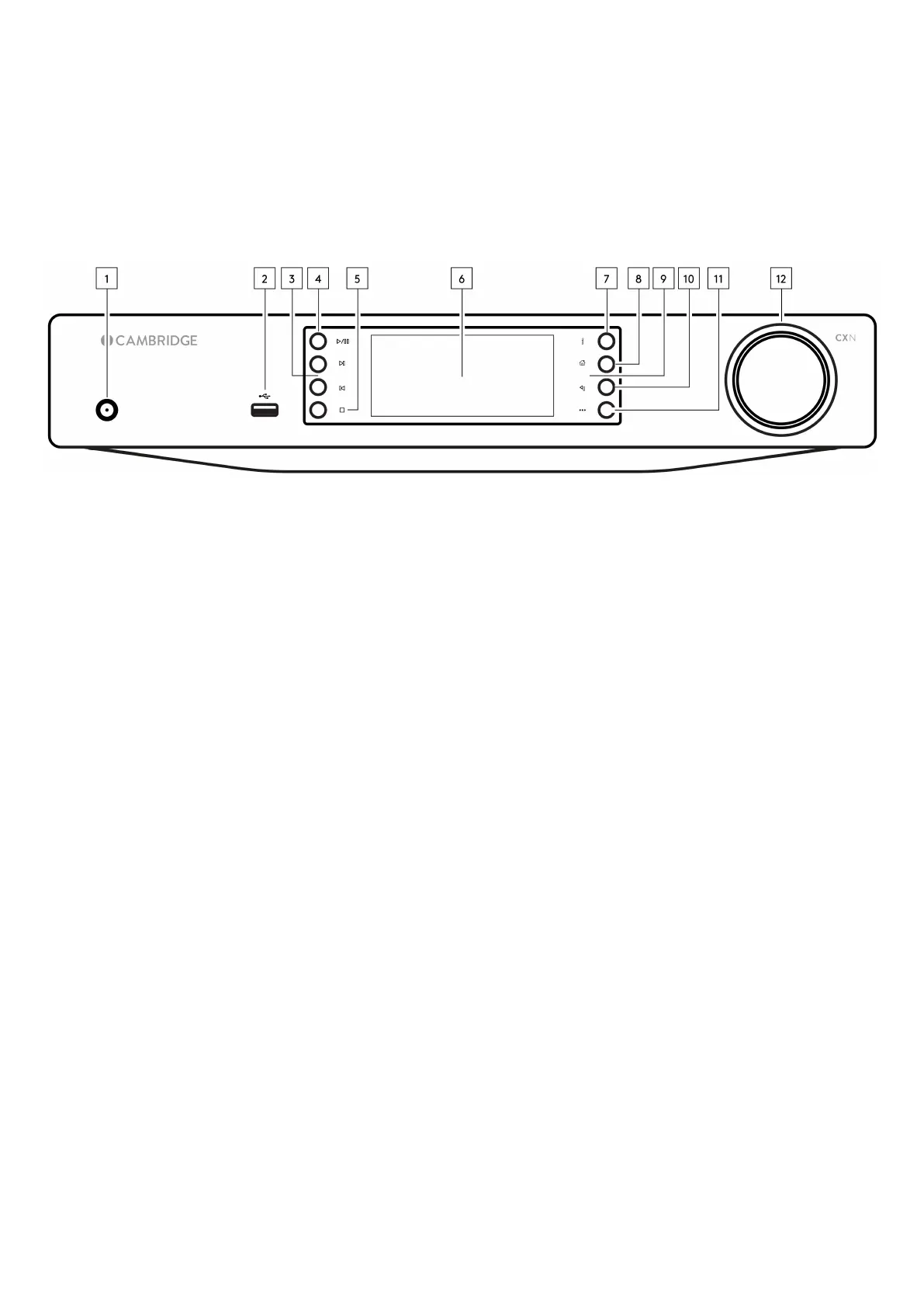
1. Standby/On
Switches the unit between Standby Mode (indicated by dim power LED) and On (indicated by bright power LED). Standby Mode is a low power mode
(0.5 Watts) – This can only be achieved when using Eco mode. The unit should be left in Standby Mode when not in use.
2. USB
For use with USB storage devices. 1A maximum current consumption.
3. Skip
Skip to next track during playback.
4. Play/Pause
Play or Pause current track.
5. Stop/Delete
Press during playback to stop or delete items in various menus.
6. Display
7. Info
During playback, pressing this button will cycle through ‘Now Playing’ screens. Press and hold to display the product info.
8. Home
Press to navigate to Home menu.
9. Infrared Sensor
IR sensor that receives IR commands from the remote control.
10. Return
Press to return to the previous menu.
11. (More)
When playing from UPnP sources, this button displays queued tracks and options.
12. Navigation/Select (Rotary Dial)
Rotate to scroll and navigate around the menus. Press to accept the item/function shown on the display.


 To Next Page