Page 3
Using CA Essential Micro Docking Station with your Laptop USB Type C AC
Power Adapter
- If your Laptop computer comes with a USB Type C Power Adapter rated at 90W or higher. This power
adapter can be used to power the CA Essential Micro Docking Station as well as slowly charge the
battery on your laptop.
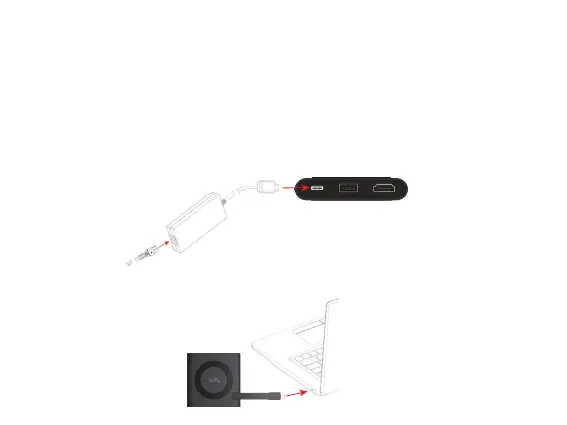
Step 1: Connect CA Essential Micro Docking Station to your Laptop USB Type C AC Power Adapter as shown on.
Step 3: Connect CA Essential Micro Docking Station to your Laptop.
Step 2: Plug your Laptop USB Type C AC Power Adapter to a power source.


 To Next Page