Using the CA Essential Micro Docking Station with a USB Type C
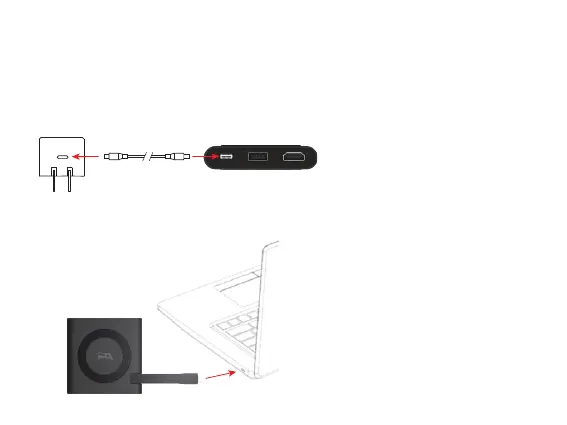
15W Power Adapter (Not Included)
Step 3: Insert the end of the USB Type C Docking Station Cable into the USB Type C port on your Laptop as show below.
Step 2: Insert the other end of the USB Type C Charging Cable into the connector of a USB Type C 15W Power Adapter as shown
and plug the USB Type C 15W Power Adapter into a power source.
Step 1: Insert the USB Type C Charging Cable into the USB Type C port on the CA Essential Micro Docking Station.
Page 5


 To Next Page