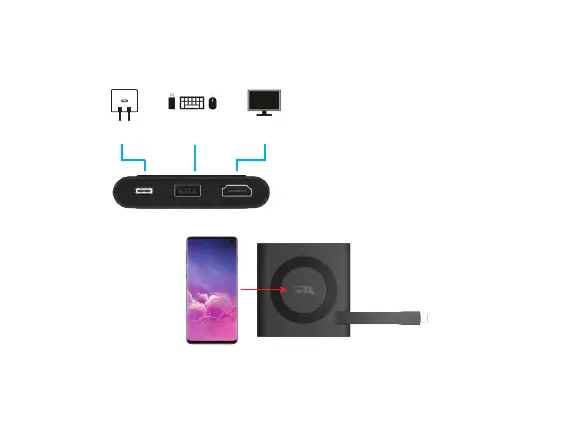
USB Type A
Gen 2 Port
USB Type C
15W Power Adapter
HDMI Connection
to a TV or Monitor
Step 5: Place your device supporting Wireless charging on the top of the CA Essential Micro Docking Station.
Note: The CA Essential Micro Docking Station will support standalone charging of your smartphone
when the CA Essential Micro Docking station is not connected to your Laptop. The CA Essential Micro
Docking Station still needs to be connected to a power source with a USB Type C 15W Power
Adapter and Cable.
Using the CA Essential Micro Docking Station with a USB Type C
15W Power Adapter (Not Included) - Continued
Step 4: Connect your Peripherals to the CA Essential Micro Docking Station.
Page 6


 To Next Page