CyberData Corporation
3 Justin Court, Monterey, CA 93940
www.cyberdata.net
P 831.373.2601 | F 831.373.4193
RING CENTRAL CONFIGURATION GUIDE: SIP PAGING ADAPTER (SPA)
Doc. 931050B Page 50
Note: The red square boxes are the multicast IP address and port numbers for each
paging group. The addresses and port numbers must match the SPA’s configured
multicast paging group addresses and port numbers.
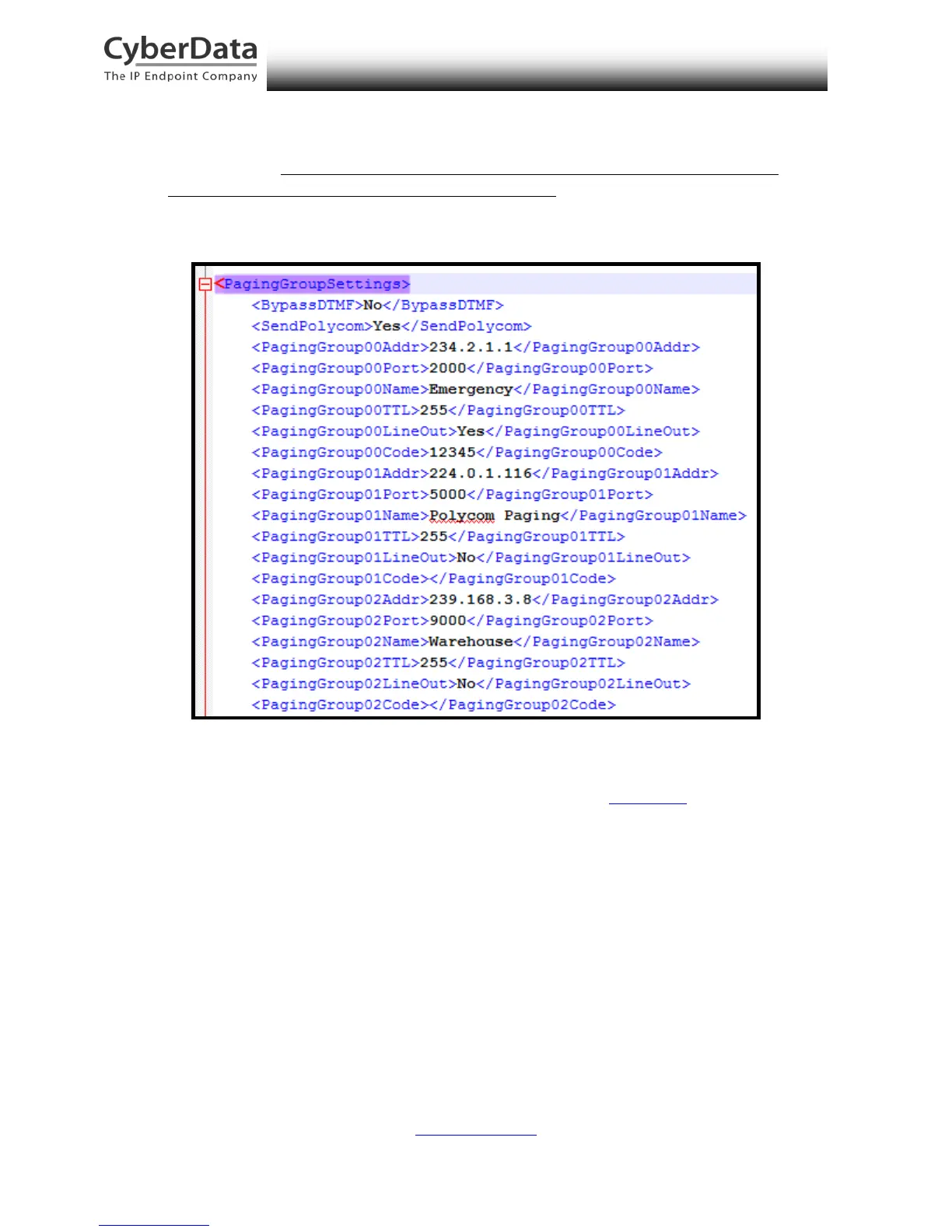
Figure 8-2. Autoprovisioning Example – V3.1 Paging Server PagingGroupSettings
Note: SendPolycom is enabled in this example configuration. While the paging group
configuration reflects an even-numbered port, as it does in Figure 8-1, the CyberData
Paging Server will send a second multicast stream to the configured Paging Group
Address and the next higher Port number (Paging Group Port + 1) for Polycom
interoperability. The CyberData Paging Server assumes the Polycom phones will use an
odd-numbered port.
In this example, when Paging Group 01 is selected, the CyberData paging server will
send a second audio stream to the next higher port. This results in the second stream
being sent to port 5001, or the 224.0.1.116:5001 address.
Since the SPA supports RFC 1889 and Polycom Group Paging multicasts, you may
configure the SPA to join the standard multicast group address containing an even-
numbered port or a Polycom Group Paging address containing an odd-numbered port.



 To Next Page