
 Need help?
Do you have a question about the CyberPower AVRG750LCD and is the answer not in the manual?
Essential safety warnings for installation and operation of the UPS unit, including fire and electric shock prevention.
Instructions for checking UPS contents, initial charging, and understanding AVR functionality.
Steps for connecting equipment, surge protection, and power source to the UPS unit.
Details on battery-protected and surge-only outlets, and operation of the power switch and indicators.
Description of USB, communication protection ports, circuit breaker, and ground screw.
Identifies common problems like power loss, runtime, or unit not turning on, with corresponding solutions.
Explains the meaning of LED lights and audible beeps for UPS status.
Details the various icons and messages displayed on the LCD screen for UPS status.
Lists performance metrics like VA/W capacity, voltage, frequency, and physical dimensions.
Explains the patented energy-saving features and efficiency benefits of the GreenPower UPS technology.
Outlines warranty terms, coverage period, and procedures for making a claim.
Lists what the warranty does not cover and applicable limitations.
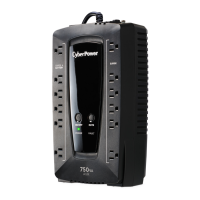
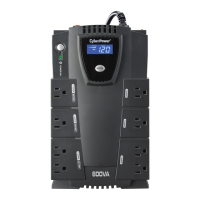
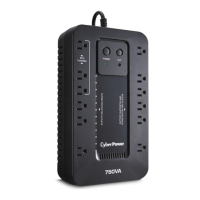
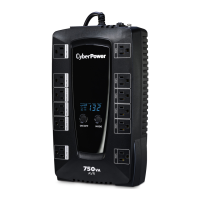
The CyberPower AVRG750LCD / AVRG900LCD is an Uninterruptible Power Supply (UPS) designed to provide reliable power protection, ensuring uninterrupted operation and performance for connected equipment. It features Automatic Voltage Regulation (AVR) to stabilize inconsistent utility power, correcting damaging voltage levels to a safe 110/120 volts. This protection is crucial for safeguarding important data and hardware from power fluctuations such as brownouts, blackouts, and over-voltages.
The UPS unit includes both battery-powered and surge-protected outlets, as well as full-time surge protection outlets. The battery-powered outlets ensure temporary uninterrupted operation of equipment during a power failure, while the full-time surge protection outlets suppress surges and spikes. It is important to note that large electrical devices such as laser printers, paper shredders, copiers, space heaters, vacuum cleaners, or sump pumps should not be plugged into the battery-powered outlets, as their power demands can overload and potentially damage the unit.
For optimal system performance, it is recommended to keep the load below 80% of the unit's rated capacity. An overload condition can cause the UPS to shut down or trip its circuit breaker. The unit is equipped with a circuit breaker on its side, which provides overload and fault protection. If tripped, the circuit breaker button will project from the side of the unit and can be reset by pressing it after reducing the load.
The UPS features a Power Switch for master on/off control of equipment connected to the battery-powered outlets. To turn the UPS ON, the power button must be pressed for approximately 2 seconds until a constant tone is heard, then released after a short beep. The same procedure applies for turning the UPS OFF, but with two short beeps upon release. The audible alarm, which indicates various power events, can be toggled On or Off by quickly pressing the POWER button twice. The default setting is Alarm On. When the alarm is turned Off, there will be no audible notification during a low battery state.
A Power On Indicator LED illuminates when utility power is normal and the UPS outlets are providing power, free of surges and spikes. The LCD module display provides comprehensive UPS information through icons and messages. This includes input and output voltage meters, estimated runtime, battery and load capacity meters, and various status icons such as NORMAL, BATTERY, SILENT MODE, and OVER LOAD. The display also shows fault codes (E22, E21, E01, E24) if a problem occurs, guiding the user to troubleshoot or contact support.
The Mode Switch allows users to enter setup mode by pressing it for approximately 3 seconds. In setup mode, three functions can be selected: Utility High Voltage Range, Utility Low Voltage Range, and LCD sleep ON/OFF. Once a function is selected, pressing the Mode Switch for 3 seconds allows viewing options. After an option is selected, an 8-second wait confirms the setting, and the LCD screen returns to status display. If no action is taken for 8 seconds during setup, the LCD will also exit setup mode. The LCD can be set to be always ON (L1) or to dim if untouched for 1 minute (L0). In battery mode, the LCD is always on regardless of this setting.
For connectivity, the UPS includes a USB Port for communication between the computer and the UPS unit. Communication Protection Ports (RJ11) are also provided to protect standard modem, fax, or telephone lines. Four widely-spaced outlets are designed for AC adapters, preventing them from overlapping or blocking adjacent outlets. A Ground Screw is available for equipment requiring a chassis ground connection.
Upon receipt, the UPS can be used immediately. However, it is recommended to charge the battery for at least 8 hours to ensure maximum charge capacity. The UPS has an auto-charge feature, meaning the battery will charge automatically when plugged into an AC outlet, whether the UPS is turned on or off. When installing, ensure the UPS is turned off and unplugged before connecting equipment. Computer, monitor, and other peripherals requiring battery backup should be connected to the battery power supplied outlets. Other peripheral equipment (e.g., printer, scanner, speakers) can be connected to the full-time surge protection outlets.
To protect a fax, phone, or modem line, a telephone cable can be connected from the wall jack outlet to the IN jack of the UPS, and another cable from one of the UPS OUT jacks to the modem port on the computer. The UPS should be plugged into a 2-pole, 3-wire grounded receptacle (wall outlet) that is protected by a fuse or circuit breaker and does not service equipment with large electrical demands. The use of extension cords, outlet strips, and surge strips in conjunction with the UPS unit is prohibited by the warranty.
To turn the unit on, press the power switch. The Power On indicator light will illuminate green, and the unit will "beep" once. If an overload is detected, an audible alarm will sound, and the unit will emit one long beep. To correct this, the UPS should be turned off, at least one piece of equipment unplugged from the battery power supplied outlets, the circuit breaker depressed, and then the UPS turned on again. To maintain optimal battery charge, the UPS should remain plugged into an AC outlet at all times. For extended storage, the UPS should be covered, stored with a fully charged battery, and recharged every three months to ensure optimal battery life. The wall outlet and UPS should be located near the equipment for proper accessibility.
Battery replacement is a key maintenance feature. The batteries are located in an operator access area. When replacing batteries, it is crucial to use the same number of the specified replacement battery type (CyberPower / RB1270B for AVRG750LCD; CyberPower / RB1290A for AVRG900LCD). Before replacing batteries, all connected equipment should be turned off and unplugged from the AC power source. Conductive jewelry such as chains, wrist watches, and rings should be removed to prevent severe burns from high energy through conductive materials. Batteries should not be disposed of in a fire, opened, or mutilated, as released material can be harmful and toxic. Used batteries are considered hazardous waste and must be disposed of properly according to local regulations; most retailers that sell lead-acid batteries collect them for recycling.
To replace the battery, the UPS must be turned off and unplugged. The unit is then turned upside down, and the retaining screw for the battery compartment cover is removed. The cover slides off, and the battery is removed from the compartment. The battery wires are disconnected from the battery terminals. The replacement battery is installed by connecting the red wire to the positive (+) terminal and the black wire to the negative (-) terminal. The battery is then placed back into the compartment, the cover is slid back on, and the retaining screw is tightened. After replacement, the unit should be charged for 8 hours to fully charge the new battery.
The CyberPower GreenPower UPS™ Technology is an advanced energy-saving patented bypass technology that reduces UPS energy costs by up to 75% compared to conventional UPS models. This technology allows the UPS to bypass the transformer under normal utility power conditions, significantly increasing power efficiency, reducing waste heat, and lowering energy costs. When an abnormal power condition occurs, the GreenPower UPS™ automatically routes power through its transformer to regulate voltage and provide safe power. Since utility power is normal over 88% of the time, the GreenPower UPS™ operates primarily in its efficient bypass mode. This technology also ensures the product is manufactured in accordance with the Restriction on Hazardous Substances (RoHS) directive, making it environmentally friendly.
 General
| Output power | 450 W |
|---|---|
| UPS topology | Line-Interactive |
| Input frequency | 60 Hz |
| Surge energy rating | 1030 J |
| Output power capacity | 0.75 kVA |
| EMI/RFI noise filtering | Yes |
| Power protection features | Overload |
| Input operation voltage (max) | 148 V |
| Input operation voltage (min) | 90 V |
| Output operation voltage (min) | 120 V |
| Power plug | NEMA 5-15P |
| AC outlet types | NEMA 5–15R |
| AC outlets quantity | 12 AC outlet(s) |
| Modem (RJ-11) ports | 3 |
| USB 2.0 ports quantity | 1 |
| Safety | UL1778 4th, cUL 107.3-05, FCC/DoC Class B |
| Form factor | Compact |
| Cable length | 1.5 m |
| Product color | Black |
| Battery technology | Sealed Lead Acid (VRLA) |
| Typical backup time at full load | 2.5 min |
| Typical backup time at half load | 7.6 min |
| Operating altitude | 0 - 2000 m |
| Non-operating altitude | 0 - 15000 m |
| Storage temperature (T-T) | -15 - 45 °C |
| Operating temperature (T-T) | 0 - 40 °C |
| Operating relative humidity (H-H) | 0 - 90 % |
| Sustainability certificates | RoHS, ENERGY STAR |
 Weight and Dimensions
| Depth | 88.9 mm |
|---|---|
| Width | 310 mm |
| Height | 178 mm |
| Weight | 5620 g |




 To Next Page