CAPÍTULO 2: NAVEGACIÓN: MAPA GPS
NAVEGACIÓN: MAPA GPS
La pantalla de navegación es un mapa GPS con puntos de ruta.
PUNTOS DE RUTA
Para añadir un punto de
ruta, seleccione
Navegación en el menú
principal, seleccione
entonces los puntos de
ruta y, a continuación,
seleccione Nuevo Punto
De Ruta.
INT
[INTRO]
Mantener
pulsado
3 segundos
DESDE EL TABLERO
NAVEGACIÓN
(MAPA GPS)
9:34A 71º
WATIOS
184 96
CAD
0
1
2
Ocina
Casa
8 km
Se muestra la medida
de la categoría
seleccionada
Flecha del Norte
Puntos de ruta
Recepción de satélite
Indicador de posición
Intervalos
Inicio
Pulse + [MÁS] para ampliar con el zoom.
Pulse - [MENOS] para reducir con el zoom.
Menú principal
Sesión
Historial
Sensores
Formación
Navegación
Usuario
Disp.
Regr. al Tablero
9:34A 71º
CHAPITRE 2: NAVIGATION: CARTE GPS
NAVIGATION: CARTE GPS
L'écran de navigation affiche une carte GPS comprenant les points de route.
POINTS DE ROUTE
Pour ajouter un point
de route, sélectionnez
«Navigation» dans le
menu principal, puis
sélectionnez l'option
«Points de route» et enfin
«Nv Point De Route».
INT
[ENTER]
Maintenez
enfoncé
3 secondes
À PARTIR DU TABLEAU
DE BORD
NAVIGATION
(CARTE GPS)
9:34A 71º
WATTS
184 96
CAD
0
1
2
Bureau
Maison
5 mi
La métrique de la catégorie
sélectionnée s’affiche
Flèche d’orientation (Nord)
Points de route
Réception par satellite
Indicateur de position
Intervalles
Démarrer
Appuyez sur + [Plus] pour effectuer un zoom avant
Appuyez sur - [Moins] pour effectuer un zoom arrière
Menu principal
Tour
Historique
Capteurs
Entraînement
Navigation
Utilisateur
Appareil
Retour Tableau Bord
9:34A 71º
KAPITEL 2: NAVIGATION: GPS-KARTE
NAVIGATION: GPS-KARTE
Der Navigationsbildschirm ist eine GPS-Karte mit Wegmarken.
WEGMARKEN
Um Wegmarken
hinzuzufügen, wählen
Sie im Hauptmenü
„Navigation“,
„Wegmarken“ und
dann „Neue
Wegmarke“.
INT
[ENTER]
Drücken
und 3 Sek.
gedrückt halten
VON DER ANZEIGE
NAVIGATION
(GPS-KARTE)
9:34A 71º
WATT
184 96
CAD
0
1
2
Ofce
Home
5 mi
Die Metrik der gewählten
Kategorie wird angezeigt
Nordpfeil
Wegmarken
Satellitenempfang
Positionsanzeige
Intervalle
Start
+ [Plus] drücken, um zu vergrößern
- [MINUS] drücken, um zu verkleinern
Hauptmenü
Fahrt
Verlauf
Sensoren
Training
Navigation
Benutzer
Gerät
Zurück zur Anzeige
9:34A 71º
CAPITOLO 2: NAVIGAZIONE: MAPPA GPS
NAVIGAZIONE: MAPPA GPS
La schermata di navigazione è una mappa GPS con i punti di riferimento.
PUNTI DI RIFERIMENTO
Per aggiungere un punto
di riferimento, selezionare
la voce Navigazione dal
menu principale, quindi
in sequenza Punti di
riferimento e Nuovo punto
di riferimento.
INT
[INVIO]
Premere
e mantenere
premuto
per 3 sec.
DA CRUSCOTTO
NAVIGAZIONE
(MAPPA GPS)
9:34A 71º
WATT
184 96
CAD
0
1
2
Ufcio
Casa
8,05 km
Viene visualizzata la
misura della categoria
selezionata
Freccia nord
Punti di riferimento
Ricevimento satellite
Indicatore di posizione
Intervalli
Avvio
Premere + [PIÙ] per ingrandire
Premere + [MENO] per ridurre
Menu principale
Corsa
Dati storici
Sensori
Allenamento
Navigazione
Utente
Dispositivo
Torna a Cruscotto
9:34A 71º
HOOFDSTUK 2: DASHBOARDS
NAVIGATIE: GPS-PLATTEGROND
Navigatiescherm is een GPS-plattegrond met routepunten.
ROUTEPUNTEN
Om een routepunt toe te
voegen, selecteert u
Navigation in het Main
Menu, vervolgens
selecteert u Waypoints
en daarna selecteert u
New Waypoint.
INT
[ENTER]
Druk
en houd
3 seconden aan
OP HET DASHBOARD
NAVIGATIE
(GPS-plattegrond)
9:34 A 71º
WATTS
184 96
CAD
0
1
2
Ofce
Home
5mi
De meetgegevens van
de geselecteerde
categorie worden
weergegeven
Pijl noordelijke richting
Routepunten
Satellietontvangst
Huidige positie
Intervallen
Vertrekpunt
Druk op de + [PLUS]-knop om in te zoomen
Druk op de - [MINUS]-knop om uit te zoomen
Main menu
Ride
History
Sensors
Training
Navigation
User
Device
Back to Dashboard
9:34 A 71º
Joule GPS User Guide page 18
CHAPTER 4: NAVIGATION
WAYPOINTS, continued
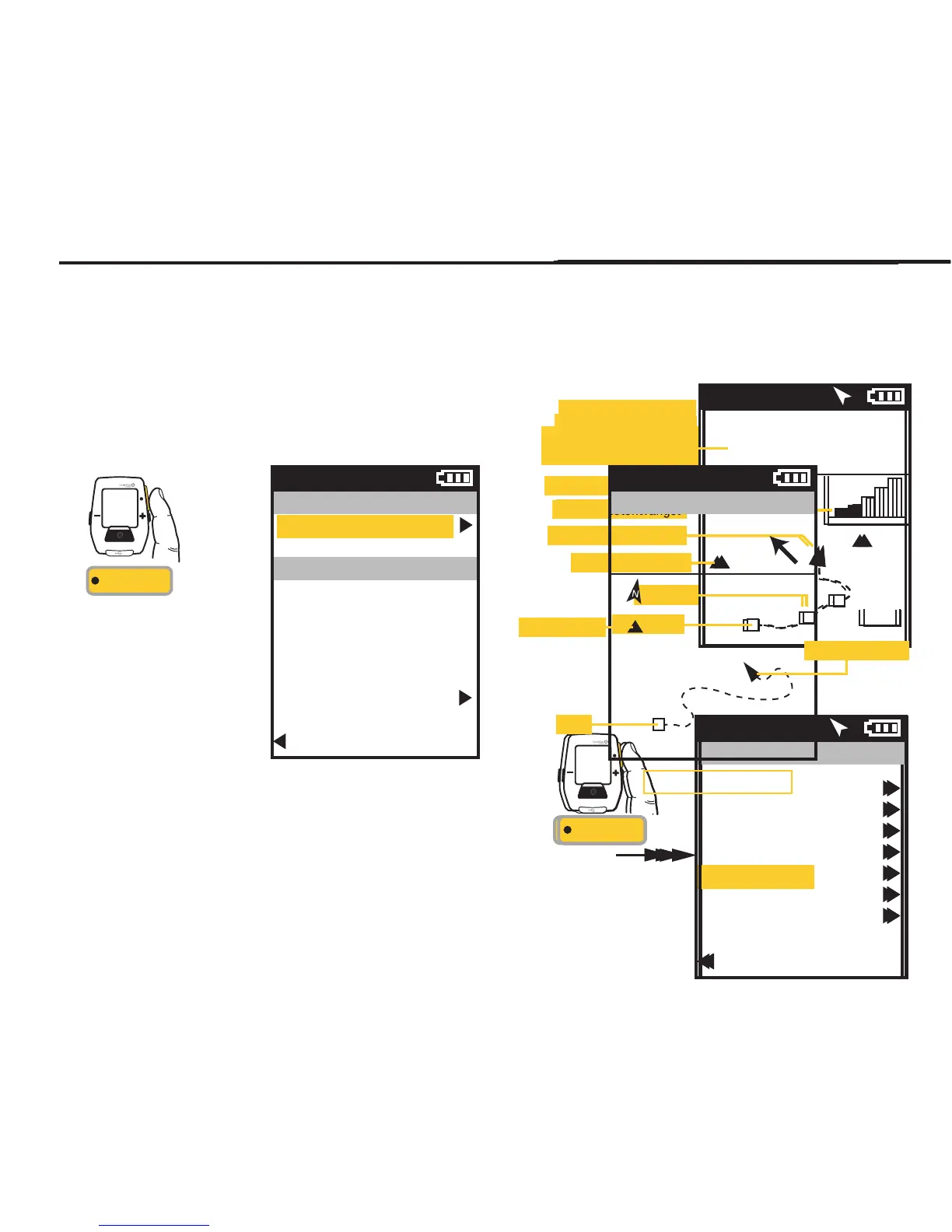
To navigate to a particular waypoint, select it from the list. At this point you can navigate to it, rename it or delete it.
Selecting the Navigate To option will take you the GPS Map Dashboard. The name of the waypoint will be listed at the top of
the screen along with the distance to the waypoint, from your current position, along a straight line, in the direction
indicated by the heading arrow.
Press • [ENTER] to
advance through the
Menus. Once Waypoint
is selected the Distance
To and the Heading to the
waypoint is displayed on
the GPS Map Dashboard.
INT
[ENTER]
Waypoint
Navigate To
Name
Home
Location
29 mi NW
Delete Waypoint
Back to Waypoints
9:34A
Home
GPS Map Dashboard
9:34A
DIST TO
24
HDG TO
0
Home
10 mi
Waypoint ()
Position indicator
Start


 To Next Page
 Loading...