Guía del usuario de Joule GPS, página 15
CAPÍTULO 4: SELECCIONES DEL MENÚ: FORMACIÓN
El Joule GPS muestra los entrenamientos por nombre y cuenta con una función de intervalo automático e
intervalo de cuenta regresiva.
ENTRENAMIENTOS
INTERV. AUTO
CUENTA REGRESIVA
Interv. Auto
Modo
Hora
Hora
1:00:00
Regr. a Formac.
9:34A 71º
Interv. Auto:
configura el Joule
GPS para registrar
intervalos de forma
automática durante
su sesión en
función del tiempo,
la distancia o la
posición del GPS.
Cuando se marca
un intervalo de
posición del GPS se
cuenta una vuelta
cada vez que se
cruza el punto
establecido en el
GPS.
Cuenta Regresiva
Modo
Distancia
Distancia, mi
2,00
Iniciar cuenta regres.
Regr. a Formac.
9:34A 71º
Intervalo de
cuenta regresiva:
configura el Joule
GPS para contar
hacia atrás un
intervalo en función
de la distancia, el
tiempo o los
kilojulios.
Guide de l'utilisateur du GPS Joule page15
CHAPITRE 4: COMMANDES DU MENU: ENTRAÎNEMENT
Le GPS Joule affiche les entraînements par nom. Il propose une fonction d'intervalle automatique et une
fonction d'intervalle par compte à rebours.
ENTRAÎNEMENTS
INTERVALLE
AUTO
COMPTE À
REBOURS
ENTRAÎNEMENT
Intervalle auto
Mode
Durée
Durée
1:00:00
Retour Entraînement
9:34A 71º
Intervalle auto:
Paramétrez le GPS
du Joule afin qu'il
enregistre
automatiquement
les intervalles
pendant votre tour,
sur la base de la
durée, de la distance
ou de la position
GPS. Lorsque vous
marquez un
intervalle selon une
position GPS, un
nouveau tour est
comptabilisé chaque
fois que vous passez
par ce point GPS.
Compte à rebours
Mode
Distance
Distance, mi
2,00
Démarrer rebours
Retour Entraînement
9:34A 71º
Intervalle compte
à rebours:
Paramétrez le GPS
du Joule pour
effectuer le compte
à rebours de
l'intervalle, selon la
distance, la durée ou
les kilojoules.
Joule GPS Benutzerhandbuch Seite 15
KAPITEL 4: MENÜAUSWAHL TRAINING (Training)
Der Joule GPS zeigt Workouts nach Name an und hat eine automatische Intervall- und Countdown-
Intervallfunktion
WORKOUTS
AUTO-INTERVALL
COUNTDOWN
Auto-Intervall
Modus
Zeit
Zeit
1:00:00
Zurück zum Training
9:34A 71º
Auto-Intervall:
Stellen Sie den
Joule GPS so ein,
dass er Intervalle
während Ihrer Fahrt
automatisch auf
Basis der Zeit, der
Strecke oder der
GPS-Position
aufzeichnet. Bei
Markierung eines
GPS-Positions-
intervalls wird jedes
Mal, wenn der
festgelegte
GPS-Punkt passiert
wird, eine Runde
gezählt.
Countdown
Modus
Strecke
Strecke, mi
2,00
Countdown starten
Zurück zum Training
9:34A 71º
Countdown-
Intervall: Stellen
Sie den Joule GPS
so ein, dass er ein
Intervall auf Basis
der Strecke, der Zeit
oder der Kilojoule
herunterzählt.
Manuale dell’utente Joule GPS pag. 15
CAPITOLO 4: SELEZIONI MENU: ALLENAMENTO
Joule GPS mostra gli allenamenti per nome e dispone sia di una funzione di intervallo automatico che di una
funzione di conto alla rovescia.
ALLENAMENTI
INTERVALLO
AUTOM.
CONTO
ALLA ROVESCIA
Intervallo automatico
Modalità
Tempo
Tempo
1:00:00
Torna ad Allenamento
9:34A 71º
Intervallo
automatico:
Impostare Joule GPS
in modo da registrare
automaticamente gli
intervalli durante la
corsa in base al
tempo, alla distanza,
o alla posizione GPS.
Quando si marca un
intervallo posizione
GPS, si conteggia un
giro ogni volta che si
attraversa un punto
GPS.
Conto alla rovescia
Modalità
Distanza
Distanza, mi
2.00
Avvia conto alla rovescia
Torna ad Allenamento
9:34A 71º
Intervallo conto alla
rovescia: Impostare
Joule GPS sul conto
alla rovescia di un
intervallo in base alla
distanza, al tempo o
ai kilojoule.
Gebruikershandleiding Joule GPS pagina 15
HOOFDSTUK 4: MENU SELECTIONS: TRAINING
De Joule GPS geeft trainingen weer op naam en heeft een automatische interval- en intervalaftellingsfunctie.
TRAININGEN
AUTO INTERVAL
COUNTDOWN
9:34A 71º
Auto Interval:
Stel de Joule GPS in
om automatisch
intervallen te
registreren tijdens
uw rit op basis van
tijd, afstand of
GPS-locatie.
Wanneer u een
GPS-positie
markeert, dan zal er
een ronde worden
bijgeteld telkens u
het punt voorbijkomt.
9:34A 71º
Aftelling interval:
Stel de Joule GPS in
om een interval af
te tellen op basis
van afstand, tijd of
kilojoules.
Auto Interval
Mode
Time
Time
1:00:00
Back to Training
Countdown
Mode
Distance
Distance, mi
2.00
Start Countdown
Back to Training
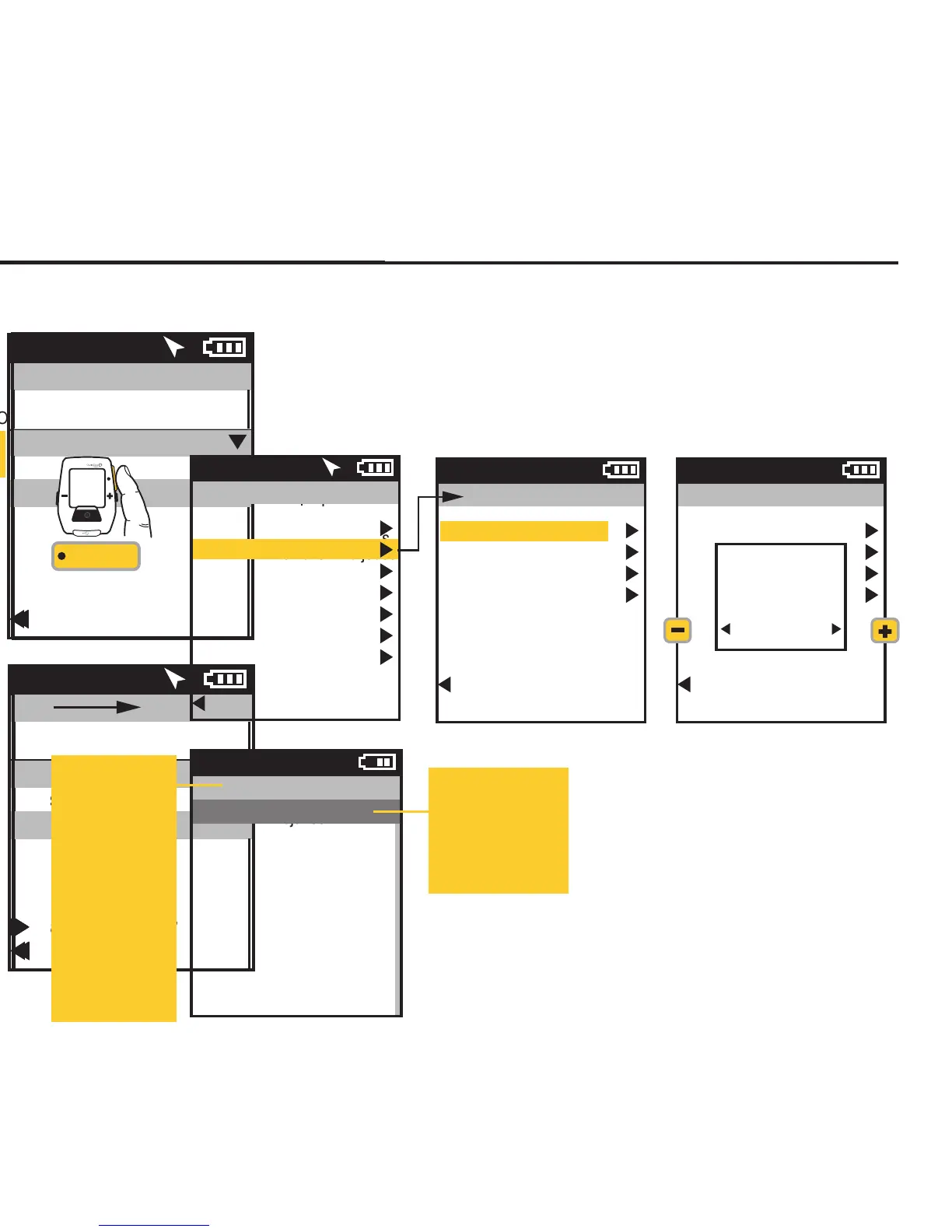
CHAPTER 5: RIDE HISTORY REPORTS
HISTORY REPORTS
The Joule GPS can create and display reports comparing one of your rides to the average of what you have done
over a previous time frame. History reports by the last ride or any selected ride are compiled and compared to
averages over 2 weeks, 4 weeks, 8 weeks, 6 months or 12 months prior to the selected ride. The data is either
averaged by Date or by Ride (see explanation below). Compared information includes Power, Heart Rate, Time in
zones, Climbing, watt per kilogram Surges and more Note: the averages do not include the selected ride.
Joule GPS User Guide page 23
Main Menu
Ride
History
Sensors
Training
Navigation
User
Device
Back to Dashboard
9:34A 71º
Averages by Ride gives the
average by the total number of
rides for the given time period. If
only 3 rides were completed
during a 2 week period the
average will be given for 3 rides.
Average by Date gives the
average for the whole time period.
Every non-riding day during the
given period of time will be
calculated as zero.
History
Last Ride
Select a Ride
Report - Max
Report - Totals
Back to Main Menu
9:34A
History
Last Ride
Select a Ride
Report - Max
Report - Totals
Back to Main Menu
9:34A
Average
Data By
Date Rides
INT
[ENTER]
Press & Hold
3 sec. to enter
Menus. Scroll
to History;
Press •[ENTER] ;
Select a report,
FROM DASHBOARD
Summary - 2
8/27/12 2 Wk
178
86
17.3
135
156
78
16.5
126
AV
WATTS
AV
CAD
AV
MPH
AV
HR
9:34A
Press +[PLUS] to
scroll to the next
time frame.
Press -[MINUS] to
return to previous
time frame.
Press •[ENTER] to
scroll to each
report:
Summary 1 & 2
Pwr Detail 1 & 2
Work
Peak Pwr 1 & 2
Time in Zones
Climbing
Surges
Press [INTERVAL]
to view previous
report.


 To Next Page
 Loading...