CAPÍTULO 8: PRECAUCIONES IMPORTANTES
Mantenga la vista sobre la carretera. No atienda excesivamente a la pantalla.
Le recomendamos que se familiarice con las funciones de la consola mientras está detenido.
La consola y la banda pectoral son resistentes al agua, pero no herméticas. Evite un contacto
prolongado con el agua y no coloque deliberadamente el dispositivo bajo el agua ni bajo pulverizadores
de agua de alta presión.
Evite limpiar la unidad directamente con disolventes. No utilice disolventes para limpiar las piezas.
Si no se respetan estas precauciones se podría producir una avería prematura o el funcionamiento
incorrecto de la unidad y podría anularse la garantía.
CAPÍTULO 9: CARACTERÍSTICAS Y ESPECIFICACIONES TÉCNICAS DEL JOULE GPS
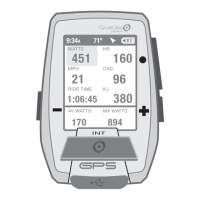
CARACTERÍSTICAS DEL JOULE GPS
Balance de pedal (actual, promedio)
Pendiente en porcentaje (actual, promedio)
Potencia (actual, promedio y máxima)
Zona de potencia (actual, promedio)
Distancia recorrida en la sesión
Tiempo de sesión
Velocidad (actual, promedio y máxima)
Recuento de subidas de tensión (W/kg)
Temperatura
Hora del día
Tiempo restante del entrenamiento
Tiempo hasta el compañero de sesión
Ascenso total
Kilojulios totales
Cuantificación de la carga de entrenamiento
VAM
Vatios por kilogramo (actuales, promedio y máximos)
Guía del usuario de Joule GPS, página 20
CHAPITRE 8: PRÉCAUTIONS IMPORTANTES
Regardez la route. Ne gardez pas les yeux fixés sur l'appareil.
Nous vous conseillons de vous familiariser avec les fonctions de l'ordinateur avant de prendre la route.
L'ordinateur et la sangle thoracique résistent à l'eau, mais ne sont pas étanches. Évitez tout contact
prolongé avec l'eau. N'immergez pas délibérément l'appareil et ne le faites pas entrer en contact avec des
jets à haute pression.
Évitez d'asperger tout solvant directement sur l'unité. N'utilisez ni diluants ni solvants pour nettoyer les
pièces.
Le non-respect de ces précautions peut entraîner une défaillance prématurée ou un dysfonctionnement de
l'unité et rendre la garantie caduque.
CHAPITRE 9: FONCTIONNALITÉS ET SPÉCIFICATIONS TECHNIQUES DU GPS JOULE
FONCTIONNALITÉS DU GPS JOULE
Équilibre pédale (Actuel, Moyen)
Pente en pourcentage (Actuelle, Moyenne)
Puissance (Actuelle, Moyenne, Maximum)
Zone de puissance (Actuelle, Moyenne)
Distance du tour
Temps d'utilisation
Vitesse (Actuelle, Moyenne, Maximum)
Comptabilisation des pics (P/Kg)
Température
Heure
Durée restante dans l'entraînement
Temps qui vous sépare de votre coéquipier
Ascension totale
Kilojoules totaux
Score d'effort
VAM
Watts par kilogramme (Actuel, Moyen, Maximum)
Guide de l'utilisateur du GPS Joule page20
KAPITEL 8: WICHTIGE VORSICHTSMASSNAHMEN
Achten Sie immer auf die Straße. Konzentrieren Sie sich nicht zu sehr auf das Display.
Sie sollten sich zuerst im Stehen mit den Computerfunktionen vertraut machen.
Computer und Brustgurt sind wasserbeständig, nicht wasserfest. Vermeiden Sie ständigen Wasserkontakt
und legen Sie das Gerät nicht absichtlich ins Wasser und setzen Sie es nicht Hochdrucksprühgeräten aus.
Vermeiden Sie es, die Lösungsmittelmischung direkt auf das Gerät zu sprühen. Verwenden Sie keinen
Verdünner oder andere Lösungsmittel, um Teile zu reinigen.
Nichtbefolgen dieser Vorsichtsmaßnahmen kann zu einem vorzeitigen Ausfall oder falschem Betrieb des
Geräts und zum Erlöschen der Garantie führen.
KAPITEL 9: MERKMALE UND TECHNISCHE DATEN FÜR JOULE GPS
JOULE GPS – MERKMALE
Pedalbalance (aktuell, Durchschnitt)
Steigungsgrad (aktuell, Durchschnitt)
Leistung (aktuell, Durchschnitt, Maximum)
Leistungszone (aktuell, Durchschnitt)
Fahrstrecke
Fahrzeit
Geschwindigkeit (aktuell, Durchschnitt, Maximum)
Wellenzahl (W/kg)
Temperatur
Tageszeit
Restliche Zeit des Workout
Zeit zum Fahrpartner
Gesamter Anstieg
Kilojoule gesamt
Training-Stress-Score
VAM
Watt pro Kilogramm (aktuell, Durchschnitt, Maximum)
Joule GPS Benutzerhandbuch Seite 20
CAPITOLO 8: PRECAUZIONI IMPORTANTI
Tenere gli occhi fissi sulla strada. Non concentrarsi troppo sul display.
Si consiglia di prendere confidenza con le funzioni del computer mentre non si fanno esercizi.
Il computer e la fascia per il torace sono resistenti all'acqua, non impermeabili. Evitare il contatto
protratto con l’acqua e non usare deliberatamente il dispositivo in acqua o sottoponendolo a un getto
spray ad alta pressione.
Evitare di spruzzare direttamente sull’unità una miscela a base di solventi. Non utilizzare diluenti o altri
solventi per pulire i componenti.
Il mancato rispetto di queste misure precauzionali potrebbe causare danni prematuri all'unità o un
funzionamento non corretto, con il rischio di invalidare la garanzia.
CAPITOLO 9: CARATTERISTICHE E SPECIFICHE TECNICHE DI JOULE GPS
CARATTERISTICHE DI JOULE GPS
Bilanciamento pedali (attuale, media)
% Pendenza (attuale, media)
Potenza (attuale, media, massima)
Gamma potenza (attuale, media, massima)
Distanza percorsa
Tempo della corsa
Velocità (attuale, media, massima)
Conteggio sprint (W/Kg)
Temperatura
Ora
Tempo allenamento residuo
Tempo fino al compagno di corsa
Salita totale
Kilojoule totali
Valore di stress da allenamento
VAM
Watt per chilogrammo (attuale, media, max)
Manuale dell’utente Joule GPS pag. 20
HOOFDSTUK 8: Belangrijke voorzorgsmaatregelen
Blijf naar de weg kijken. Besteed niet te veel aandacht aan het scherm.
Wij raden u aan om u eerst in stilstand vertrouwd te maken met de werking van de functies.
De computer en de borstriem zijn waterbestendig, maar niet waterdicht. Vermijd aanhoudend contact met
water en breng geen van de onderdelen in contact met water of hogedruksproeiers.
Vermijd het direct besproeien van de unit met een oplosmiddel. Gebruik geen verdunningsmiddel of andere
oplosmiddelen om de onderdelen schoon te maken.
Als u zich niet aan deze voorzorgsmaatregelen houdt, dan kunnen er vroegtijdig defecten of storingen
optreden in de unit, waardoor de garantie kan komen te vervallen.
HOOFDSTUK 9: KENMERKEN EN TECHNISCHE SPECIFICATIES VAN DE JOULE GPS
KENMERKEN VAN DE JOULE GPS
Pedal Balance (huidig, gemiddeld)
Hellingspercentage (huidige, gemiddelde)
Power (huidige, gemiddelde en maximale)
Krachtzone (huidige, gemiddelde)
Ritafstand
Rittijd
Snelheid (huidige, gemiddelde en maximale)
Aantal pieken (W/Kg)
Temperatuur
Dagtijd
Nog beschikbare tijd in de training
Tijd tot de ritpartner
Totale afdaling
Totaal aantal kilojoules
Training Stress Score
VAM
Watts per kilogram (huidige, gemiddelde en maximale)
Gebruikershandleiding Joule GPS pagina 20
Joule GPS User Guide page 31
CHAPTER 7: DEVICE MENU
Change number of metric display windows & individual metrics within each Dashboard
Yes/No. Yes to display Map Dashboard. No to not show in list of Dashboards.
Select metrics to be displayed above map on Map Dashboard.
0-4. Level of backlight brightness.
Yes/No. Yes means, when the device is on, the backlight is on continually, at the
specified level, between sunset and sunrise. The GPS location is used to
determine when sunrise and sunset occur. The backlight functions normally with
button presses between sunrise and sunset.
0-5. Level of screen contrast.
Never on, 10 sec, 20 sec, 30 sec, 1 min, Always On.
3, 5, or 10 min. Period of inactivity before device goes into sleep mode.
Display language: English, Deutsch, Français, Italiano, Español, Nederlands.
Display units: English or Metric
Dashboard
Show Map
Edit
Backlight Level
Smart Backlight
Contrast
Backlight Timeout
Sleep Time
Language
Units
DISPLAY MENU MENU INPUT OPTION
DEVICE DISPLAY
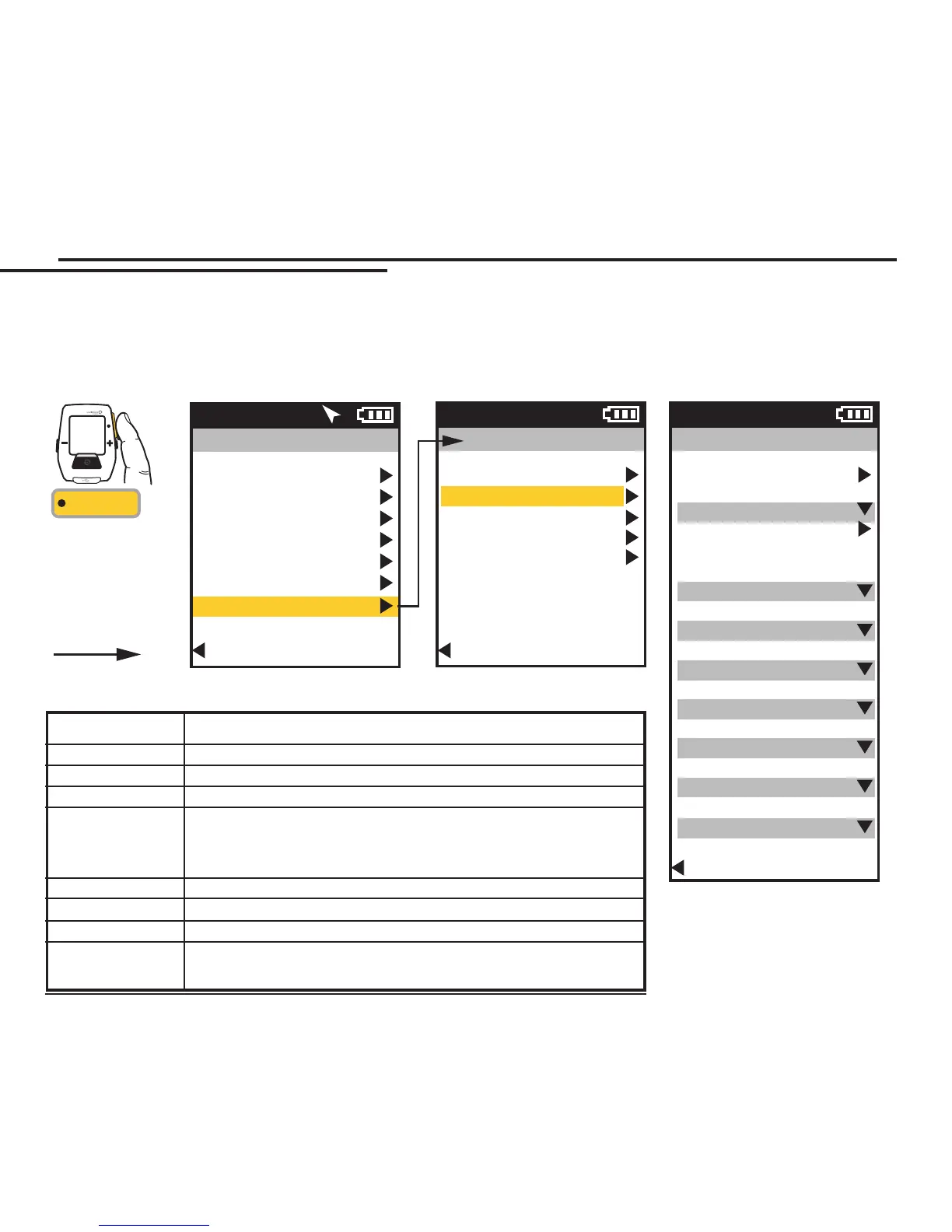
All of the Dashboard configuration, lighting levels, sleep, language, metrics, and units can be set in the Device Display
area. You can determine the number of dashboards to display, as well as the number and type of metric associated with
each dashboard. See Appendix C for a full list of all metrics.
Main Menu
Ride
History
Sensors
Training
Navigation
User
Device
Back to Dashboard
9:34A 71º
INT
[ENTER]
Press & Hold
3 sec. to enter
Menus. Scroll
to Training;
Press •[ENTER] ;
Select an option,
FROM DASHBOARD
Device
Date and Time
Display
Memory
Altimeter
About Joule
Back to Main Menu
9:34A
Display
Dashboard
Show Map
Yes/No
Edit
Backlight Level
0-4
Smart Backlight
Yes/No
Contrast
0-5
Backlight Timeout
Off - Always On
Sleep Time
3-10 min
Language
En, De, Fr, It...
Units
English/Metric
Back to Device
9:34A


 To Next Page
 Loading...