Operation
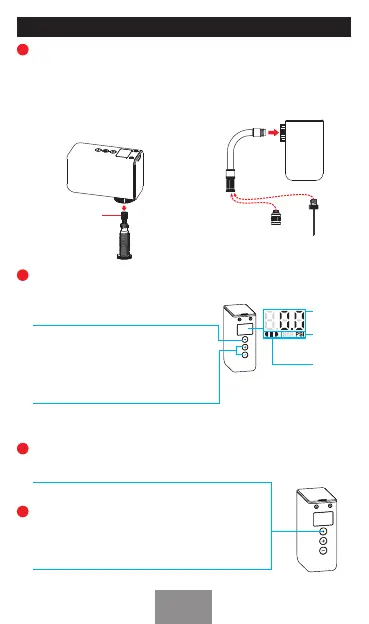
Connect the air valve
Power on and set target air pressure
Inating
Long-press the Power button to power
on, and the screen illuminates, showing
the real-time air pressure reading.
Pressure
Value
Pressure
Unit
Batte
Level
Press '+' and '-' together to switch
between PSI and BAR. Adjust target
pressure using '+' and '-' buttons. The
set pressure will display for 3 seconds
before reveing to current pressure.
Press the Power Button to sta ination. It will auto
shut o when the target air pressure is reached.
Shut down
Long-press the Power Button to power o. If the air
pump is not staed and there is no operation within
1 minute while it is powered on, the air pump will
automatically shut down.
Connect the nozzle directly
to the valve
Note:
Always loosen
the nut rst.
Use the hose
Adjust the nozzle mode and
connect it to the valve.
Keep a tight grip on the nozzle
while inating.
Hold the hose and the suitable
adapter, then connect it to the
valve. it’s recommended to use
the hose when using Schrader
valve.
A. B.
For Ball Valve
For Presta Valve
For Schrader Valve
1
2
3
4
EN
03


 To Next Page