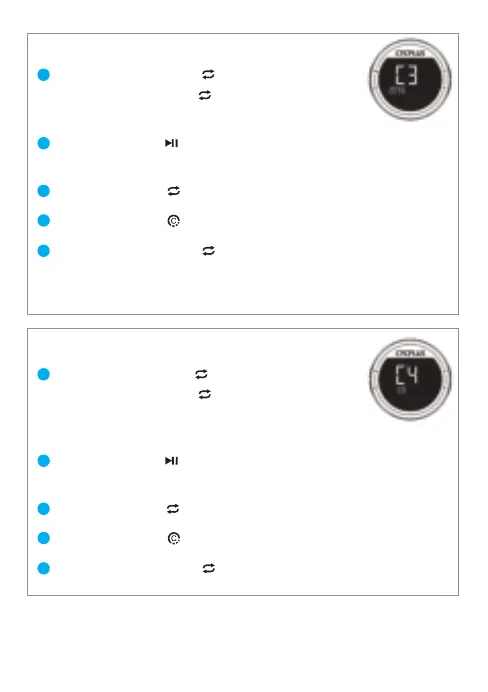
02.Wheel circumference setting(C3)
03.Time zone setting(C4)
Long press [R1 button ] to enter the setting,
then press [R1 button ] once.
*The screen displays C3 and the below 4 digits flash.
Press [L1 button ] to enter setting.
*The first digit flashes, indicating that the current digit can be set.
Press [R1 button ] to modify the digit.
Press [L2 button ] to switch the selected digit.
Long press [R1 button ] to quite.
*The Wheel Circumference only needs to be set when connecting the
ANT+ speed sensor. The unit is MM.
1
2
3
4
5
Long pres [R1 button ] to enter the setting,
then press [R1 button ] twice.
*The screen displays C4 and the 08 (factory setting
time zone) is flashing.
Press [L1 button ] to start setting.
*‘08’ stops flashing.
Press [R1 button ] to modify.
Press [L2 button ] to switch the selected digit.
Long press [R1 button ] to quite.
1
2
3
4
5
06


 To Next Page