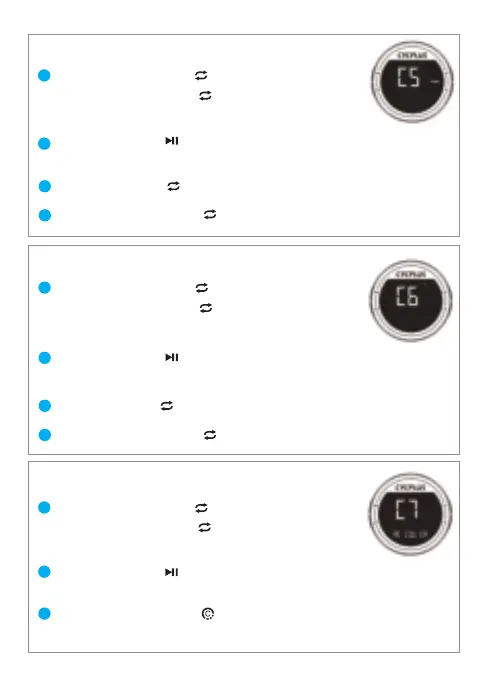
04.Speed unit setting(C5)
05.Temperature unit setting(C6)
06.Factory reset(C7)
Long pres [R1 button ] to enter the setting,
then press [R1 button ] thrice.
*The screen displays C5 and the KMH is flashing.
1
2
Long press [R1 button ] to quite.
3
4
Long pres [R1 button ] to enter the setting,
then press [R1 button ] quartic.
1
2
Long press [R1 button ] to quite.
3
4
*The first digit flashes, indicating that the current digit can be set.
*‘°C’ stops flashing.
*The screen displays C6 and the ‘°C’ is flashing.
Long pres [R1 button ] to enter the setting,
then press [R1 button ] quintic.
*The screen displays C7 and RECOVER is flashing.
1
2
Long press [L2 button ] to restore factory settings,
and the computer will turn off.
3
Press [L1 button ] to start setting.
* ‘RECOVER’ stops flashing.
Press [L1 button ] to start setting.
Press [R1 button ] to switch between KMH and MPH.
Press [L1 button ] to start setting.
Press [R1 button ] to switch between Celsius and Fahrenheit .
07


 To Next Page