EasyManua.ls Logo

CYP AU-D21 - User Manual

CYP AU-D21
12 pages
Print Icon
To Next Page IconTo Next Page
Loading...
OPERATION MANUAL
AU-D21
Digital Audio Optical Switcher
Question and Answer IconNeed help?

Do you have a question about the CYP AU-D21 and is the answer not in the manual?

Summary

Introduction

Main Features

Operation Controls and Functions

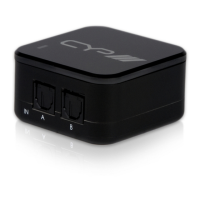
Front Panel Ports

Optical (Toslink) Input Ports A and B for connecting audio equipment.

Rear Panel Port

Optical (Toslink) Output Port for connecting audio equipment.

Side Panel Controls

Input Selection switch and DC 5V power input.
Connection and Installation

Specifications

Summary

Introduction

Main Features

Operation Controls and Functions

Front Panel Ports

Optical (Toslink) Input Ports A and B for connecting audio equipment.

Rear Panel Port

Optical (Toslink) Output Port for connecting audio equipment.

Side Panel Controls

Input Selection switch and DC 5V power input.

Connection and Installation

Specifications

CYP AU-D21 Specifications

General IconGeneral
BrandCYP
ModelAU-D21
CategorySwitch
LanguageEnglish

Related product manuals