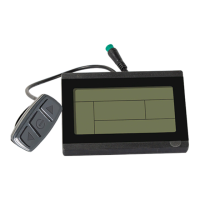
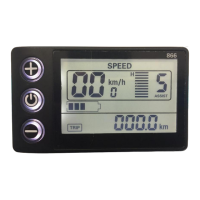
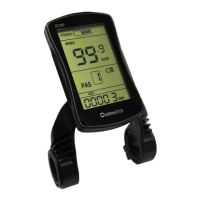
The Cyrusher K5242 LCD is a display unit designed for e-bikes, providing a variety of function modes to meet riding needs. It features a black and white PC shell, ensuring normal usage and good mechanical performance within a temperature range of -20 to 60°C. The display unit measures 84.5mm x 72mm. It is equipped with a special N3 button, which can be installed on either the left or right side of the handlebar and connects to the bottom lead of the K5242 display. The N3 button has dimensions of 49.44mm x 22.20mm x 17.98mm.
Function Description
The K5242 LCD offers comprehensive information and control for your e-bike. Its core functions include:
- Battery power indication: Displays the remaining battery power as a percentage bar.
- Motor power indication: Shows the current output power of the motor in watts.
- Speed indication: Displays real-time speed in KM/H or Mile/h.
- Distance: Includes both single trip distance (TRIP) and total odometer (ODO) display.
- Single riding time indication: Tracks the duration of a single ride.
- Walk assist indication: Activates a mode for pushing the e-bike at a constant speed.
- Cruise Mode: Allows the e-bike to maintain its current speed without continuous throttle input.
- Backlight setting: Adjustable backlight brightness for optimal visibility.
- Error code indication: Automatically displays error codes in case of electronic control system failures.
- Various setting parameters: Provides access to a range of customizable settings.
Usage Features
The K5242 LCD features three buttons: "UP" (A), "DOWN" (V), and "MODE" (M).
On/Off:
- To turn on: Long press the "MODE" button. The display will activate, and the controller will power on.
- To turn off: With the display on, long press the "MODE" button. The display will shut down, consuming less than 1µA of leakage current.
- Automatic shut-down: If the e-bike is not used for more than 10 minutes, the display will automatically turn off.
User Interface:
The display offers two main interfaces:
- Normal Display Interface: Shows real-time battery power, speed (SPEED), single trip distance (TRIP), odometer (ODO), motor power output (WATT), and PAS level (PAS).
- Data Statistics Interface: Calculates and displays data for a single ride, including riding time, riding distance, max speed, average speed, and a linear statistical chart of single riding speed.
- Switching to Data Statistics: When the speed is 0, long press "UP" + "MODE".
- Switching back to Normal Display: Long press "MODE" or if the e-bike has speed. The data statistics chart has a maximum statistical time range of three hours, after which it restarts.
Walk Assist Mode (Cruise Mode):
- Walk Assist: When stationary, press and hold "DOWN" for 3 seconds. The e-bike will move at a constant 6km/h. To exit, press and hold "DOWN" again for 3 seconds or squeeze the brake lever. This function is intended for pushing the e-bike by hand, not for riding.
- Cruise Mode: When riding with speed, press and hold "DOWN" for 3 seconds. The e-bike will maintain its current speed. To exit, press and hold "DOWN" again for 3 seconds or squeeze the brake lever.
Headlight On/Off:
- To turn on: Long press the "UP" button. This also informs the controller to turn on the headlight.
- To turn off: Long press the "UP" button for 2 seconds again.
PAS Level Selection:
- Short press "UP" or "DOWN" to switch between PAS levels. The default range is 0-5 levels, with level 1 being the lowest output and level 5 the highest.
User Settings:
To enter the setting interface (when stationary and powered on), press and hold "UP" and "DOWN" simultaneously for 2 seconds. Use "UP" or "DOWN" to navigate settings and "MODE" to confirm or return.
- Wheel Size Setting: Adjustable values include 16, 18, 20, 22, 24, 26, 700C, 27.5, 28, and 29 inches. Set this to match your e-bike's wheel diameter for accurate speed and mileage display.
- Speed Limit Setting: Sets the maximum speed from 20Km/h to 50Km/h, or 99Km (unlimited).
- Backlight Brightness Setting: Options are 1 (darkest), 2 (standard), and 3 (brightest). Default is 3.
- Display Unit Setting: Choose between Km/h (metric) and Mile/h (imperial).
- Auto Off Time Setting: Sets the automatic shut-off time from 5 to 60 minutes. Default is 10 minutes.
- Battery Display Mode Setting: Select between percentage and volt display for battery information.
- About Interface: Displays manufacturer's name, software version (e.g., K5242_K6306), and hardware version (e.g., K5242-M-UART-06) for maintenance purposes.
Advanced Settings:
To enter advanced settings (when stationary and powered on), press and hold "UP" and "DOWN" simultaneously for 2 seconds, then select "Advanced Display Settings".
- PAS Range Setting: Choose between 0-3, 0-5, or 0-9 PAS levels.
- Speed Sensor Setting (Speed Magnetic Number): Set from 1 to 6, corresponding to the number of magnets on the e-bike's wheels.
- Zero Start Setting:
- "Yes": Motor can start from 0 speed with the throttle.
- "No": Throttle function requires an initial speed to activate.
- PAS Power Sensitivity Setting: Range from 3 (highest sensitivity) to 24 (lowest sensitivity). Default is 3.
- Start Strength Setting: Range from 1 (lowest start strength) to 5 (highest start strength). Default is 3.
- PAS Magnetic Number Setting: Set to 5, 8, or 12, based on the number of magnets on the PAS disk. Default is 12.
- Current Limit Setting: Adjustable from 1.0A to 22.0A, controlling the maximum current of the controller. Default is 22A.
- Factory Data Reset: "Yes" restores all settings to default; "No" retains current settings.
- Speed Duty Setting (PWM): Sets the speed duty percentage from 0% to 100%.
- Driver Mode Setting:
- 0: PAS assist mode only.
- 1: Throttle mode only.
- 2: Coexistence of PAS assist and throttle modes. Default is 2.
Maintenance Features
Error Code Indication:
The display automatically shows error codes if the e-bike's electronic control system fails. The e-bike cannot be driven after a fault occurs until the fault is eliminated. For detailed error code definitions, refer to Appendix 1.
- 0x04: Throttle abnormal
- 0x06: Under voltage protection
- 0x08: Motor Hall abnormal
- 0x09: Motor phase cable failure
- 0x10: Controller high temperature protection
- 0x11: Motor high temperature protection
- 0x12: Current sensor failure
- 0x13: Battery temperature failure
- 0x14: Motor temperature sensor failure
- 0x15: Controller temperature sensor failure
- 0x21: Speed sensor failure
- 0x23: Headlight fault
- 0x24: Headlight sensor failure
- 0x25: Torque sensor torque signal failure
- 0x26: Torque sensor speed failure
- 0x30: Communication failure
If an error code appears, contact the e-bike maintenance station.
- King-Meter is responsible for faults caused by quality defects during normal operation.
- The warranty period is 24 months from the factory departure date.
- The warranty does not cover: opened shell, damaged connectors, scratched or damaged shell after leaving the factory, scratched or broken lead wires, damage due to force majeure (e.g., fire, earthquake, natural disasters), or products exceeding the warranty period.
Important Notes for Users:
- Always ensure the e-bike is powered off before connecting or disconnecting the display.
- Avoid hitting the display.
- Do not remove the waterproof sticker, as this may compromise waterproof performance.
- Avoid modifying system parameters to prevent display malfunction.
- If an error code appears, seek repair.

 Need help?
 General

 To Next Page