Need help?
Do you have a question about the Czur Tech czur scanner and is the answer not in the manual?
Overview of the Czur scanner as an intelligent scanning device for various users and applications.
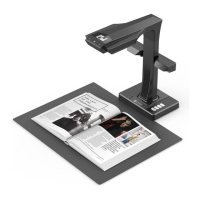
Provides detailed physical dimensions and visual appearance of the Czur scanner.
Step-by-step guide on how to assemble the Czur scanner unit.
Instructions for operating the Czur scanner using a PC via USB connection.
Steps to prepare for scanning documents in PC mode using USB.
How to preview scanned images and use presenter functions in PC mode.
Guide for using the scanner as a visual presenter via HDMI connection.
Steps to prepare the device for presentations using HDMI output.
Previewing and utilizing presenter functions in HDMI mode.
Instructions for connecting and operating the scanner via Wi-Fi.
Preparing the scanner for scanning via Wi-Fi connection.
Guide to registering, binding, and sharing Czur cloud accounts for scanner usage.
Procedures for releasing and applying scanner usage authority in Wi-Fi mode.
Previewing scanned content and understanding functions in Wi-Fi mode.
Steps for updating the Czur scanner's firmware and hardware.
Instructions on how to reset the Czur scanner to its factory default settings.
Frequently asked questions and troubleshooting for the scanner in PC (USB) mode.
FAQs and solutions for issues encountered in Visual Presenter (HDMI) mode.
Common questions and troubleshooting tips for operating the scanner in Wi-Fi mode.
Details on the after-sale service policy and warranty coverage for the product.
Step-by-step procedure for submitting a warranty claim or repair request.
Contact details for technical support, sales, and general inquiries.
 General
| Brand | Czur Tech |
|---|---|
| Category | Scanner |
| Scanning Speed | 1 second per page |
| Output Formats | JPG, PDF, TIFF |
| Connectivity | USB |
| Compatibility | Windows, macOS |
| Special Features | OCR |

 To Next Page