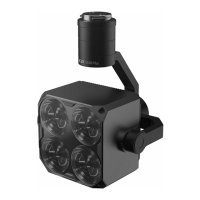
The LP12 Searchlight & Broadcasting System is a two-in-one payload specifically designed for the DJI M30 drone. It features a streamlined aesthetic design that aims to reduce wind resistance and enhance the drone's flight endurance. The system integrates the imaging optics of the GL Series gimbal searchlight with the LRAD long-range sound broadcasting technology of the MP Series digital voice broadcast system, resulting in a lightweight and efficient unit.
Function Description:
The LP12 serves two primary functions: searchlight illumination and sound broadcasting. It is designed to meet operational needs in various scenarios, including law enforcement patrol and forest search and rescue. The system is deeply integrated with the DJI Pilot APP, allowing for quick access and control of all sound broadcasting and light illumination functions, which enhances operational convenience.
Important Technical Specifications:
- Model: LP12
- Electrical Interface: DJI OSDK
- Weight: 270g (without quick-mount fixture); 283g (with quick-mount fixture)
- Dimensions: L162W115H75mm
- Searchlight Power: Regular mode: 30W; Ultra bright mode & Flashing mode: 40W
- Speaker Power: 15W
- Power Supply Voltage: 24V
- Luminous Flux: 2700lm ±3%
- Searchlight FOV: 13°
- Illumination Distance:
- 150m: Spot diameter 34m, Illuminated area 917m², Central illuminance 1.7Lux
- 130m: Spot diameter 29.6m, Illuminated area 688m², Central illuminance 2.5Lux
- 100m: Spot diameter 22.8m, Illuminated area 407m², Central illuminance 6.3Lux
- 50m: Spot diameter 11.4m, Illuminated area 102m², Central illuminance 25Lux
(All illumination distances are specified at 95% air humidity)
- Gimbal Movement Range: Pitch -120° to +45°
- Maximum Sound Pressure: 122dB
- Effective Broadcasting Distance: 200m@76dB; 350m@69dB
- Broadcasting Method: Live broadcasting, Uploading recording files, Playing audio files, Text To Speech (regional dialect and multi-language), Background sound
- Audio Formats Supported: mp3/wav/m4a/flac/aac
- App Support: DJI Pilot / DJI Pilot 2
- Operating Temperature: -20°C to +50°C
Usage Features:
- Installation: The LP12 is installed on the DJI M30 using a quick mount/dismount bracket. The bracket is secured with H2.0 hexagonal screwdriver and M3×10 screws. The LP12 slides onto the bracket rails and locks securely. The power/communication cable is then connected to the MSDK interface (ensure the M30 is off during this operation).
- DJI Pilot APP Integration:
- Upon entering the DJI Pilot main interface, the LP12 PSDK is recognized, indicating payload readiness.
- In the flight interface, clicking "PSDK" in the bottom right corner reveals the payload control options.
- Searchlight Control:
- Light on/off toggle.
- Gimbal synchronization.
- Searchlight pitching angle adjustment via a slider.
- Status information list.
- Searchlight modes option: Normal brightness, Ultra brightness, Strobe mode.
- Broadcasting Control:
- Text To Speech (TTS): Users can input text, select from various human voice options (Cantonese, Hunan dialect, DongBei dialect, English, Italian, Russian, German, French), and send the message for broadcast.
- Audio File Playback: Users can play audio files uploaded to the device. The interface includes volume control, play, stop, music previous, and music next options.
- Live Broadcasting: This function will be available with future firmware upgrades.
- Micro USB Port Functionality:
- Audio File Copy: Connect the LP12 to a computer using a micro USB cable. The device will appear as a U drive. Audio files (mp3/wav/m4a/flac/aac) can be copied into the "Music" folder on the U drive.
- Firmware Upgrade: Connect the LP12 to a computer via micro USB. Copy the firmware file (e.g., MP122_V03.01.01.06.bin) into the U drive. After copying, safely quit the U drive. Then, connect the LP12 power/communication cable to the M30 MSDK interface and turn on the M30 to initiate the firmware upgrade.
Maintenance Features:
- Precision Equipment: The LP12 is precision equipment with a sealed body to prevent dust and water ingress.
- No Self-Disassembly: Users are explicitly warned not to disassemble or repair the device themselves. Doing so will void the warranty and repair eligibility. In case of hardware problems, contact the manufacturer's after-sales service.
- Optical Equipment: The searchlight contains precise optical equipment; self-disassembly is prohibited.
- Safety Precautions:
- Avoid direct eye contact with the light outlet due to high intensity.
- Exercise caution when using the broadcasting function at close range or indoors, as it can cause permanent damage to human hearing.
- Updates and Support: For LP12 updates and information, users should visit the official czi website (www.gzczzn.com). For non-working devices, contact the dealer or ChengZhi Intelligence directly. Technical support and service hotline information are provided.

 Need help?
 General

 To Next Page