18
4. Lights, horn and indicators
Familiarize yourself with all safety components.
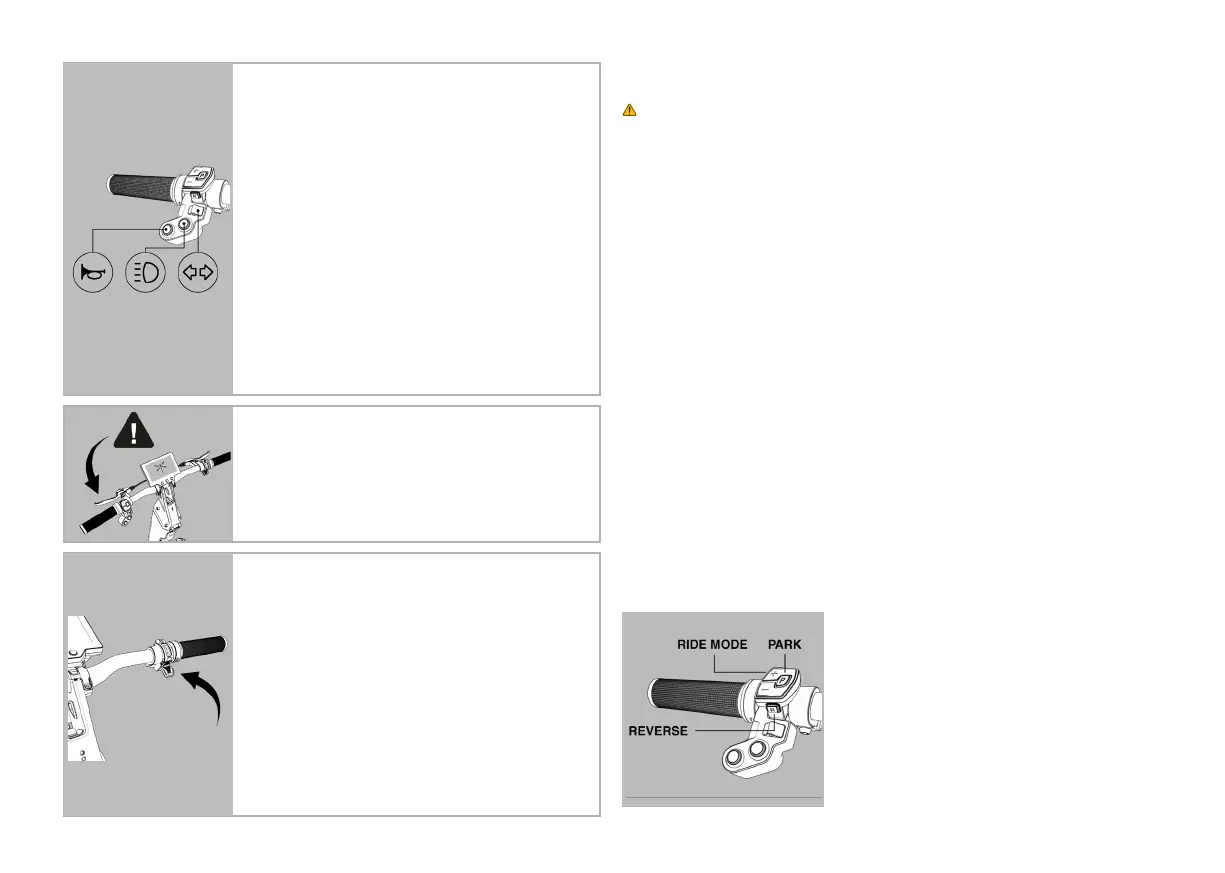
Lights: The lights and can be operated with the press of
a button on the left-hand side of the handlebars, marked
with the lights icon displayed above. Be aware, the daylight
running lights are always on by default. Press the lights
button to switch your lights to non-full beam. If you want
to turn the lights off altogether, press and hold the lights
button until the lights switch off. It is always recommended
to ride with your lights on.
Horn: Press the horn button to emit a warning sound. The
horn button is marked with the horn icon displayed above.
Always be seen and be heard.
Indicators: Always use the indicators before turning.
Your indicators can be controlled by icking the indicator
button left or right, displayed by the arrow indicators
displayed above. Flick the button back to the middle once
you are nished using the indicator.
5. Testing the brakes
Your Dragony is equipped with an electric front braking
system operated by the right lever and a mechanical drum
rear braking system operated by the left lever. Start testing
the braking mechanisms by kick-pushing your Dragony
and applying the brakes. Note: The front electronic brakes
only work when your Dragony is switched on.
6. Accelerating
Your Dragony’s acceleration is controlled by an
accelerator. The button is located on the right-hand side
of the handlebars. Familiarize yourself with the accelerator
before trying to maximize speed.
7. Traction control
Your Dragony has the ability to intelligently control the
power to each front wheel. In slippery conditions this
means that more power is directed to the wheel that
has the grip. Be aware that in these conditions the front
wheels may feel a little different and you might need to
adjust your typical steering style to counter the effect of
the traction control.
4.3 Riding Your Dragony
Your Dragony is a powerful e-mobility vehicle. Always use caution before and
during your ride and always wear personal protective equipment when riding. Always
practice somewhere safe, away from moving objects and pedestrians and away from
any potential hazard.
Note: Your Dragony has a push start
1. Turn your Dragony on.
2. Push your Dragony until a 1.5 - 3mph / 3 - 5kmh speed is reached. Once you reach
that speed, press the accelerator and prepare for your Dragony to accelerate.
3. Practice at the lowest speed possible, in D1 speed setting and 25% torque, to get
familiar with your Dragony’s manoeuvrability.
4. Practice turning your vehicle, at the lowest speed. Make sure to slow down when
taking sharp turns. Keep your body evenly balanced when making turns to avoid a
fall.
5. Practice turning using the handlebars rst, as you would a traditional vehicle steered
with handlebars. Then practice turning with your handlebars and tiller (steering
column) You steer with the tiller by tilting it in the direction you want to steer
towards. Then nally try the three-dimensional steering, including the handlebars,
the tiller and tilting the deck, as you might when snowboarding. Take plenty of time
to get familiar with steering the Dragony, at low speed.
6. Practice braking and judging good stopping distance, paying attention to the
weather and surface conditions you are riding on.
7. Keep practicing at low speed to get used to the Dragony before driving it around
cars and pedestrians.
4.4 Riding Modes
Your Dragony comes with 3 riding modes. They are
as follows:
• Driving Mode 1 (D1) Max speed 4mph / 6kmh
• Driving Mode 2 (D2) Max speed 15mph / 25kmh
• Driving Mode 3 (D3) Enhanced performance
• Reverse (R) Max speed 3mph / 5kmh
• Park (P) Locks the front wheels
when Dragony is off.
(All gures rounded up the nearest whole number)


 To Next Page
 Loading...