20
4.7 Adjusting Your Dragony
You can adjust your Dragony to suit your riding style. Carve with 3-D Full Tilt or cruise
around bends at leisurely pace for scenic delight.
Each Dragony comes with 8 adjustable springs:
4 x springs to regulate the stiffness of your deck tilt
4 x springs to regulate the tension of your shock spring
4.7.1 Your toolkit
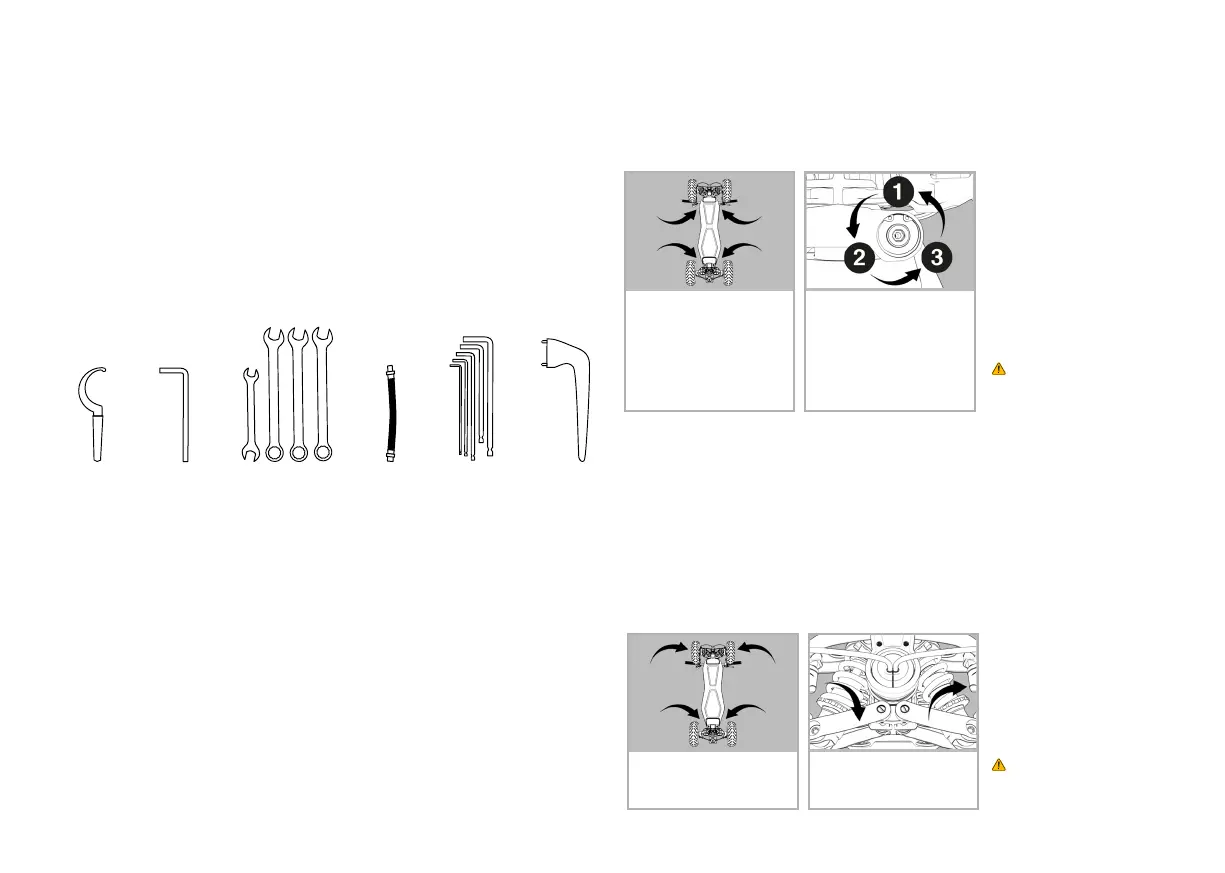
1 2 3 4 5 6
1. Shock Wrench (adjusting suspension)
2. Wheel Bolt Star Wrench (tire replacement)
3. Wrenches
4. Valve Extender
5. Allem Wrench (2.5, 3, 4, 5, 8)
6. Wheel Cap Wrench
4.7.2 Roll Spring Adjustment / Deck Tilt
On the underside of your Dragony, you will nd four location points that enable you to
modify the tightness of the springs, which in turn control the stiffness of the deck tilt.
Looser springs mean more tilt, and tighter springs mean less tilt.
Each spring comes with three settings:
1. Loose (factory setting)
2. Medium
3. Firm
WARNING. All four roll
springs require the same
setting.
4.7.3 Shock Spring Adjustment
Your shock springs can also be tightened and loosened to suit your ride preference.
NOTE: When you receive your Dragony, the shock springs will be tight for a rm ride.
There is a unique tool in your tool roll which you will use to turn the dial that controls the
tightness of your shock springs. The dials for each spring can be found on the bottom end
of your hydraulic shock springs. The tighter you adjust your spring, the harder the ride. A
looser adjustment will soften your ride.
WARNING. Ensure all
four shock springs are set
to the same tightness.
1. Fold and stand up Dragony
to easily access the underside.
2. Using the special tool, turn
the dial to either tighten or
loosen the red shock spring.
1. Fold and stand up Dragony
to easily access the 4 points
on the underside.
2. Using the largest (No8) Allen
wrench turning counter-
clockwise through the three
settings means a tighter
spring. Turning clockwise
means a looser spring. You will
see the setting number visible.


 To Next Page
 Loading...