DES-1005 P
4
ENGLISH
CONNECTING THE DES-1005P TO YOUR NETWORK
A. POWER
Plug the AC power cord into a free outlet or surge protector, then plug the other end of the DC
power jack into the power port of the DES-1005P. The Power LED will illuminate conrming that
the device has powered up successfully.
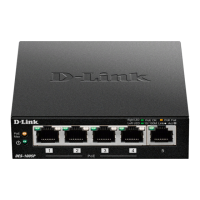
B. PoE PORTS (PORTS 1 - 4)
PoE Ports 1 to 4 support 802.3at for up to 30W per port for individual usage.
C. 10/100MBPS ETHERNET PORTS (PORTS 1-5)
These ports offer network speeds of either 10 Mbps or 100 Mbps and can operate in half or full-
duplex transfer modes. These ports also support automatic MDI/MDIX crossover, eliminating the
need for crossover cables or uplink ports. Each port can be connected directly to a server, hub,
router, or switch using regular straight-through twisted-pair Ethernet cables.


 To Next Page