74D-Link DIR-827 User Manual
Section 3 - Conguration
IPv6 Firewall
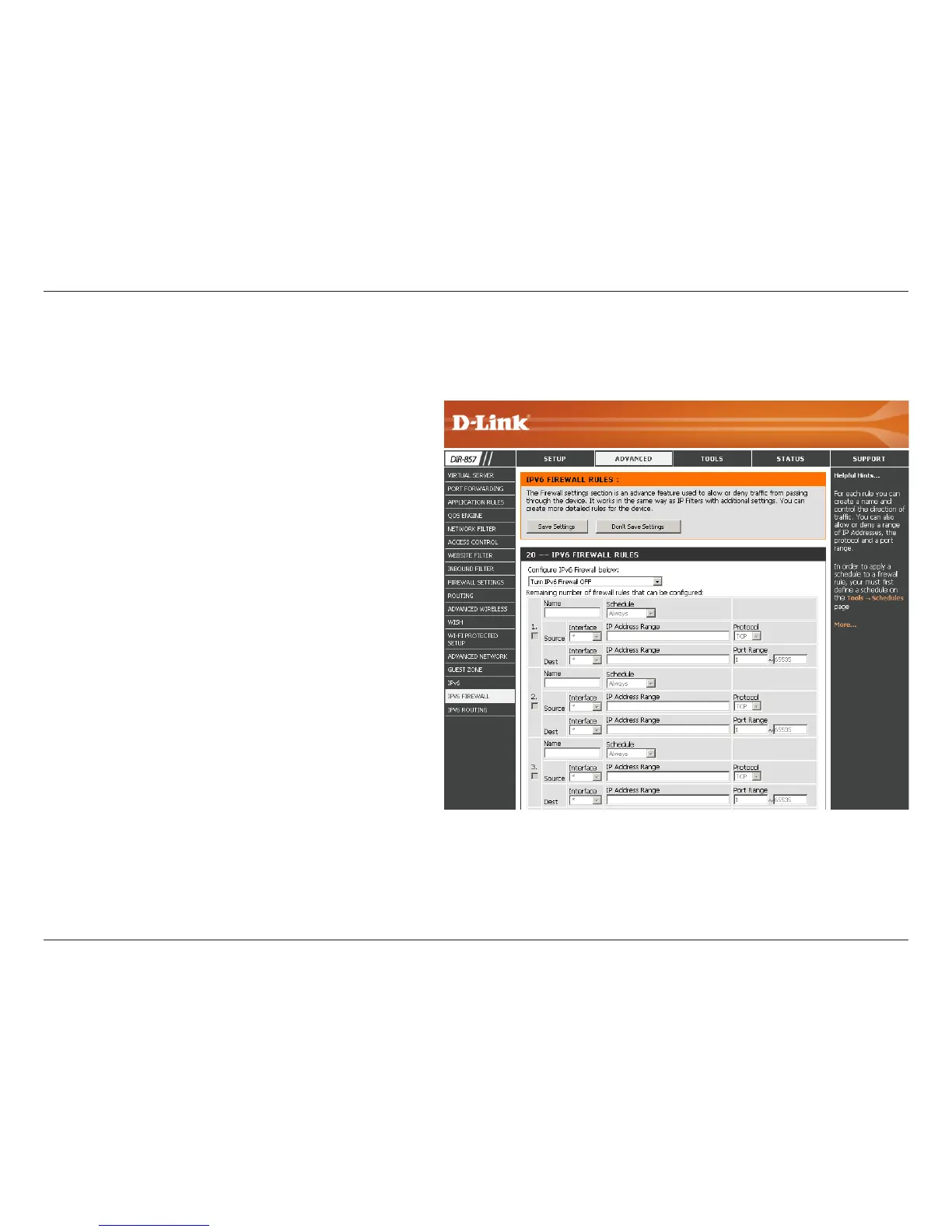
On this page the user can congure the IPv6 rewall settings. The rewall settings section is an advance feature that is used to allow or deny
trac from passing through the device. It works in the same way as IP Filters with additional settings. You can create more detailed rules for the
device.
Name: Enter a custom rewall rule name here.
This name is used for identication.
Source
Interface:
Select the appropriate source interface
used here.
Destination
Interface:
Select the appropriate destination inter-
face used here.
Schedule: Select a time schedule that will be applied
to this rules here.
IP Address
Range:
Enter the IPv6 address range used here.
Protocol: Select the protocol used for this rule here.
Options to choose from are ALL, TCP, UDP,
and ICMP.
Port Range: Enter the port range used for this rule
here.



 To Next Page