DWL-700AP User’s Manual
13D-Link Systems, Inc.
Using the Configuration Utility (continued)
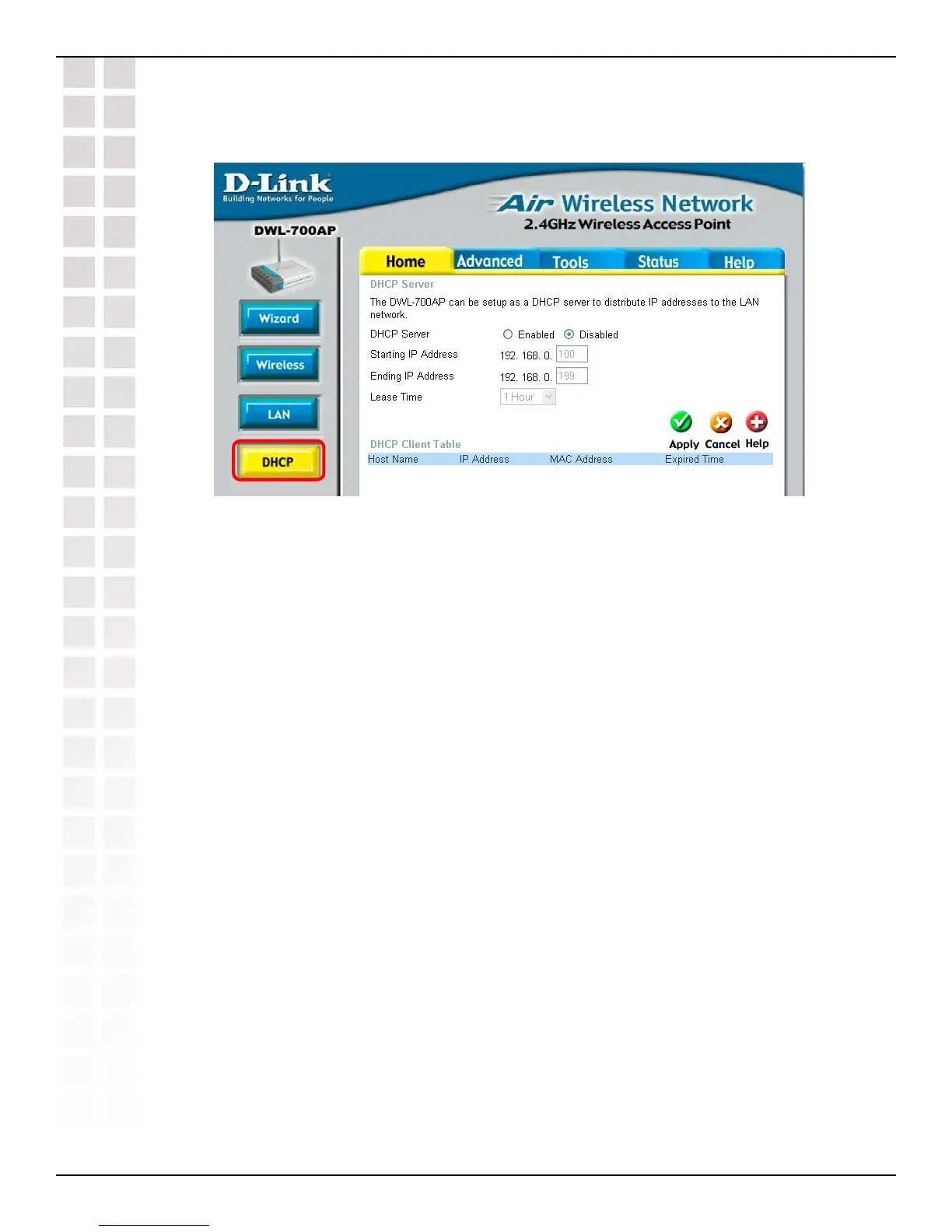
Home > DHCP
DHCP Server: Select Enabled or Disabled. Disabled is the default setting. If you
want to use the access point as a DHCP server to automatically assign dynamic IP
addresses on the network, you will select Enabled.
Starting IP Address: If you have enabled the DHCP server function, enter the
starting point of the IP address range for your network.
Ending IP Address: Enter the ending IP address of your IP address range, if you
have enabled the DHCP function of the access point.
Lease Time: Choose the length of time during which the DHCP function of the
DWL-700AP automatically regenerates the IP addresses to the devices in your
network.
DHCP Client Table: Lists the devices on your network that are receiving dynamic
IP addresses from the access point.
Using the Configuration Utility












 To Next Page