EasyManua.ls Logo

D-Link KVM-221 2 - User Manual

D-Link KVM-221 2
2 pages
Print Icon
To Next Page IconTo Next Page
Loading...
KVM-221
1
FEATURES
2-Port USB KVM Switch
With Audio Support
Mini KVM Switch for 2 PCs
Supports USB Keyboard/Mouse Connections
Supports SVGA, VGA, Multi-Sync Monitors
Share Speakers Between 2 PCs
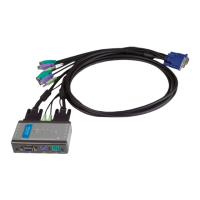
2 Sets of KVM Cable Provided
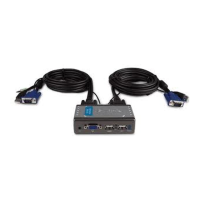
The KVM-221 2-port KVM (Keyboard, Video and Mouse) switch is a cost effective device
for home and office users. It allows users to easily control two PCs from a single set of
keyboard, mouse, and VGA monitor. This switch provides audio support and an audio
socket, allowing the two connected PCs to share a set of speakers. The switch provides
many easy-to-use features and is perfect for home and small office use.
Cost-Effective for PC Users. If you have two PCs and need to use them at the same time,
the KVM-221 saves the money and space by allowing you to control the two computers from
a set of keyboard, monitor and mouse. Or, you may have a better, bigger monitor and want
to connect both PCs to it. The KVM-221 allows you to do this. Two sets of cables are
attached to the KVM switch for ready for use, dispensing users of the need to prepare
separate cables and connect them to the switch.
Versatile Functions. The KVM-221 utilizes advanced microprocessor emulation to
intelligently manage each KVM port. This allows simultaneous boot-up of the connected
PCs. Auto scan, audible feedback, and keyboard "Hot Keys" make the KVM-221 simple to
use and manage. There is also a control button located on the front panel that allows users
to switch between the Purchase.
Status Save and High Resolution Support. The KVM-221 supports VGA, SVGA and Multi-
Sync monitors at up to 2048 x 1536 resolution at 72Hz refresh rate. Support for Microsoft
IntelliMouse is provided.
Share Audio Device. The KVM-221 provides audio support and an audio socket, allowing
users to plug in an audio device such as a set of speakers for sharing between the two
connected PCs.
2 KVM Ports
USB Keyboard/Mouse Support
SVGA, VGA, Multi-Sync Monitor
Support
Audio Socket for Connection of
an Audio Device
Auto-Scans Connected PCs Every
10 Seconds
Audible Feedback for
Confirmation While Switching
Between PCs
Front Panel LED Indicator for
Each Connected PC
Can Switch Between PCs Using
Push Button or Keyboard Hot
Keys
Up to 2048 1536 Video
Resolution Support
2 Sets of KVM Cable Provided
Question and Answer IconNeed help?

Do you have a question about the D-Link KVM-221 2 and is the answer not in the manual?

Overview

The D-Link KVM-221 is a 2-port USB KVM (Keyboard, Video, Mouse) switch with audio support, designed for home and small office users to control two PCs from a single set of peripherals. It offers a cost-effective solution for managing multiple computers without the need for separate keyboards, mice, and monitors for each.

Function Description:

The primary function of the KVM-221 is to allow users to control two personal computers using a single USB keyboard, a single USB mouse, and one SVGA, VGA, or Multi-Sync monitor. Additionally, it provides audio support, enabling the two connected PCs to share a single set of speakers or an audio device plugged into its audio socket. The switch utilizes advanced microprocessor emulation to intelligently manage each KVM port, facilitating simultaneous boot-up of the connected PCs.

Important Technical Specifications:

Connections:

  • Console Connections:
    • 1 x DB-15 female connector for console monitor.
    • 2 x USB 1.1 Type A female connectors for console USB keyboard/mouse.
    • 1 x 3.5-mm audio socket for an audio device.
  • KVM Cable Connections (to PCs):
    • 2 x HDDB 15-pin female connectors.
    • 2 x 3.5-mm audio sockets.
  • KVM Cables Provided: Two sets of 1.8-meter (6-ft) KVM cables are included for connecting to computers. Each cable features:
    • HDDB 15-pin male connector (for monitor).
    • USB 1.1 Type A male connector (for keyboard/mouse).
    • 3.5mm audio plug.

Video Resolution:

  • Supports up to 2048 x 1536 resolution at a 72Hz refresh rate.
  • Compatible with VGA, SVGA, and Multi-Sync monitors.
  • Supports Microsoft IntelliMouse.

Power:

  • Power Input: Draws power from the PC's PS2 ports; no external power adapter is required.
  • Power Consumption: 5V 70mA.

Physical Characteristics:

  • Dimensions: 104 x 61 x 28 mm (4.09 x 2.40 x 1.10 inches).
  • Weight: 565 grams (1.246 lb) (including KVM switch and 2 sets of KVM cables).

Environmental Conditions:

  • Operating Temperature: 0° to 40°C.
  • Storage Temperature: -20° to 60°C.
  • Operating Humidity: 0% to 80% non-condensing.

Compliance:

  • Emission (EMI): FCC Class B, CE, C-Tick.

Usage Features:

PC Selection Methods:

  • Push Button: A control button is located on the front panel for direct switching between PCs.
  • Keyboard Hot Keys: Users can switch between PCs and perform other functions using specific keyboard combinations.
    • Scroll Lock + Scroll Lock + F1: Switch to computer 1 with audio signal synchronization.
    • Scroll Lock + Scroll Lock + F2: Switch to computer 2 with audio signal synchronization.
    • Scroll Lock + Scroll Lock + 1: Switch to computer 1 without audio signal synchronization.
    • Scroll Lock + Scroll Lock + 2: Switch to computer 2 without audio signal synchronization.
    • Scroll Lock + Scroll Lock + →: Switch to the next computer with audio synchronization.
    • Scroll Lock + Scroll Lock + ←: Switch to the previous computer with audio synchronization.

Audible Feedback:

  • The device provides audible feedback to confirm successful switching between PCs.
  • Beeper ON/OFF: Scroll Lock + Scroll Lock + B can enable or disable the beeper.

Auto-Scan Mode:

  • The KVM-221 can automatically scan between connected PCs every 10 seconds.
  • Auto-Scan Activation: Scroll Lock + Scroll Lock + S activates auto-scan mode.
  • The auto-scan feature can also be used without auto-scan mode.

Diagnostic LEDs:

  • Two port LEDs on the front panel indicate the currently active connected PC.

Operating System Support:

  • Microsoft Windows 98, ME, NT, 2000, 2003, XP.
  • Microsoft DOS.
  • Linux.

Maintenance Features:

Mouse/Keyboard Reset:

  • Scroll Lock + Scroll Lock + M can reset the mouse and keyboard, which can be useful for troubleshooting peripheral issues.

Key Beep Enable/Disable:

  • The ability to enable or disable the key beep provides flexibility for users who prefer silent operation or require audible confirmation.

The KVM-221 is designed for ease of use, with features like plug-and-play setup (due to included cables), front panel indicators, and versatile switching options. Its robust support for various operating systems and high video resolutions makes it a practical choice for managing multiple computers efficiently.

D-Link KVM-221 2 Specifications

General IconGeneral
BrandD-Link
ModelKVM-221 2
CategorySwitch
LanguageEnglish

Related product manuals