8
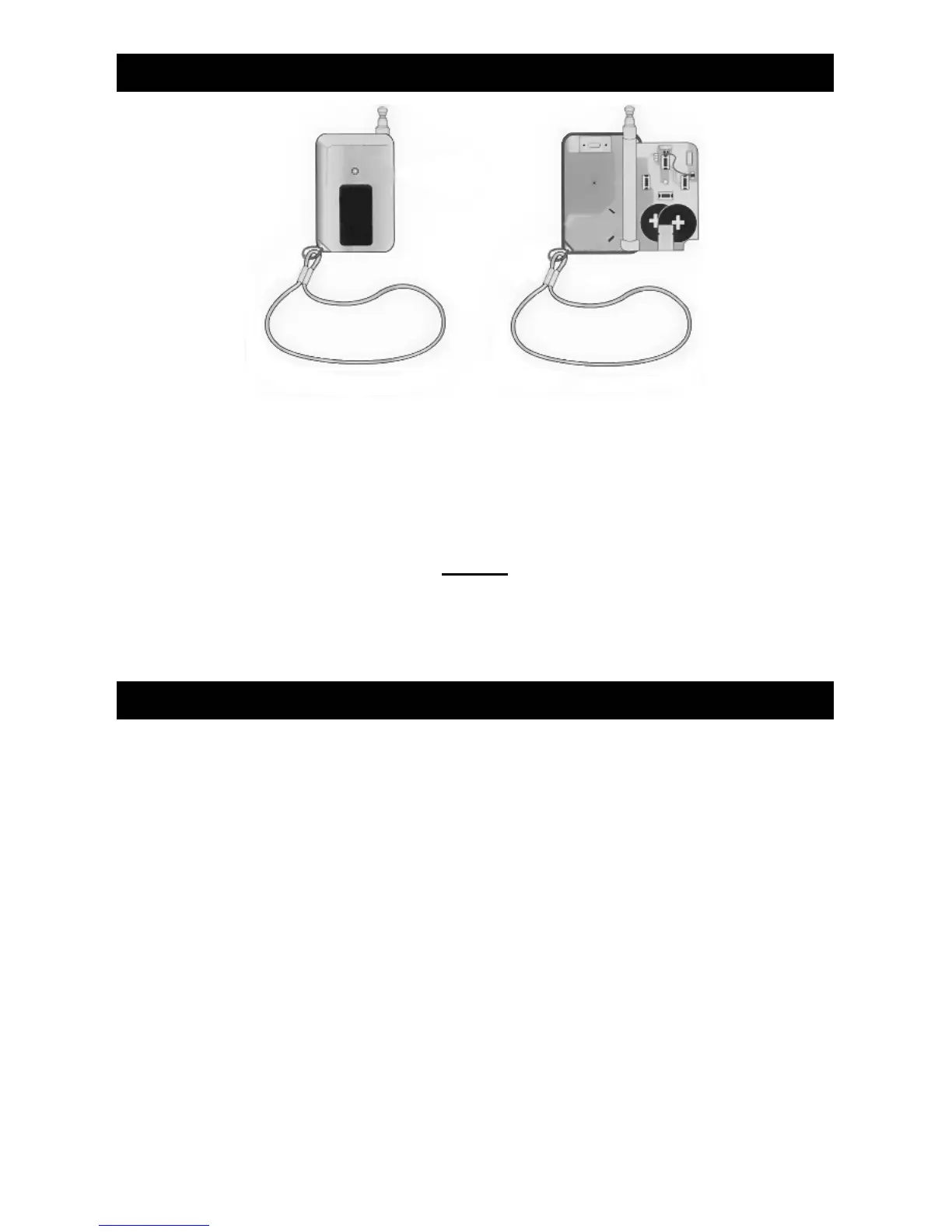
CHANGING THE REMOTE BATTERY (BTB 809)
1. Unscrew the small screw on the back of the Remote
Control unit.
2. Replace both 3 Volt watch style batteries as shown
below.
Note:
Watch “+” “-” while installing. If battery is installed
backward it may cause the unit to operate in Vibration
mode only.
TROUBLESHOOTING Q & A
1. Q : My Collar’s range is not as far as when I first
bought the unit.
A : (a) Test batteries. They may be low.
(b) Fully extend transmitter antenna.
2. Q : The unit is not working after I replaced the battery.
A : You might have installed the batteries incorrectly.
Re-read the section of this manual on “Changing the
Remote Battery” very carefully and try again.
3. Q : The LED Lights on my Transmitter and
Collar/Receiver have gotten very dim.
A : This indicates a low batteries. You may continue
to use the unit until it stops working.




 To Next Page