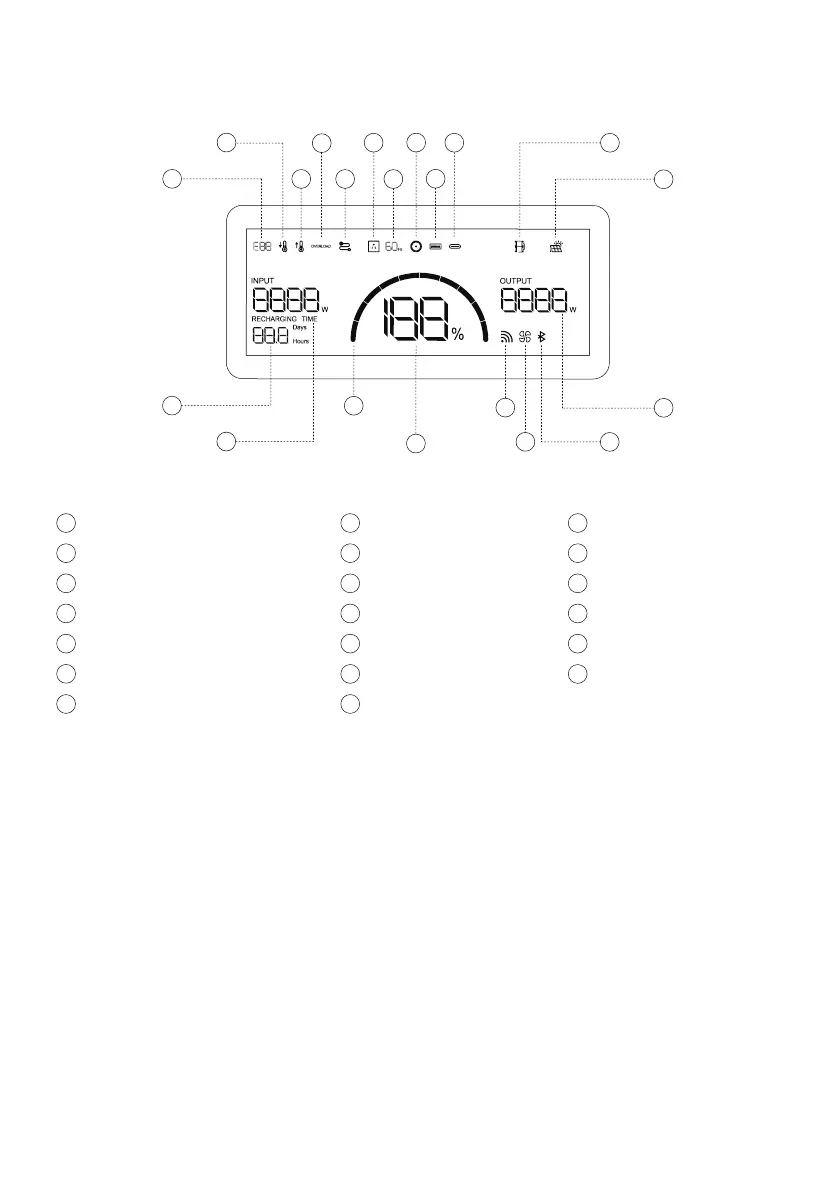
3.2 LCD Screen
Error Code
a
Low Temperature Warning
b
High Temperature Warning
c
Overload Warning
d
AC Output Frequency
g
e
Connection Failed
AC Output
f
Pairing Indicator
s
Output Power
t
DC Output
h
USB-A Output
i
USB-C Output
j
Solar Panel Indicator
l
Extra Battery Indicator
k
Remaining Charge/Discharge Time
m
Input Power
n
Battery Level Indicator
o
Remaining Battery Percentage
p
Fan Indicator
r
Wi-Fi Status
q
t
q
p
o
n
r
s
m
a
b
c
d
f
l
j
i
h
k
g
e
Press and hold the IOT button for 3 seconds, and the Wi-Fi icon will flash, indicating that the
product is ready for pairing. If the product pairing is completed, the Wi-Fi icon will stay on.
When charging, the icon rotates clockwise. When the battery level of this product at 0%, AC
and DC output will turn off and this icon will start flashing; When the battery level is 100%, this
icon is the full grid state.
Wi-Fi Status
Battery Level Indicator
5


 To Next Page