Jaune Noir Noir texte
1.64
ENG_UD33916_2
Éclairages et signalisations extérieures (H79 Ph2 - Dacia)ENG_NU_1079-3_H79Ph2_Dacia_1
EXTERIOR LIGHTING AND SIGNALS (1/2)
u
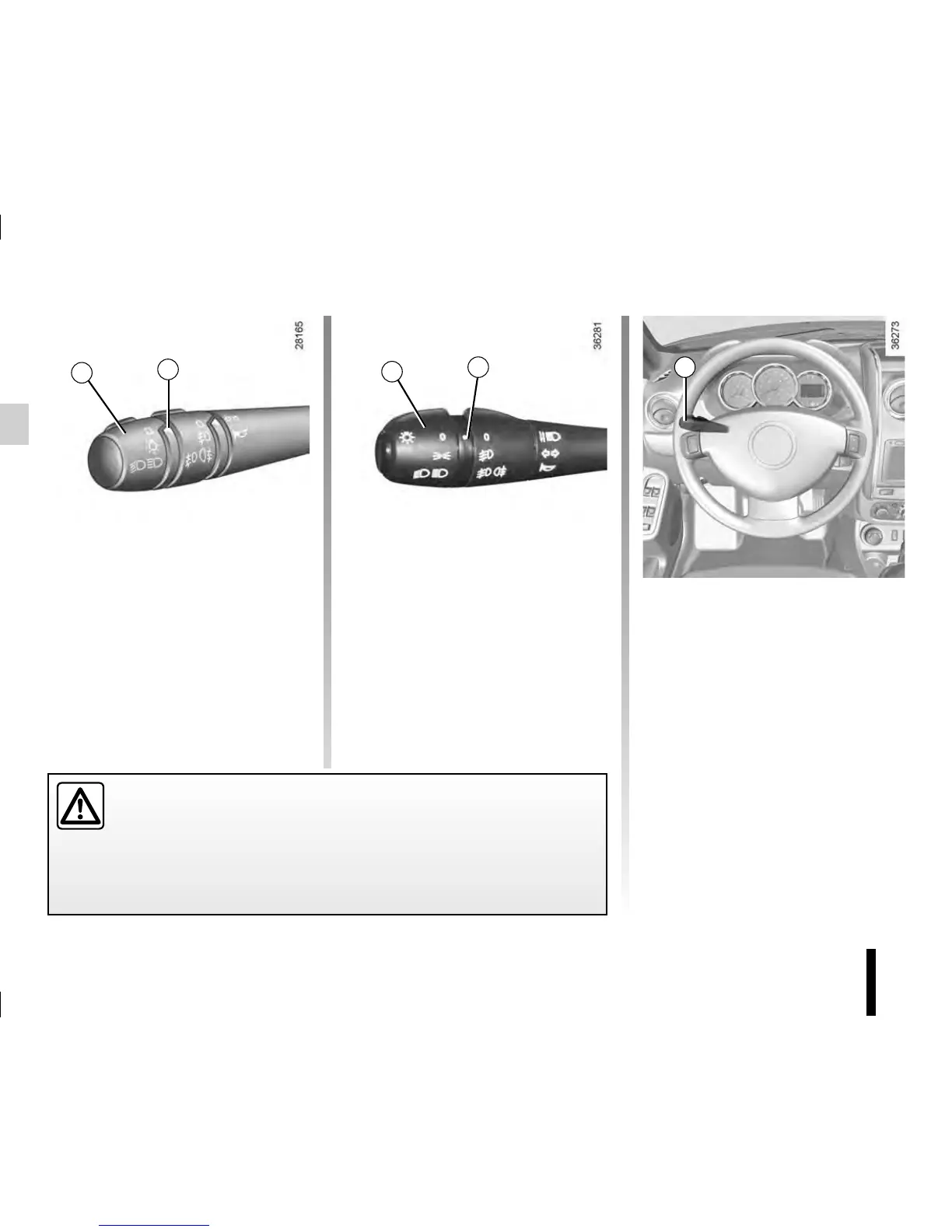
Side lights
or
š
Side lights
Turn the end of stalk 1 until the
symbol is opposite mark 2.
k
Dipped beam
headlights
Turn the end of stalk 1 until the symbol
is opposite mark 2.
An indicator light on the instrument
panel will come on.
á
Main beam headlights
With the dipped beam head-
lights lit, push stalk 1. This indicator
light on the instrument panel comes on.
To return to the dipped headlight posi-
tion, pull the stalk 1 towards you again.
e
Switching off the lights
Return the end of stalk 1 to its
initial position.
Before driving at night, check that the electrical equipment is operating
correctly and adjust the headlight beams (if your vehicle is not carrying
its normal load).
Check that the lights are not obscured (by dirt, mud, snow or objects
which could cover them).
1
1
2
1
2



 To Next Page