05
IDEA Series ENIT
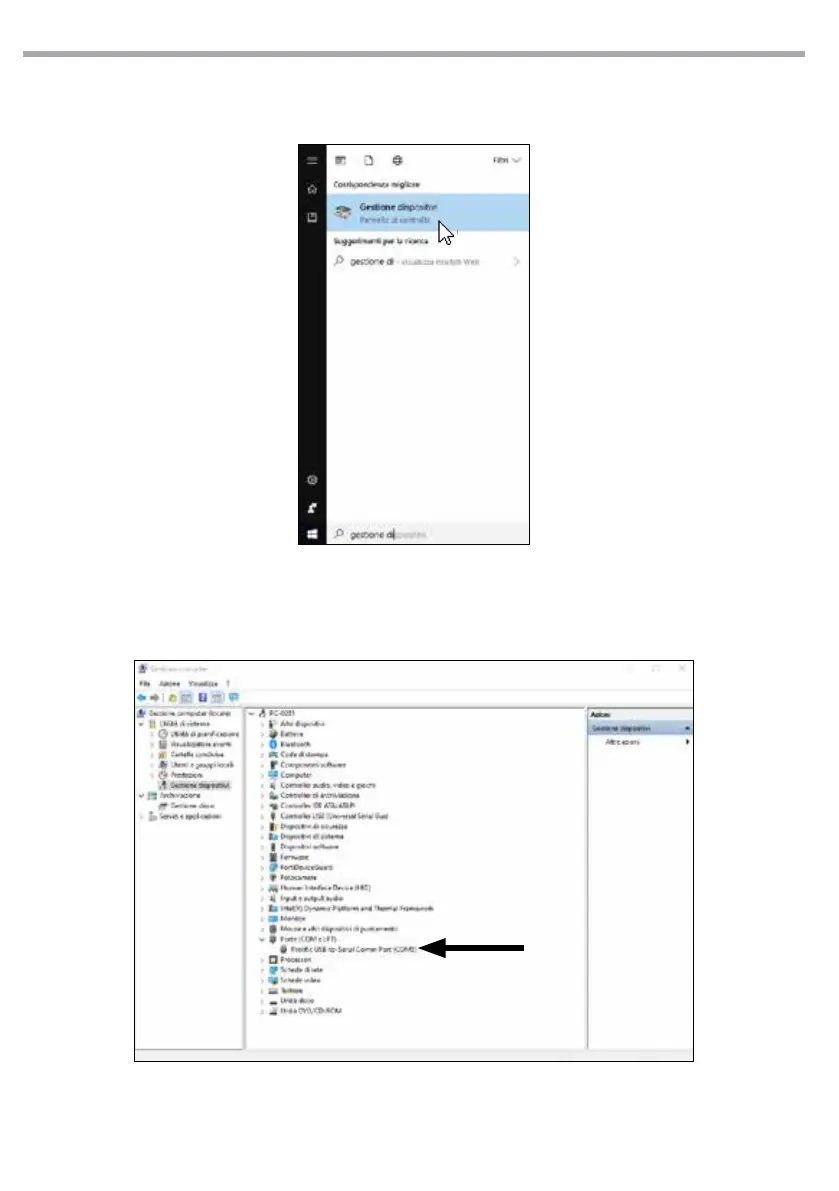
• Cliccare su “Gestione dispositivi”. Apparirà la
nestra “Gestione dispositivi”.
• Nel menu a tendina, cliccare su “Porte (COM
eLPT)”; sarà possibile leggere “Prolic USB-to-
Serial Comm Port (COMX)”, dove X rappresen-
ta il numero della porta utilizzata.
• Ricorda il valore COM, servirà per impostare
correttamente il software di editing.
• Click on “Device Manager”, the “Device Man-
ager” window will appear.
• Click on “Port (COM and LPT)” in the drop-
down menu. You can see “Prolic USB-to-Se-
rial Comm Port (COMX). “X” is the port value.
• Remember this COM value, you will need it to
set the editor software.



 To Next Page