06
ENIT IDEA Series
LEGGERE L’INDIRIZZO ID IDEA 1402,
IDEA2804
• Il controllo del DSP degli amplicatori
IDEA1402, IDEA2804 avviene tramite porta
RS485. Munirsi di adattatore ARK485RU e col-
legare il tutto come in g. 7
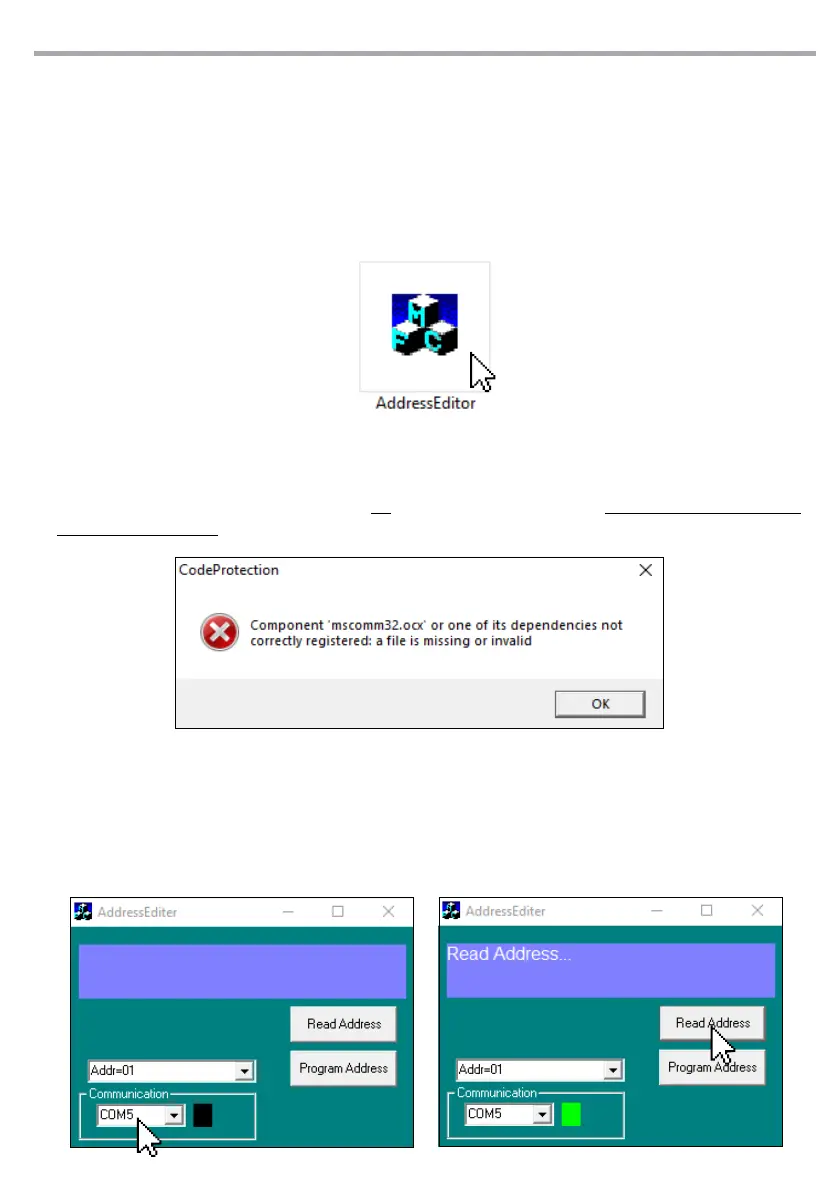
• Cliccare sull’icona del programma “Address
Editor” per avviare il software.
READ THE ID IDEA 1402, IDEA2804 ADDRESS
• The DSP control of the IDEA1402, IDEA2804
ampliers takes place via the RS485 port. Get
the ARK485RU adapter and connect every-
thing as shown in g. 7
• Click on “Address Editor” icon to run the soft-
ware.
• Click on the “Communication” drop-down
menu and select the COM port previously de-
tected, the green indicator will light up.
• Click on “Read Address” to read the COM port
of the currently connected device.
• Cliccare sul menu a tendina “Communication”
e selezionare la porta COM precedentemen-
te rilevata, si accenderà l’indicatore verde.
• Cliccare su “Read Address” per leggere la por-
ta COM del dispositivo connesso.
• Se appare il messaggio di errore ragurato
nell’immagine in basso, bisogna scaricare da
Internet il le “MSCOMM32.OCX”. Succesi-
vamente copiare il le nel collegamento C:\
Windows\SysWOW64
• If the error message shown in the image be-
low appears, the “MSCOMM32.OCX” le must
be downloaded from the Internet. Then copy
the le to the link C: \ Windows \ SysWOW64


 To Next Page
 Loading...