12
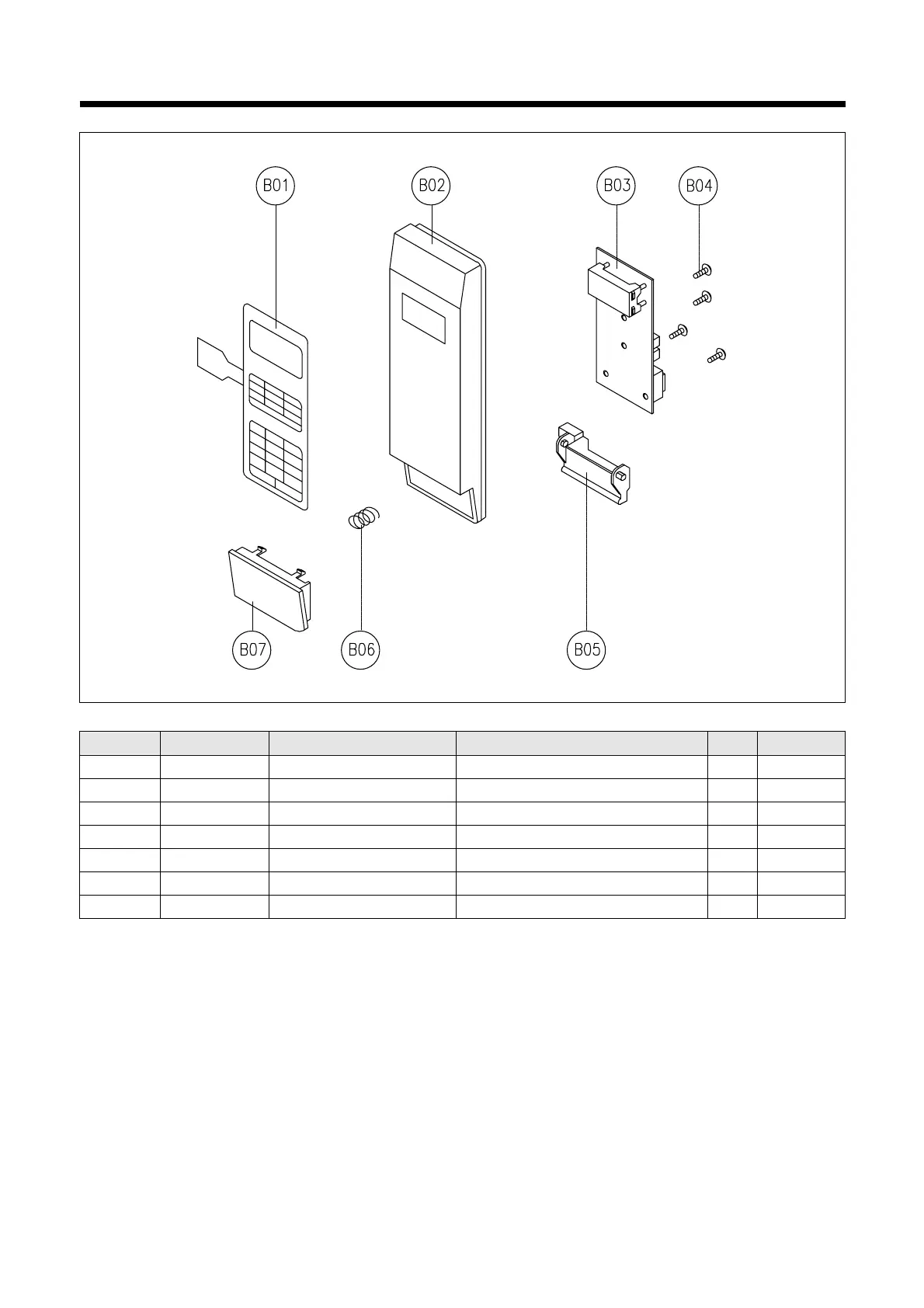
1) Remove the screw which secure the control panel, push up two snap fits and draw forward the control panel assembly.
2) Disconnect wire flat from the connector of the PCB assembly.
3) Remove four screws which secure the PCB assembly to control panel.
4) Remove the PCB from the control panel.
5) Remove the membrane, lever door open, spring button and button door open from the control panel.
6) Reverse the above steps for reassembly.
REF NO. PART CODE PART NAME DESCRIPTION Q’TY REMARK
B01 3518521890 SWITCH MEMBRANE KOR-167H9A27 1
B02 3516719180 CONTROL-PANEL ABS 1
B03 PKMPMSKN30 PCB MAIN MANUAL AS KOR-167H9A27 1
B04 7122401211 SCREW TAPPING T2S TRS 4X12 MFZN 4
B05 3513702900 LEVER DOOR OPEN PP 1
B06 441G430171 SPRING BUTTON SWP DIA 0.7 1
B07 3516907780 BUTTON DOOR OPEN ABS 1
KOR-167H



 To Next Page