How to use (DBR-W21)
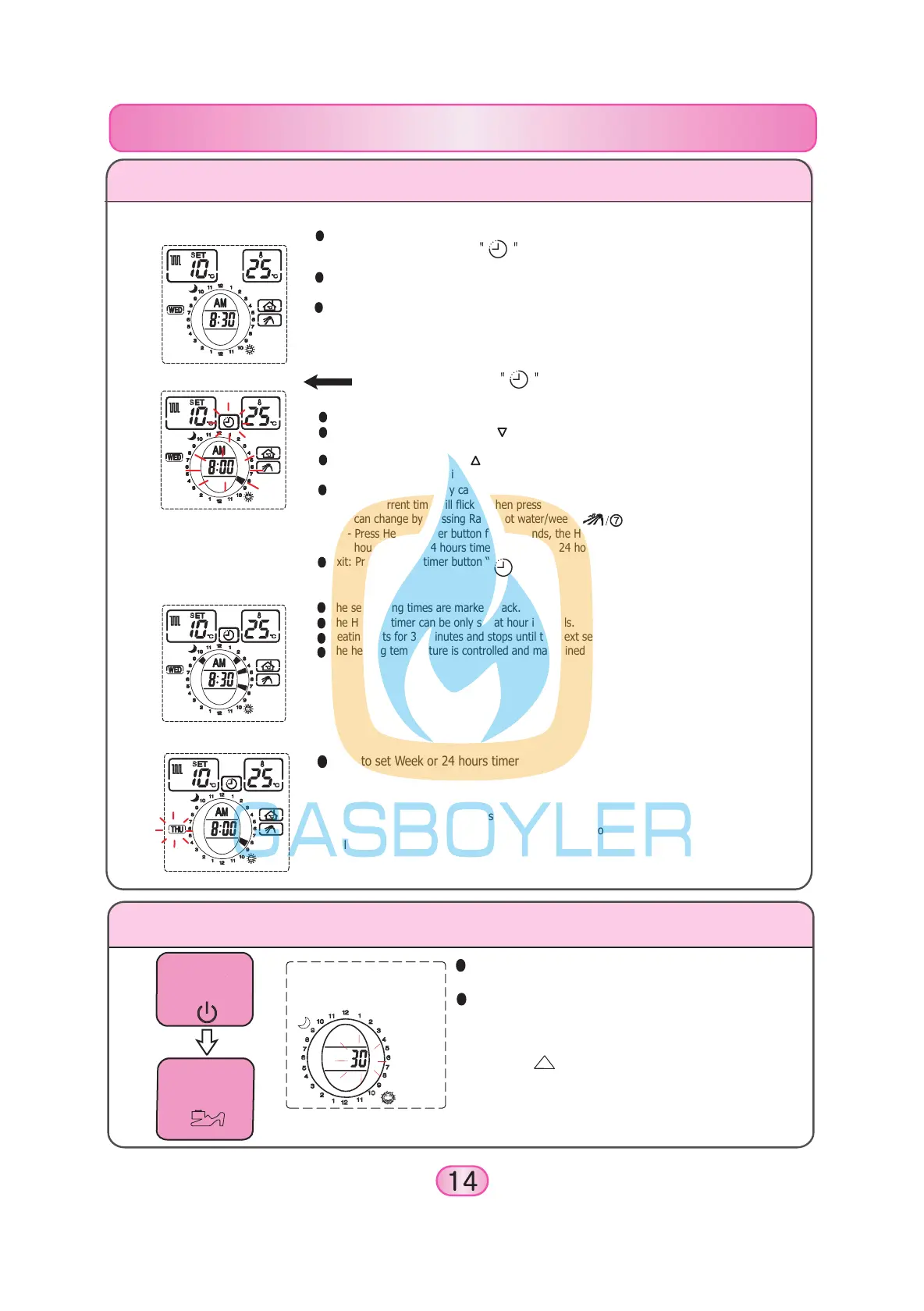
How to change the time heating lasts
Press Power button
(Power lamp lights)
Press Going-out
button for 2 seconds
Use when you want to change the length of time
heating lasts.
You can change the default value of 30 minutes to
15,30,45 or 60 minutes.
1. Default value of “30” flickers.
2. Press the button to choose the desired period.
3. Press the Power button and the setting is completed.
(Each press changes the period by 15 minutes intervals.
(45 -> 60 -> 15 -> 30))
The set heating times are marked black.
The Heating timer can be only set at hour intervals.
Heating lasts for 30 minutes and stops until the next set time.
The heating temperature is controlled and maintained by the set temperature.
3. When using Heating timer
How to set Heating timer and week
1. Continuous Heating
The Heating timer automatically turns the heating on and off at times you set.
Press the Heating timer button , and you can newly set or change the times and
weeks at which the boiler active.
Using the Heating timer is energy efficient because the boiler operates only at the programmed
heating time.
In continuous heating (the Heating timer display is all white), the boiler operates and controls
by a selected temperature in Room or Heating water. And when using Heating timer (the
programmed times are marked in black), the boiler operates by Heating timer.
2. Heating timer setting
Press Heating timer button
During the adjustment, the current time display will flicker.
Cancel: If you press Cancel/min “ ” button, the Heating timer indicator moves clockwise
and cancels the any previously set heating times. (marked white)
Setting: If you press Set/hr “ ” button, the Heating timer indicator moves clockwise and you
can set heating times at specific hours. (marked black)
Week timer change: (Only can select when using week timer)
- The current time will flicker when press Heating timer button, and then the week timer
can change by pressing Rapid hot water/week “ ” button.
- Press Heating timer button for 3 seconds, the Heating timer will change from week & 24
hours timer to 24 hours timer only or from 24 hours timer only to week & 24 hours timer.
Exit: Press Heating timer button “ ” to exit.
How to set Week or 24 hours timer
- You can use for Week & 24 hours timer when the week is displayed,
but if the week is not displayed, you can use for 24 hours timer only.
- Press Heating timer button for 3 seconds, the Heating timer will change
from week & 24 hours timer to 24 hours timer only or from 24 hours timer
only to week & 24 hours timer.


 To Next Page
 Loading...