FUNCTION
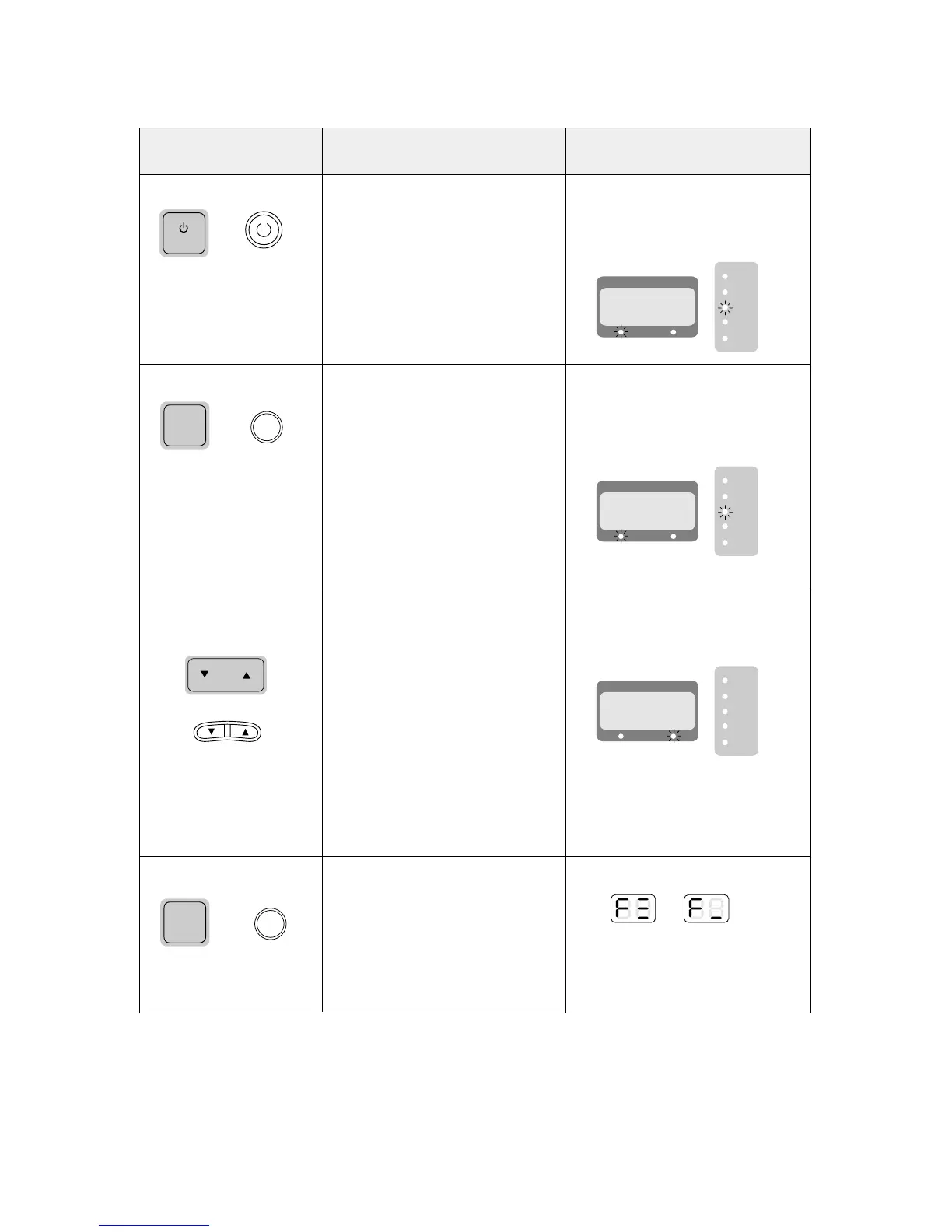
POWER ON
Push POWER button
COOLING MODE
Push the ‘MODE’ button until
‘COOLING’ lamp lights.
Change desired room
temperature
Push the ‘TEMP▲▼’ button.
Change ‘FAN SPEED’
Push the ‘FAN SPEED’
button.
OPERATION
1. The unit starts working.
(It is delayed 3 minutes after main
power source is supplied.)
2. Default mode is ‘COOLING’ mode.
3. Default desired room temperature is
‘26°C’ (79°F).
And fan speed is ‘HIGH’.
1. Operating modes are changed as
follows by pushing “MODE” button.
(COOLING→TURBO→FAN→
COOLING)
2. The compressor and fan work.
3. In this mode you can change fan
speed and desired temperature at
any time.
4. SLEEP mode and ON/OFF TIMER
can be selected.
(By remocon button only)
1. The desired room temperature is
changed within a range from 16°C
(60°F) to 32°C (90°F) by 1°C (°F)
1. FAN SPEED is changed as follows
by pushing “FAN SPEED” button.
(HIGH→LOW→HIGH)
DISPLAY
1. Current room temperature is
displayed.
2. ‘COOLING’ lamp lights.
3. ‘ROOM TEMP’ lamp lights.
1. Current room temperature is
displayed.
2. ‘COOLING’ lamp lights.
3. ‘ROOM TEMP’ lamp lights.
1. It display desired room temperature
when ‘TEMP’ button is pushed.
2. ‘DESIRED TEMP’ lamp lights.
3. After a few seconds, display is
changed to current room
temperature and ‘ROOM TEMP’
lamp lights.
1. It displays as follows.
2. After a few seconds, display is
changed to current room
temperature.



 To Next Page