EasyManua.ls Logo

Daewoo DWF-6021 - Water Connection

Daewoo DWF-6021
31 pages
Print Icon
To Next Page IconTo Next Page
To Previous Page IconTo Previous Page
Loading...
7
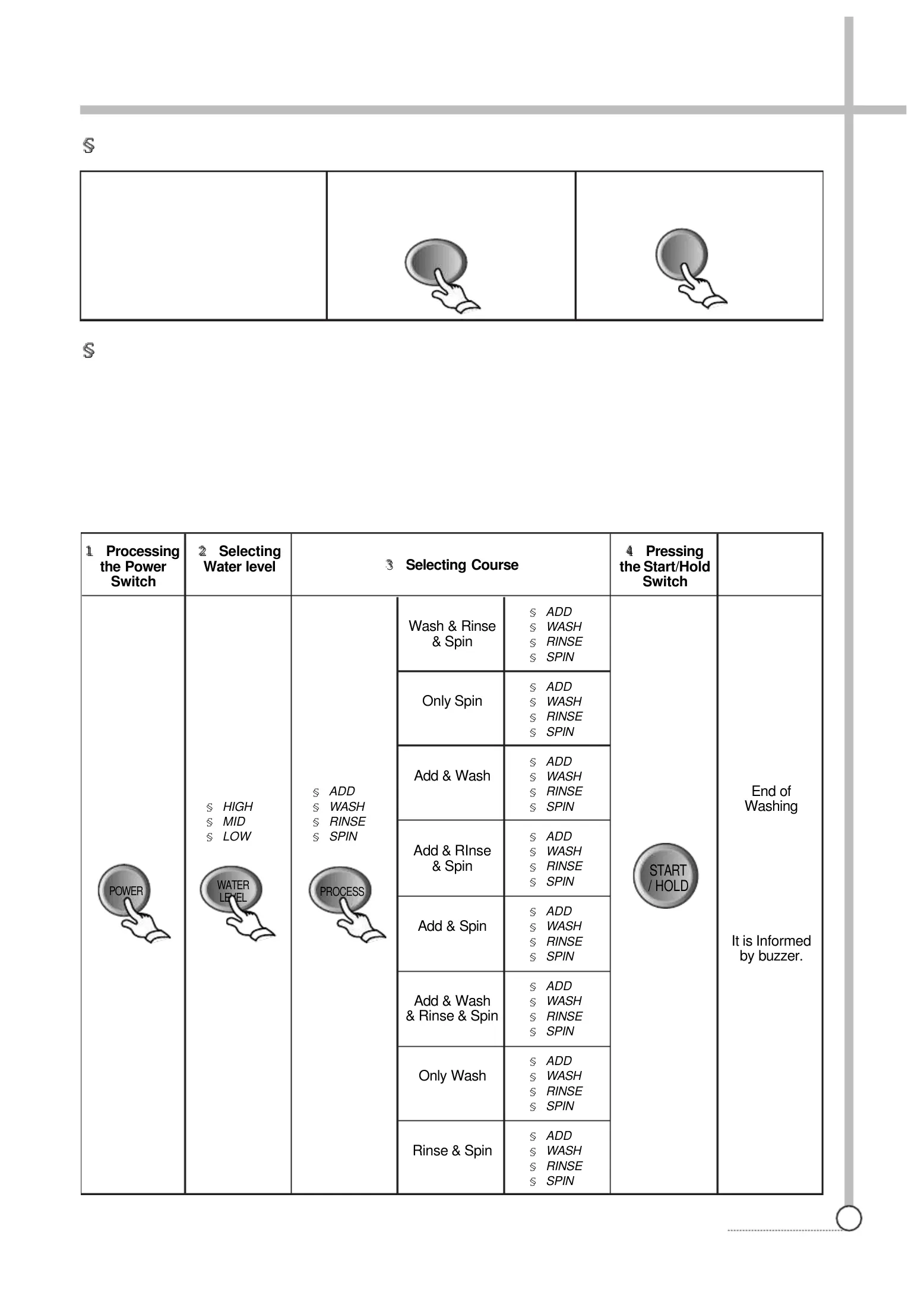
PROCEDURE
§
R e
s e r
v e d W
a s h i n g
§
P
a r
t
i
a l
S e
l
e c t
i
o n
A m
o n
g W
a s
h , R
i
n s e o r
S p
i
n
ste
p 1.
Pre
ss po
we
r swi
tch
.
step 2.
Press progra
m button u
ntil the indica
ting lamps m
ake the com
binations you
want.
If only spin lamp is
turned on, that means you will operate your washer for spin only.
If rinse and spin lamp are turned on, that means you will
operate your washer for rinse and spin.
If add lamp is turned on with other porcess lamps, that means the time
of the corresponding porcess will
increase by 1~2 minutes, that is, if
add is on with wash, rinse and spin, the time
of each precess will increase
by 1~2 minutes. (Wash: add 2 min., Rinse: add 1 min., Spin: add 1 min.)
step 3.
Pres
s water le
vel sele
ctor as yo
ur deci
sion.
step 4
.
Press
Start/Hold
to start.
1
Processing
the Power
Switch
2
Selecting
Water level
§
HIGH
§
MID
§
LOW
§
ADD
§
WASH
§
RINSE
§
SPIN
Wash & Rinse
& Spin
Only Spin
Add & Wash
Add & RInse
& Spin
Add & Spin
Add & Wash
& Rinse & Spin
Only Wash
Rinse & Spin
§
ADD
§
WASH
§
RINSE
§
SPIN
§
ADD
§
WASH
§
RINSE
§
SPIN
§
ADD
§
WASH
§
RINSE
§
SPIN
§
ADD
§
WASH
§
RINSE
§
SPIN
§
ADD
§
WASH
§
RINSE
§
SPIN
§
ADD
§
WASH
§
RINSE
§
SPIN
§
ADD
§
WASH
§
RINSE
§
SPIN
§
ADD
§
WASH
§
RINSE
§
SPIN
4
Pressing
the Start/Hold
Switch
End of
Washing
It is Informed
by buzzer.
3
Selecting Course
WATER
LEVEL
PROCESS
POWER
START
/ HOLD
1
Set your program as the above
procedure, remaining last step.
Press the course selection button.
Press the procedure selection but-
ton.
But WOOL/SUIT course can
not
reservation.
2
Press reservation button until the
digital monitor displays the finish-
ing time you want.
3
Press Start/Hold to start.
RES.
START
/ HOLD

Other manuals for Daewoo DWF-6021

Related product manuals