Hardware Trouble shooting
-11-
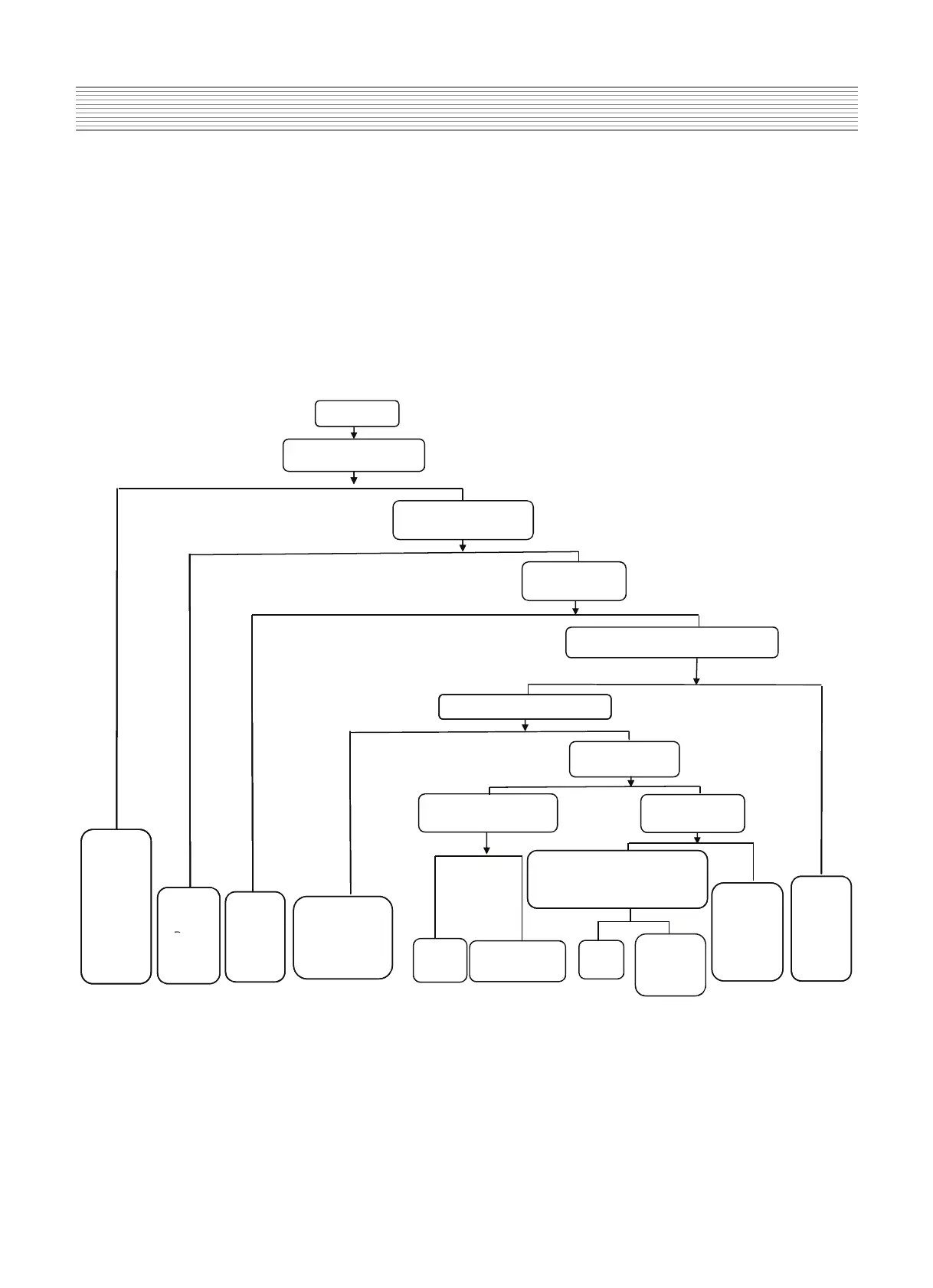
5-5)Audio Trouble(No sound)
No sound
Is there audio input signal
N
Y
Y
Check if the setting of volume
and MUTE are normal
Check if CN22 has
output signal
Y
N
Check if the power supply of
U13/R2A15122FP –pin13 –pin14 >11V
N
Y
U13-pin34≥2.5V
Check if U13-pin19,32
has signal input?
Y
N
Check if U13-pin11,12,39,40
have signal output
Check if U12-pin64,65
has signal output?
Y
N
Y
N
Check
peripheral
audio
equipment
Repair the
power
Check the circuit
Check the
circuit
between
Check if the audio input signal
is normal:PC:U12-pin47,48
AV:U12-pin49,50 SCART: U12-55,56
YN
supp
y
or
U13
eset
speaker
to sU6 or U12 I/O
has been damaged
U13 is
damaged
Check the circuit
from U13 to CN22
U12-pin64,65
Change
U12
Check if the
audio input
from U13 is
normal or U13
is damaged



 To Next Page
 Loading...