1. UpgradingfromUSB port(buildinMainboard)—Atworking;
1.1 CopyF/WtoUSBdisk,U:/bin_6m181.bin
(FileNameshouldberenameto<bin_6m181.bin>andshouldbesettorootdirectory),
plugUSBdiskwhenTVrunning.
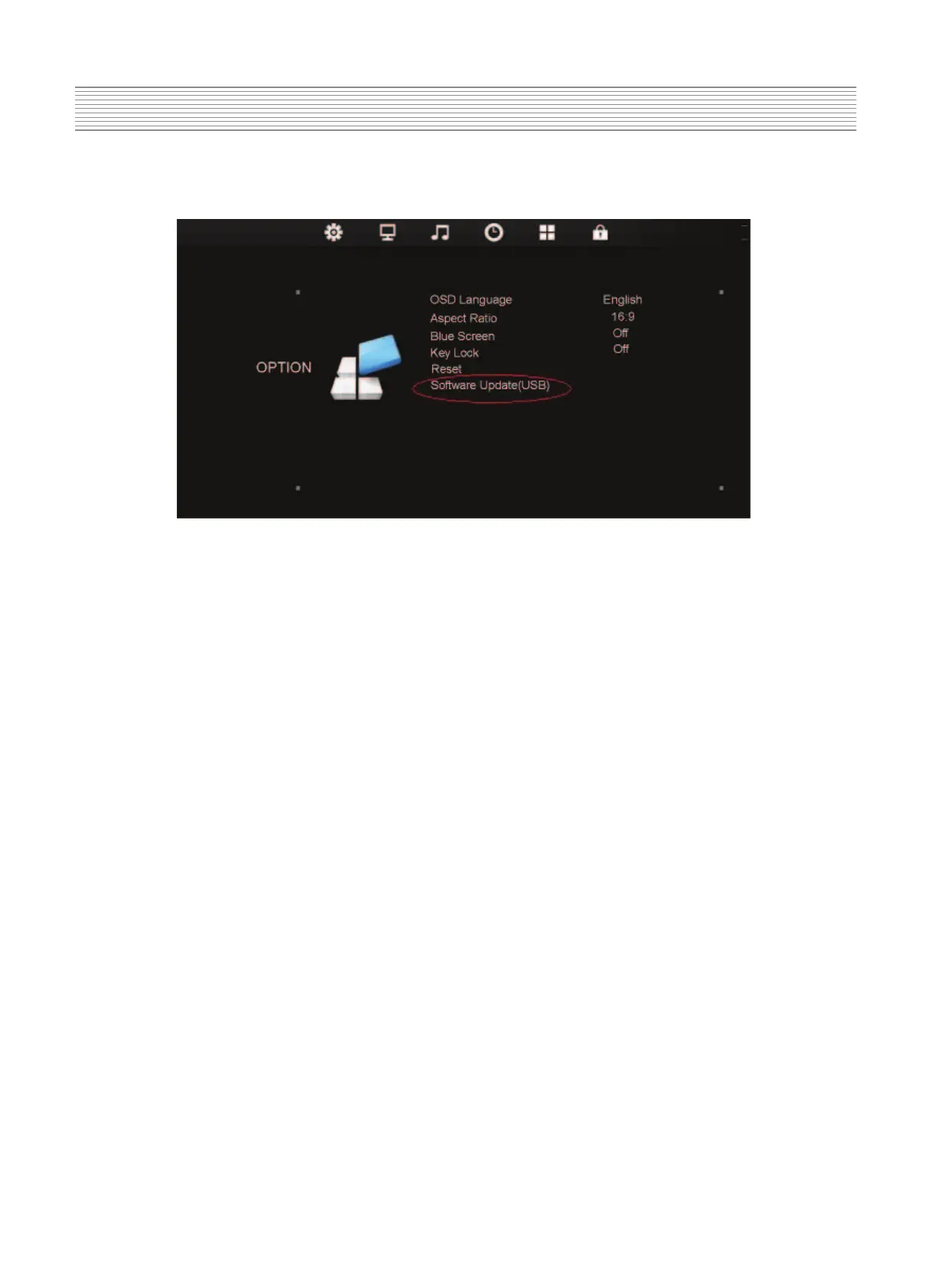
1.2 RunTV,<Menu>key==>choiceOPTION==>SotfwareUpdate(USB)==>Enter
1.3 TVwillbeauto‐restartafterupgradingsucceful.
2.Upgrading
from USB port(buildinMainboard)—Atstandy
2.1 CopyF/WtoUSBdisk,U:/bin_6m181.bin
(FileNameshouldberenameto<bin_6m181.bin>andshouldbesettorootdirectory),
plug USBdisk(ACOFF);
2.2 ACon,Autoreflash,BlueLEDstatus: blinking(on‐>off‐>on‐>off…..)
2.3 LEDkeep
R,TVgetintoSTB,Actioncomplete,upgradingsucceful;
2.4 MoveUSBdisk,<Power>key runningTV.
Note:itshouldbereflashbyjigwhenUSBreflashfail.



 To Next Page
 Loading...