3
CLUTCH
Removal and installation CF65/75/85 series
5-6
5.4 REMOVAL AND INSTALLATION, PUSH-TYPE CLUTCH THRUST BEARING
Removing the push-type clutch thrust
bearing
1. Remove the gearbox.
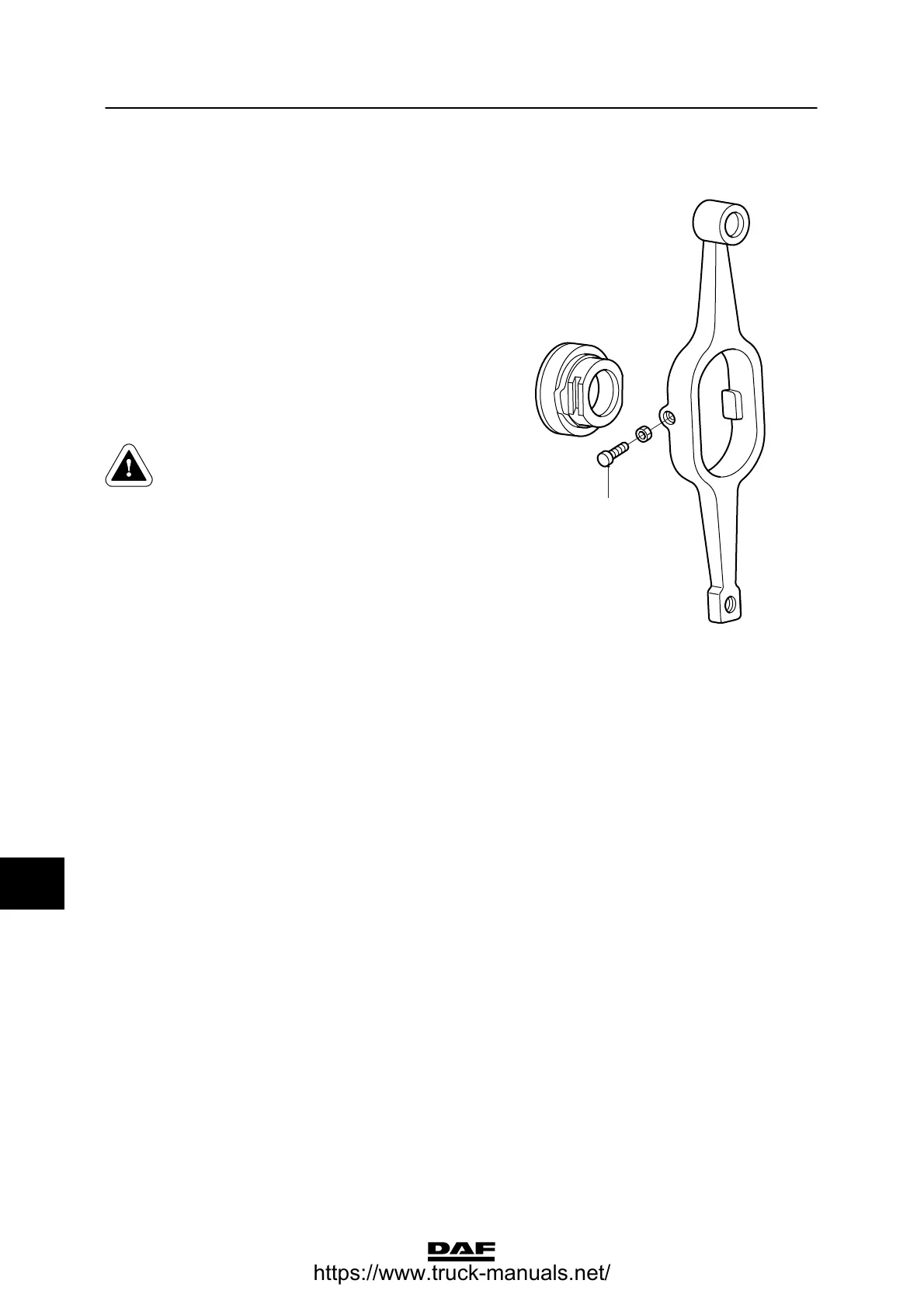
2. Remove the thrust bearing from the clutch
lever in the clutch housing. If fitted, remove
the locking bolt (1).
Note:
This applies only to the fork of the CF75.
The fork of the CF65 does not have a locking
bolt.
Installing the push-type clutch thrust bearing
In the case of thrust bearings with a
plastic coating, no grease should be
used on the gearbox front cover.
The grease will attack the plastic
coating and shorten the service life
of the thrust bearing.
1. Apply a little grease to the pressure
surfaces of the release fork and the thrust
washer.
2. In the case of thrust bearings with an
aluminium lining, apply a little grease to the
gearbox front cover.
3. Install the thrust bearing onto the clutch
lever and install the locking bolt (1), if
present.
Note:
When tightening the locking bolt (1) in the
thrust bearing groove, ensure that the thrust
bearing can move freely relative to the
clutch lever.
4. Fit the gearbox.
1
V300291
10
ᓻ 200337
https://www.truck-manuals.net/



 To Next Page